I just received an e-mail that the Beta 1 for Mobile Communicator has been released. This product is a "mobile" version of Office Communicator 2005 designed for Windows Mobile 2003 SE and Windows Mobile 2005 and it appearently includes VoIP functionality and remote call control. I personally look forward to testing this product and I'm already downloading it - but I will have to wait for my new Qtek 8310 (a.k.a. HTC Tornado) that arrives Thursday this week :-)
This is the first version of Next Gen line of products that also will include new versions of Live Meeting with multipoint audio/video and VoIP as the significant enhancements.
I will get back to you with a small review of the product and also information on Live Communications Server 2005 in the near future.
Wednesday, November 09, 2005


Tuesday, November 01, 2005
Changes to Virtual Server and VMWare support
There’s a couple of new changes on support for virtualization software one of them is the change to support for Exchange Server under Virtual Server that we've earlier reported would happen as part of Exchange 2003 Sp2, this is still true but apparently Virtual Server R2 or later will also be required.
On another story Microsoft also changed the support policy for other non-Microsoft hardware virtualization software (a.k.a. VMWare). Now they will provide “commercially reasonable efforts” to test the software - but only for Premier Support customers and furthermore they may require a reproduction "independently from the non-Microsoft hardware virtualization software" ;-)
On another story Microsoft also changed the support policy for other non-Microsoft hardware virtualization software (a.k.a. VMWare). Now they will provide “commercially reasonable efforts” to test the software - but only for Premier Support customers and furthermore they may require a reproduction "independently from the non-Microsoft hardware virtualization software" ;-)
Tuesday, October 11, 2005
Limits of search categories
Blogger does not have categories as a standard feature but Amy has found an interesting way to use Blogger Search for this, which I have implemented in the sidebar.
Note that the search has Limited capabilities and won't find all posts in a given category. Especially older posts before mid 2005 won't be a part of the searches. Check out Blogger Help on Blog Search for further info.
Note that the search has Limited capabilities and won't find all posts in a given category. Especially older posts before mid 2005 won't be a part of the searches. Check out Blogger Help on Blog Search for further info.
Monday, October 03, 2005
Setting SMS 2003 Cache Tombstone Duration
If you are downloading before running a lot in SMS - i.e. making SMS copy the package down to its cache before running the program - you may have come across the problem that the cache is full, even though all your programs have finished and you'd expected that it had freed the cache entries.
Well, SMS keeps the cache entries around for at least a day - just in case you need it again, I guess. In normal circumstances, that could be ok, but if you are installing a fresh PC with a lot of packages, this cache strategy can get you in space problems.
Microsoft writes about it in KB 839513 - How the Systems Management Server 2003 Advanced Client manages its cache. Microsoft states that the cache tombstone duration is 24 hours.
Microsoft draws you attention to the SDK, especially the CacheInfo object. But this object only allows you to read the tombstone duration.
What they do not mention, is that you can simply tweak the cache tombstone duration, so the problem is gone or at least highly reduced. You do that by creating a MOF file - say SetCacheTombstoneDuration.mof - with these lines (sorry about the tiny font - I try to prevent the lines from wrapping)
#pragma namespace("\\\\.\\root\\ccm\\policy\\machine\\requestedconfig") [CCM_Policy_PartialPolicy(true)]
instance of CCM_SoftwareDistributionClientConfig
{
SiteSettingsKey = 1;
// Override only this property,
// all others come from the Site/Management Point
PolicySource = "Local";
// 5 min, default 86400 - one day
[CCM_Policy_Override(true)] CacheTombstoneContentMinDuration = 300;
};
Send the program to the relevant clients and execute it with -
mofcomp SetCacheTombstoneDuration.mof
That is all these is to it.
I cannot see that this method give any side-effects - but I also cannot guarantee it. If you experience any problems, please feel free to share your experience as comments to this entry.
Wednesday, September 28, 2005
netstat -b (and -v)
I just learned something useful - so this day is not completely wasted ;)
On Windows XP SP2 and Windows Server 2003 SP1 netstat got a new -b argument.
So what does it do? It lists the executable using the connection. No more need to consolidate information between netstat -o and task manager or such :D
Example output:
TCP MyPC:4137 baym-cs344.msgr.hotmail.com:1863 ESTABLISHED 1532
[msnmsgr.exe]
-v gives even more information (and is quite slow):
TCP MyPC:4137 baym-cs344.msgr.hotmail.com:1863 ESTABLISHED 1532
C:\WINDOWS\System32\mswsock.dll
C:\WINDOWS\system32\WS2_32.dll
C:\Program Files\MSN Messenger\msnmsgr.exe
C:\WINDOWS\system32\USER32.dll
[msnmsgr.exe]
Try it for yourself...
Sunday, September 25, 2005
Granting access to eventlogs on Windows Server 2003
When Windows Server 2003 came out, a more flexible method for granting access to eventlogs was made available. A REG_SZ called CustomSD below HKLM\System\CCS\Services\Eventlog\NameOfLog contains an SDDL string with the specified access. This can be automated using the suggested Group Policy changes or you can use a script like the one below. This script attempts to find a local admin for a given AD site and grant this person and a global Security Reviewer role read access to the server at hand. This script could be used as a startup script on the servers, you want to delegate access to.
The WSF script -
<job>
<script language="vbscript">
Option explicit
main
sub main
dim strLocalAdminSid
dim strSecurityReviewerSid
strLocalAdminSid = GetSidForGroup("Local Admin for " & GetSite)
strSecurityReviewerSid = GetSidForGroup("Security Reviewer Role")
UpdateEventlogAccess strLocalAdminSid
UpdateEventlogAccess strSecurityReviewerSid
end sub
sub UpdateEventlogAccess(strSID)
' Give user read access to eventlog
const ROOTKEY="HKLM\SYSTEM\CurrentControlSet\Services\Eventlog"
dim objShell
dim strSDDLKey
dim strSDDL
dim strReadAccessSDDL
const NOSUCHKEY=&h80070002
dim objEventLog
dim lngError
set objShell = CreateObject("wscript.shell")
for each objEventlog in GetObject("winmgmts:")._
InstancesOf("win32_NTeventlogFile")
wscript.echo objEventlog.Logfilename
strSDDLKey=ROOTKEY & "\" & _
objEventlog.Logfilename & "\CustomSD"
on error resume next
strSDDL=objShell.RegRead(strSDDLKey)
lngError=err
on error goto 0
if lngError<>0 then
' Key not found - so we can’t do anything
else
wscript.echo "Existing SDDL - " & strSDDL
' check if key needs to be updated
strReadAccessSDDL = "(A;;0x01;;;" & strSID & ")"
if instr(strSDDL,strReadAccessSDDL)=0 then
strSDDL=strSDDL & strReadAccessSDDL
objShell.RegWrite strSDDLKey, strSDDL, "REG_SZ"
wscript.echo "New SDDL - " & strSDDL
end if
end if
next
end sub
function GetSite
dim objInfo
set objInfo = CreateObject("ADSystemInfo")
GetSite = objInfo.SiteName
end function
function GetSidForGroup(strName)
dim objWMIService
dim objItems
dim objItem
dim strSID
Set objWMIService = GetObject("winmgmts:\\.\root\cimv2")
Set objItems = objWMIService.ExecQuery _
("Select * from Win32_Group Where name='" & strName & "'")
For Each objItem in objItems
strSID = objItem.SID
Next
GetSidForGroup=strSID
end function
</script>
</job>
Use it at your own risk - but have fun!
Wednesday, September 14, 2005
Microsoft re-issues SP4 Rollup 1
As reported earlier Microsoft has now re-released Windows 2000 SP4 Rollup 1 due to customers problems with the Rollup. Some of these can be found in the comments part of my first posting - but according to the KB it doesn't seem to address the problems regarding SNMP reporter by our readers (Source can be found here)
Thursday, August 18, 2005
One Management Pack to Monitor them all...
The management pack called Microsoft Management Pack Notifier is very useful as you do not have to monitor the Microsoft sites to get the latest MPs. This MP will do the job for you. Unfortunately, it does not monitor report versions.
To benefit from it, first download and install the MSI package. It creates Microsoft Management Pack Notifier.akm (and an EULA and a readme) below %programfiles%\MOM 2005 Management Packs\Microsoft Management Pack Notifier.
It seems to be old stuff, now being released for the public. The file is dated November 11th 2004.
Next import this MP from the administrator console using the Management Pack Import/Export Wizard. Remember to select 'Import Management Packs only' or you may be stuck in the Wizard when you must specify report to import (you can though step back).
The MP creates a new rule group called Microsoft Operations Manager MPNotifier, creates a new computer group called Microsoft Operation Manager MPNotifier MOM Server. The rule group contains a rule that check the versions against microsoft.com. This rule has a provider called MPNotifier-Schedule daily which runs the Microsoft MPNotifier Version Check script daily. Another rule fires off an alert when the versions mismatch. Finally an alert rule forwards the alerts to the Operation Manager Administrators notification group. I do not know why, but on my RTM test system, it does not fire off any alerts - I only get events.
An event looks like this -
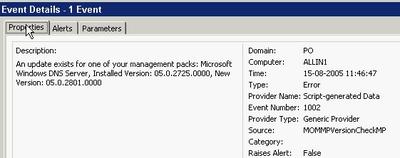
You must manually add the server you want to check microsoft.com for updates to the new computer group. Keep in mind that the agent account on the server in question must have http access to microsoft.com across any firewall in the path. The actual URL it uses can be found in the script and is http://www.microsoft.com/management/mma/momnotifier.xml.
Unfortunately, the XML does not provide a direct download link. Let us hope, that will be added in the next release. Ideally, it should provide the option of downloading the files and even upgrade the MPs. The latter for test environments only naturally ;).
To benefit from it, first download and install the MSI package. It creates Microsoft Management Pack Notifier.akm (and an EULA and a readme) below %programfiles%\MOM 2005 Management Packs\Microsoft Management Pack Notifier.
It seems to be old stuff, now being released for the public. The file is dated November 11th 2004.
Next import this MP from the administrator console using the Management Pack Import/Export Wizard. Remember to select 'Import Management Packs only' or you may be stuck in the Wizard when you must specify report to import (you can though step back).
The MP creates a new rule group called Microsoft Operations Manager MPNotifier, creates a new computer group called Microsoft Operation Manager MPNotifier MOM Server. The rule group contains a rule that check the versions against microsoft.com. This rule has a provider called MPNotifier-Schedule daily which runs the Microsoft MPNotifier Version Check script daily. Another rule fires off an alert when the versions mismatch. Finally an alert rule forwards the alerts to the Operation Manager Administrators notification group. I do not know why, but on my RTM test system, it does not fire off any alerts - I only get events.
An event looks like this -

You must manually add the server you want to check microsoft.com for updates to the new computer group. Keep in mind that the agent account on the server in question must have http access to microsoft.com across any firewall in the path. The actual URL it uses can be found in the script and is http://www.microsoft.com/management/mma/momnotifier.xml.
Unfortunately, the XML does not provide a direct download link. Let us hope, that will be added in the next release. Ideally, it should provide the option of downloading the files and even upgrade the MPs. The latter for test environments only naturally ;).
Wednesday, August 03, 2005
And I thought Power Users were a wise choice...
A lot of discussion is going on about the level of permissions one has when runing day-to-day tasks. This is not one day too early. The discussion has at least two branches: A) Administrators running without permissions and only having them when necessary and B) Standard users running as users, power users or local administrators.
Continuing on the B branch, I always thought that Power User were a pretty safe choice - at least it prevented the user from tampering with Group Policies.
This turns out to be a false feeling - even Microsoft warns us in this KB that Power Users are not safe: A member of the Power Users group may be able to gain administrator rights and permissions in Windows Server 2003, Windows 2000, or Windows XP.
Unfortunately, there are no - useful - resolution to avoid this. I would have wanted a way to tweak Power Users, so it is safe. Microsoft claims that Power Users are intended for legacy stuff and wants you to only run software certified for Windows. Get real - LOL!
Well, anyway, I think Power User is still better than local administrators - i. e. until some easy-to-use tool makes elevating to administrator easy. You could also read this post and its comments to get a feeling of how easy it is for an installation program to jeopardize the security of the system.
I came across the KB from the Hall of Shame site.
BTW: Discussion A is covered here.
Let us hope they get it right in Vista a. k. a. Longhorn as they intent.
Vista and Virtual PC / Server
Now that Windows Vista is the hottest news, I just want to direct you attention to the excellent Virtual PC Guy blog. Especially these two entries contains valuable information: Running Virtual Server / Virtual PC on Windows Vista Beta 1 and the opposite Running Windows Vista Beta 1 under Virtual PC / Virtual Server.
SMS 2003 SP2 Beta starts
Vacation done...
Just got the invitation to join i.e. nominate myself. It is going to be interesting to see if they drop in new features just like they did for SP1 and in that case what they will improve.
Just got the invitation to join i.e. nominate myself. It is going to be interesting to see if they drop in new features just like they did for SP1 and in that case what they will improve.
Saturday, July 09, 2005
There's no place like 127.0.0.1
Home at last from an exciting week at TechEd Europe. My feet are aching and I’m tired – but luckily the weather in Denmark is sunny and warm (30.5 degrees Celsius) as opposed to the rainy weather in Amsterdam. I guess my lawnmower needs some exercise (At the very least I won’t sit down all weekend after all the “sitting” I’ve done this week). I have a lot of blogging to catch up on so expect to see more tidbits from TechEd - but for now I will shutdown my notebook and enjoy the weekend.
Thanks to you all for a great week!
Thanks to you all for a great week!
Thursday, July 07, 2005
Hardware management in Windows Server 2003 R2 - tidbits from TechEd Europe
A new feature of R2 is the ability to manage hardware through something called WS-Management. WS-Management uses the WS-* Web Service architecture to support a consistent method for remote management of devices (e.g. servers). It does this by exposing a set of functionalities to consume hardware management information on top of the Intelligent Platform Management Interface (IPMI). In addition to hardware it also interfaces with WMI so you can accomplish management tasks both through IPMI-enabled devices and WMI.Functions exposed are Read and Set information. Execute methods, create and delete objects and retrieve collections of objects. By default it uses certificate-based authentication but R2 also provides basic authentication (over SSL of course).
An example would be enabling Remote Desktops through wsman as I've demonstrated earlier through WMI and through the registry -
wsman invoke http://schemas.microsoft.com/wsman/2005/
02/wmi/cimv2/Win32_TerminalServiceSetting?
ServerName=HOSTNAME -machine:FQDN @{AllowTSConnections="1"}
(Wrapped for readability)
The wsman command line tool itself is actually a script, so you can use this as a basis for your own scripts, furthermore it "only" needs port 443 open on the target system.
For more information check out the TechNet scriptcenter article or this whitepaper.
Wednesday, July 06, 2005
Microsoft's stance on third-party replication technologies in connection with Exchange
Third day at Tech-Ed. Need sleep / time off.
Attended a Chalk&Talk instead on Windows Server x64... Exchange was discussed - maybe a little off subject - but someone mentioned a KB on how Microsoft support third-party replication/clustering technologies. As that sounded interesting, I set off to find the KB. You can read it here. Required reading, if you have one of those systems, I think.
Attended a Chalk&Talk instead on Windows Server x64... Exchange was discussed - maybe a little off subject - but someone mentioned a KB on how Microsoft support third-party replication/clustering technologies. As that sounded interesting, I set off to find the KB. You can read it here. Required reading, if you have one of those systems, I think.
Tuesday, July 05, 2005
Tidbits on security and Windows 2003 SP1 - TechEd Europe day #1
As I wrote earlier I attended the "Active Directory Internals: the Sequel" a couple of hours in the late morning and there were a couple of interesting topics.
As you may know Windows Server 2003 contains a reanimation (undelete) API which recovers objects without buying third-party tools. SP1 now also recovers the sIDHistory of an object. Restore is quite easy if you know the ldp tool - just set LDAP control flags in LDP to show deleted objects, find the object and in one operation set the isDeleted attribute to NULL and set the DN appropriately (To where you want to locate your object). Find more on the subject of reanimation in KB 840001 under the topic "How to manually undelete objects".
Also SP1 introduces the notion of confidential attributes that can't be seen by default by Authenticated Users (As most attributes can). Just set the searchFlags bit 7 to 1 (Confidential / True) or 0 (False).
Steve Riley and Jesper Johansson on security
The presentation wasn't by anyway boring - I kept my eyes open all day (a first ;-) - but I'm sad to say that the overall technical content wasn't satisfactory. Most of the day wen't with plain vanilla stuff on security based on the Implementing Client/Server Security presentations used earlier, administrative templates and other plain/old information. Luckily it was nicely beefed up with good stories, discussions and provocating thoughts by Steve and Jesper.
So what was interesting? -Well "Passwords has passed the end of their useful lifetime." I do agree with that and it has also been discussed by other security experts than Jesper and the solution isn't always just to buy a two factor authentication device as Schneier discusses in his essay - To Little, To Late. But personally I do prefer to use Password Safe instead of jotting down my password ;-)
There was an interesting discussion on security and outsourcing and they stated that China doesn't even have the concept of Intellectual Property and that outsourcing companies that may have loads of internal information on their customers probably will be the next point of attack.
ISA 2004 was as usual well appraised especially the fact that Application Proxy’s are much more usable than standard Packet filtering firewalls. I do agree that ISA 2004 is a great firewall with one exemption - the application filters aren't updated on a frequent basis and there are no new ones coming unless there is a product upgrade. Like MOM Management Packs it should be a requirement that each product group, if applicable, should release a new/updated application filter at the same time or just after releasing their product (E.g. for Live Communications Server). I discussed this with Steve and he told me that there are no plans for this (And he already had a discussion with the product group around this without luck).
On the point of SP1 it was emphasized that in an Exchange scenario SCW is used to secure the OS itself - NOT exchange so we should still use the Exchange 2003 Security Hardening Guide to secure Exchange.
Also I discussed with Steve on when the Firewall actually is disabled; a discussion I’ve had earlier with Susan Bradley on my article Microsoft Security Initiatives in SP1 and SP2 - nothing but a complex toy? (Check the comments). There’s apparently some confusion on this topic – in my experience with the RTM release the Firewall is always disabled after an upgrade or on in case of a new slipstreamed SP1 installation after you press Finish in the Post Setup Security Updates (PSSU) wizard.
As I mentioned in the start I wasn't bored at anytime but each time a topic looked a bit interesting (Like on Network Isolation or Wireless Security) the comment was We have a session during the week on X and X go listen to that instead and we want to make sure that we have enough attendees to our other sessions - Well why do you think we paid for a pre-conference day ? To listen to security for one day so that we could follow other tracks or the hands on labs the rest of the week! (To Steve and Jespers defence they were provided with a set of standard slideware that they were required to follow).
Monday, July 04, 2005
The hunt for non-PC SMS programs (SMS 2003 SDK v3)
Having created an SMS script late yesterday, setting the MOM flag on the programs for one of my customers, he came back and told me, he had to do an SMS restore as it trashed the image packages.
Bad, bad.
Ok, I said to myself. I'll just modify the program to skip those image package programs - and exclude any device management programs as well.
But this was easier than done. First of all, I'm at Tech-Ed in Amsterdam with my fellow blogger Dennis. Secondly, the battery of my Dell is bad and finding power for charging is difficult here at the RAI.
Having come across all those obstacles, I went on...
First I stumbled across v3 of the SMS SDK. It was released June 21st. Get it from MS downloads. This is a must-have for all doing SMS automation. The official voice says: New for the SMS V3 SDK is a .NET server side library which simplifies access to the SMS WMI site provider, and Device Management inventory extensibility information.
So I looked to the program flags and found that bit 9 indicates a device program. But how do I see, that the program is an OS installation?
That it NOT documented.
Found it myself though. The SMS_Package class has an ImageFlags property. It seems to be zero - remember this is undocumented and at your own risk - for normal packages.
So I redid my script and can now first filter away the image packages and then the device programs.
I hope my customer does not have to do a new restore tomorrow...
Arrived at Teched Europe and looking forward to a interesting week
I arrived Sunday at the Golden Tulip Inntel which is nicely situated between the Dam place and the Central Station. Beside being a nice hotel it has free wireless and lots of shopping/restaurants and the Tram nearby as some of the best features.
I originally meant to follow the pre-conference day on security with Steve Riley and Jesper Johansson. Primarily because they both are hilarious speakers and their views on security are interesting - but the first two items on their agenda were Implementing server/client security on Windows. Those specific sessions I delivered as a speaker a year ago on one of the TechNet days in Denmark - so probably nothing new there :- Instead I joined John Craddock and Sally Storey on "Active Directory Internals the Sequel" for the morning (ldp tool advanced topics usually ;-) and then I'll probably switch back to Steve and Jesper for the afternoon sessions.
When I'm at TechEd I usually find some of the subjects that's in the future or that I don't normally specialize in myself and also I like to use quite a lot of time in the Hands On Labs. I personally use TechEd as a possibility of delving into Technology a whole week without thinking on colleagues, customers and family and this year is business as usual.
My agenda for this week contains playing in the Hands On Labs with Windows Server 2003 R2, Enterprise Project Management Solutions (EPM), Microsoft Identity and Integration Server (MIIS), NLB/CARP Load Balancing with ISA Server 2004, Indigo and the new Data Protection Manager - sometimes I follow the lab guidelines (E.g. for Indigo) but most times I don't.
For the Sessions I look forward to hearing about the Network Isolation that Microsoft uses (As a Microsoft vendor I've had all the hassles during their initial roll-out when connecting a non-Microsoft domain joined computer to their network through RAS). Also I'm attending sessions on Scripting with R2, Longhorn Client Security, Microsoft ITs administration of Windows Mobiles, MIIS, Active Directory Federation Services (Including Web SSO), System Center Reporting and not least Running Windows with least privileges by Aaron Margosis (I really enjoy reading his blog - its a 'recommended').
Btw. my postings on TechEd Europe are cross-blogged on the MS Exchange Blog.
Wednesday, June 29, 2005
ExBPA v2.1 Released
According to You Had Me At EHLO... a new version of Exchange Server Best Practices Analyzer has been released. If you don't know ExBPA by now then it's time to get acquainted with it. IMHO it should be part of every Exchange Admins toolbox!
Check the overview or the Microsoft Exchange teams blogs about it here and here and also you can find the history behind the tool here.
Check the overview or the Microsoft Exchange teams blogs about it here and here and also you can find the history behind the tool here.
Update Rollup 1 for Windows 2000 SP4
has finally been released -
Interestingly it won't be delivered to Windows 2000 through automatic updates until each server has been moved to Windows Update v6. See more info here and in the KB.
The Update Rollup contains all security updates produced for Windows 2000 between the time SP4 was released and April 30, 2005... The Update Rollup also contains a number of updates that increase system security, reliability, reduce support costs, and support the current generation of PC hardware.
Interestingly it won't be delivered to Windows 2000 through automatic updates until each server has been moved to Windows Update v6. See more info here and in the KB.
Sunday, June 26, 2005
Windows AntiSpyware beta update
The beta 1 just got updated. The second beta refresh (!) build is 1.0.614. The Microsoft AntiSpyware Update start menu shortcut does not seem to update it despite what the download page claims. Maybe I'm just too fast...
The update is a genuine Microsoft Windows update - which reminds me of an article on slashdot.org claiming that the check was cracked by the Indian researcher Debasis Mohanty.
The update is a genuine Microsoft Windows update - which reminds me of an article on slashdot.org claiming that the check was cracked by the Indian researcher Debasis Mohanty.
Friday, June 24, 2005
TechEd Europe T minus 9 days
Per and I will both be at TechEd Europe in Amsterdam. I'm personally looking forward to the Pre-Conference day with Jesper Johansson and Steve Riley on the topic "Be Secure: How to Build a Defense-in-Depth Strategy for your Environment - Today!" they are both great speakers and always fun to listen to (Even though they also can be busted as you can hear approx 17 minutes into this webcast where Steve just has been 'taught' by an MVP why 802.1x on Wired Lans isn't perfect and why a personal firewall in this case will lower your security ;-)
Anyway we look forward to seeing both former and current customers/colleagues and maybe even a reader or two (If its two its probably all of our readers ;-) My e-mail at TechEd will be My.Initials@mseventseurope.com or as usual My.Initials@inceptio.dk.
Anyway we look forward to seeing both former and current customers/colleagues and maybe even a reader or two (If its two its probably all of our readers ;-) My e-mail at TechEd will be My.Initials@mseventseurope.com or as usual My.Initials@inceptio.dk.
Top client/server support issues in Microsoft Exchange
PSS has gathered a good list of KB's / their top issues in the following areas -
You can find the KB article here
• Microsoft Outlook. This includes topics that are related to Microsoft
Exchange connectivity.
• Microsoft Outlook Web Access.
• Exchange Mobility. This includes topics that are related to remote
procedure call (RPC) over HTTP.
You can find the KB article here
Wednesday, June 15, 2005
Nasty stuff - Vulnerability in SMB Could Allow Remote Code
This is bad news. Even though most systems will be protected from internet attacks, this opens up for a new worm flooding your internal network.
Get the update distributed right away!
For those of you with NT4 systems - hmmm - bad luck??
Get the update distributed right away!
For those of you with NT4 systems - hmmm - bad luck??
Customers who require additional support for Windows NT 4.0 SP6a must contact their Microsoft account team representative, their Technical Account Manager, or the appropriate Microsoft partner representative for custom support options.
Customers without an Alliance, Premier, or Authorized Contract can contact their local Microsoft sales office.
Tuesday, June 14, 2005
Microsoft Security Initiatives in SP1 and SP2 - nothing but a complex toy?
I've written an essay on the security initiatives in SP1 and SP2 for the Industry insiders forum and it can be found here or in this post -
I recently read Kevin Day's book "Inside a Security Mind" - not because I pretend or intend to be a security guru but because I'm aware of the fact that we as a industry need to change focus in terms of security.
Working as a Solution Architect and Managing Consultant I've been pushing security focus to my customers for a long time - both in term of technology itself and more importantly around the processes involved in implementing and supporting technology - and it's quite frankly at times an uphill process. The comment from Kevin Day's book that triggered me to write this article was –
The same applies to the security initiatives in Windows Server 2003 SP1. These includes the Windows Server Post-Setup Security Updates (PSSU) that works as a firewall blocking all incoming traffic during OS installation until all required security updates has been installed and the person installing the server presses "Finish" in the wizard that pops up after logon. PSSU is luckily on by default in slipstreamed Windows 2003 SP1 installations.
Furthermore the Security Configuration Wizard and its 50+ role-based configurations allows us to create templates/roles for all servers in a organization – allowing us to take a role-based approach towards the security configuration on servers. Using the “scwcmd transform” command takes SCW to the next step by converting our templates to group policies that now can be linked to our OU structure and further enhancing the roll-out of our security policies to servers that are domain members (Be aware though that IIS settings aren’t deployable through group polices and therefore NOT part of the transformation).
One of the main advantages of the enhancements in both service packs is that when properly implemented they are a good start towards the “principle of least privilege”; in terms of OS hardening almost everything incoming is blocked by default – except the settings/roles you have defined as allowed.
This essay is not meant to be a review of all the security enhancements in SP1/SP2 but I feel the need to comment that I’m not saying SCW or the firewall in SP2 are perfect. An important feature missing in the firewall is outgoing connections – including which applications are allowed to initiate these (Although I recognize the fact that it would be hard to implement and manage in a corporate environment) another is the many different tools used for security configuration. Furthermore, I think it’s disappointing that Microsoft didn’t have the nerve to enable the firewall by default in a slipstreamed Windows Server 2003 SP1 installation (Although I’m sure they had good reasons for this) – so that “everything” was blocked by default and you had to use SCW to open the server for the necessary applications/usages. Last but not least I’m painfully aware of the work required to actually making these technologies work in an existing production environment (But I personally think it’s worth the effort).
Back to the point that relates to one of the Ten Immutable Laws of Security "Technology is not a panacea" and Kevin’s point about expensive/complex toys. If the full functionality of the Service packs isn’t implemented in your organization or if they are implemented in a environment where the proper processes around security isn’t in place or where simple things as password protected screensavers are disabled (as I’ve seen in our of my enterprise clients, due to a Managing Director that was annoyed with having to unlock Windows when returning to his desk) and/or the rest of the organization isn’t security aware – then whatever security initiatives Microsoft makes it’s almost a dead end game.
I do believe however that the enhancements in SP1/SP2 are much more than toys and that you and I can use it to make a difference - they are way better than the current situation where machines are often attacked during installation or before they are fully patched – and I do believe that if we all try to influence the people around, below and/or above us that we can help to raise the security bar and awareness in our respective companies and in the industry (Just to be clear - I don't think its Kevin’s point either that we should give up on security if all processes/systems aren’t in place ;-)
So come on – let’s join forces and go and test and design the firewall for our XP clients and role-based security based on GPO and SCW for all our servers (Btw. don’t use it with SBS 2003 and do try this Google search for other known issues).
I recently read Kevin Day's book "Inside a Security Mind" - not because I pretend or intend to be a security guru but because I'm aware of the fact that we as a industry need to change focus in terms of security.
Working as a Solution Architect and Managing Consultant I've been pushing security focus to my customers for a long time - both in term of technology itself and more importantly around the processes involved in implementing and supporting technology - and it's quite frankly at times an uphill process. The comment from Kevin Day's book that triggered me to write this article was –
“.. a security device, no matter how expensive or complex, is nothing more than a toy if it does not function within a greater security framework.”I principally agree with this statement as it relates directly to some of the solutions I have seen at customers and in terms of XP SP2 it reminds me of one of the first customer comments I heard about the Windows XP SP2 firewall - "Very fine – but how do we disable it?". From a short-sighted manageability point of view, I understand the comment, but from a security Point of View the possibility of implementing a managed firewall is an opportunity that I personally would not let go.
The same applies to the security initiatives in Windows Server 2003 SP1. These includes the Windows Server Post-Setup Security Updates (PSSU) that works as a firewall blocking all incoming traffic during OS installation until all required security updates has been installed and the person installing the server presses "Finish" in the wizard that pops up after logon. PSSU is luckily on by default in slipstreamed Windows 2003 SP1 installations.
Furthermore the Security Configuration Wizard and its 50+ role-based configurations allows us to create templates/roles for all servers in a organization – allowing us to take a role-based approach towards the security configuration on servers. Using the “scwcmd transform” command takes SCW to the next step by converting our templates to group policies that now can be linked to our OU structure and further enhancing the roll-out of our security policies to servers that are domain members (Be aware though that IIS settings aren’t deployable through group polices and therefore NOT part of the transformation).
One of the main advantages of the enhancements in both service packs is that when properly implemented they are a good start towards the “principle of least privilege”; in terms of OS hardening almost everything incoming is blocked by default – except the settings/roles you have defined as allowed.
This essay is not meant to be a review of all the security enhancements in SP1/SP2 but I feel the need to comment that I’m not saying SCW or the firewall in SP2 are perfect. An important feature missing in the firewall is outgoing connections – including which applications are allowed to initiate these (Although I recognize the fact that it would be hard to implement and manage in a corporate environment) another is the many different tools used for security configuration. Furthermore, I think it’s disappointing that Microsoft didn’t have the nerve to enable the firewall by default in a slipstreamed Windows Server 2003 SP1 installation (Although I’m sure they had good reasons for this) – so that “everything” was blocked by default and you had to use SCW to open the server for the necessary applications/usages. Last but not least I’m painfully aware of the work required to actually making these technologies work in an existing production environment (But I personally think it’s worth the effort).
Back to the point that relates to one of the Ten Immutable Laws of Security "Technology is not a panacea" and Kevin’s point about expensive/complex toys. If the full functionality of the Service packs isn’t implemented in your organization or if they are implemented in a environment where the proper processes around security isn’t in place or where simple things as password protected screensavers are disabled (as I’ve seen in our of my enterprise clients, due to a Managing Director that was annoyed with having to unlock Windows when returning to his desk) and/or the rest of the organization isn’t security aware – then whatever security initiatives Microsoft makes it’s almost a dead end game.
I do believe however that the enhancements in SP1/SP2 are much more than toys and that you and I can use it to make a difference - they are way better than the current situation where machines are often attacked during installation or before they are fully patched – and I do believe that if we all try to influence the people around, below and/or above us that we can help to raise the security bar and awareness in our respective companies and in the industry (Just to be clear - I don't think its Kevin’s point either that we should give up on security if all processes/systems aren’t in place ;-)
So come on – let’s join forces and go and test and design the firewall for our XP clients and role-based security based on GPO and SCW for all our servers (Btw. don’t use it with SBS 2003 and do try this Google search for other known issues).
Friday, June 10, 2005
Good overview of AD enhancements in SP1
Just a quick note - I found a nice overview of the New Active Directory features in Windows Server 2003 with Service Pack 1 (SP1).
Wednesday, June 08, 2005
SAP Enterprise Portal 5.0 / AD Schema conflict
SAP Enterprise Portal 5.0 requires schema changes in Active Directory and if you have SAP installed with EP 5.0 SP5 Patch 3 hotfix 2 and higher or EP 5.0 SP6 Patch 1 then it is supported on Windows 2003 - but the schema changes made by SAP Portal conflicts with the Windows 2003 schema upgrade process. During the adprep /forestprep process you will get a failure with an error like "cn=uid,cn=schema,cn=configuration windows 2000 schema and extended schema does not match" and a message to contact your supplier/vendor responsible for the schema changes for assistance.
SAP Note Number 640923 addresses this and the solution is basically to change the DN from uid to SAP-UID and add some entries to SAP Portal that tells it where to look for its usergroupmap.
SAP Note Number 640923 addresses this and the solution is basically to change the DN from uid to SAP-UID and add some entries to SAP Portal that tells it where to look for its usergroupmap.
Thursday, May 26, 2005
Reports on Microsoft Update v6 release !
Just a quick notice - it just thought that Microsoft Update v6 was released including updates Office 2003 (That I hadn't seen as part of the Beta) and through automatic updates. Typing http://windowsupdate.microsoft.com forwarded me to http://update.microsoft.com/microsoftupdate/v6/default.aspx?ln=en-us. Also I found a few similar reports on Google. But in my case it related to the fact that I'm testing MBSA 2.0 which has a checkmark for Configure computers for Microsoft Update and scanning prerequisites under Check for security updates - these checkboxes causes computers scanned to use Microsoft Update v6 ;-)
Wednesday, May 25, 2005
DNS Zone Transfer from Bind to Windows Server 2003 "silently" fails
It seems there are a few "interesting" oddities with DNS on Windows Server 2003 (See my earlier post on replication problems during a domain upgrade).
The last one I encountered is replication of secondaries from Bind DNS servers to Windows Server 2003 that fails (Its also a problem with SP1 according to my sources - but I haven’t tested that yet).
After the first successful replication of a secondary zone or after a Reload from Master (Full Zone Transfer / AXFR) Windows will request Incremental Zone Transfers (IXFR) from the BIND server. Windows then expects to receive an IXFR back but instead receives an AXFR that starts and ends with an SOA - Windows then (correctly IMHO) detects the first SOA as a "bad packet" as it should have been a record instead and drops the zone transfer.
The problem is further described in KB 841467 but there is an error in the KB as it states that a Transfer from Master will work - this isn't correct as only a Reload from Master will work (At least in the environment I worked with - Windows 2003 without Servicepack 1 and Borderware firewall with Bind 8.x).
The hotfix itselfs contains a new version of dns.exe and you don't have to boot after applying this hotfix if you manually stop the DNS service before installing it (IMHO the package should do this for you - but thats just my opinion ;-)
Furthermore according to THE book on DNS (DNS and BIND from O'reilly - if in doubt) IXFR didn't work well in BIND until version 8.2.3 (And better yet 9.x)
Sunday, May 22, 2005
Two new public patches for MPS
According to Conrad there are two new patches released for MPS (Microsoft Provisioning System) -
FIX: Event ID 5896 is logged every 15 to 60 seconds on a server that is running the Provisioning Audit and Recovery Service component in Microsoft Provisioning System 2.0
FIX: You receive a "The parameter is incorrect" error message, and the CreateMailbox procedure does not succeed in Microsoft Provisioning System
Thanks to Conrad for telling us about these ;-)
Thursday, May 19, 2005
SP1 for SBS 2003 has been released
Microsoft has finally released SP1 for SBS 2003. This contains among other updates/fixes support for these server components -
Service Pack 1 for Windows Server 2003
Service Pack 1 for Exchange Server 2003
Service Pack 1 for Windows SharePoint Services 2.0
Service Pack 4 for WMSDE
Service Pack 4 for MSDE
Service Pack 4 for SQL Server 2000
ISA Server 2004 with Service Pack 1
Windows SBS 2003 SP1
Windows SBS Upgrade Best Practices
Installation Instructions
Release Notes
Setup for Microsoft Windows SBS Premium
What's new for SP1
The ISA 2004 bits needs to be ordered on CD from here (The link is currently broken - I will update if its changed).
For gotchas with SP1 and general tips and tricks for SBS i would recommend that you check out the SBS Diva's blog. It so happens that I'm responsible for two small instalations of SBS 2003 - so I guess I need to take the time to read all these papers :-
Slow blogging ahead
My blogging rate has slowed down lately. I'm using a lot of time trying to buy a new home and getting my old one sold..
Self-Service Password Reset Solutions with Microsoft Speech Server
Stumbled across this interesting webcast. I have discussed self-service password reset solutions numerous times with customers. This is an interesting new method using the phone system and your voice.
To see the webcast, you have to start here (incredible long URL). Most solutions are based on answers to enrolled questions, but VOICE.TRUST is using the voice itself as biometric! The VOICE.TRUST is the worst presentation - but the most interesting product.
To the techies: Do not ignore it just because it is a level 200 session.
Installing Windows 2003 SP1 may cause network connectivity to fail - updated
I have run into this problem a couple of times and after discussing with PSS and a few of my colleagues it seems to be a problem that many users run into. The symptoms are -
Appearantly MS05-019 will be rereleased with a fix to the problem - I havent received any info on what happens to SP1.
Update - Microsoft has published a Security Advisory with further info and it states that the fix will be rereleased in June 2005.
You can find the KB article with more info here.
- Inability to connect to terminal servers or to file share access.
- Failure of domain controller replication across WAN links.
- Inability of Microsoft Exchange servers to connect to domain controllers.
Appearantly MS05-019 will be rereleased with a fix to the problem - I havent received any info on what happens to SP1.
Update - Microsoft has published a Security Advisory with further info and it states that the fix will be rereleased in June 2005.
You can find the KB article with more info here.
Wednesday, May 11, 2005
WPA2
With support from Microsoft for WPA2 on Windows XP Service Pack 2, you can secure your wireless network even further. Read this article from the Cable Guy explaining WPA2. I have already come across the 3Com wireless switches wx1200 and wx4400 supporting it. I have even come across a solution for a Leveno (former IBM) ThinkPad T42, supporting it on Windows 2000 Professional! It consists of a driver and the Access Connections package.
Wednesday, May 04, 2005
Changes to Functionality in Windows 2003 SP1
Microsoft has released an updated whitepaper on the changes in Windows Server 2003 SP1 (You can find the corresponding paper on XP SP2 here) - it contains some interesting information on e.g. updates to DFS and enhanced DNS tests in a new version of DCDIAG. Also if you are installing/testing SP1 then don't forget to download the updated Adminpak for SP1 from here.
Saturday, April 23, 2005
MOM Admin Console may fail with Windows Server 2003 SP1
Quote -
A problem has been identified in the MOM Administrator Console. After Microsoft Windows Server 2003 has been upgraded to Service Pack 1, the Administrator Console may fail when the Computer Groups node is selected. This fix resolves the issue.
Symptoms
When affected by this issue, the Administrator Console may fail with “The remote procedure call failed” error message. This will occur when the MOM 2005 Management Server is running on a server that has Microsoft Windows Server 2003 Service Pack 1 installed.
Wednesday, April 20, 2005
SMS and MOM are NOT going to merge
New directions for System Center! System Center is now a brand for number of products. Read it from the horse's mouth from the MMS press room. Or from the WinInfo Daily UPDATE. You can find it on the net here, and I just realized, that I can get it as RSS feed instead of by email.
Deploying MOM agent on WS2003 SP1 problem
Read the short titled ;) The Microsoft Operations Manager 2005 agent does not install on computers that are running Windows XP with Service Pack 2 (SP2) and Windows Server 2003 with Service Pack 1 (SP1) kb for more information.
Shortly, if you are running Windows Firewall, you have either to do a manual setup - or tweak the firewall to allow pushing the agent.
After the release of SCW, the articles start getting plastered with Important These steps may increase your security risk. These steps may also make your computer or your network more vulnerable to attack by malicious users or by malicious software such as viruses. We recommend the process that this article describes to enable programs to operate as they are designed to, or to implement specific program capabilities. Before you make these changes, we recommend that you evaluate the risks that are associated with implementing this process in your particular environment. If you choose to implement this process, take any appropriate additional steps to help protect your system. We recommend that you use this process only if you really require this process.
The funny thing is though - if just the programmers did check what they received from the network, no per-computer firewall was ever necessary. The claim above must mean that the programmers at Microsoft is not there yet... (but anyway this is how it was before SP1)
First run of SCW failed
My first run of Security Configuration Wizard (SCW) on my first Windows Server 2003 SP1 system failed. Needless to say, my first system is a virtual system. First, I created a new policy and saved it. Next, I re-ran the wizard to apply the policy. It failed - could not get an endpoint to the Windows Firewall Service it said.
I quickly figured out the reason. My server has two network cards. One is bound to a Microsoft loopback adapter on my host. The card could not get an IP address, so it was in the 'limited or no connectivity' state. I disabled the NIC and the wizard could complete. The state prevented the wizard from applying the policy.
The behavior is not consistent. If I disabled the NIC, applied the policy, removed the policy, enabled the NIC and applied the policy - I could not reproduce the error. Even after rolling back the policy and restarting the server, I could not reproduce the error message...
I'll try it on another server another day.
Branding Explorer running as admin account #2
There is an - perhaps better - alternative to identifying your admin windows than the one I mentioned in my earlier post. Thanks to Aaron, who is doing a lot of blogging on this subject, I have adjusted my bat file to use branding bitmaps as well. Aaron suggested this method in "RunAs" basic (and intermediate) topics below the section Some tips and tricks. Aaron seems to get his idea from someone called Keith.
The updated bat does it all. I have kept the old title branding stuff that uses html redirect. If you have multiple administrative accounts, you may want to differentiate between them. The bat file creates a yellow bitmap so I know I have one that can be used. One of my design goals was to have it all in one bat file (maybe I should have used one script file - some other time maybe). The bat file generates all the necessary stuff. The bat file got too big to fit in here, so you can download it instead. Another problem using cut&paste to transfer bat files is that the process seems to change some characters. You may not be able to see the difference in Notepad - but if a bat file or script fails in strange ways, that could be the reason. Consequently, I provide the file as a download.
The updated bat does it all. I have kept the old title branding stuff that uses html redirect. If you have multiple administrative accounts, you may want to differentiate between them. The bat file creates a yellow bitmap so I know I have one that can be used. One of my design goals was to have it all in one bat file (maybe I should have used one script file - some other time maybe). The bat file generates all the necessary stuff. The bat file got too big to fit in here, so you can download it instead. Another problem using cut&paste to transfer bat files is that the process seems to change some characters. You may not be able to see the difference in Notepad - but if a bat file or script fails in strange ways, that could be the reason. Consequently, I provide the file as a download.
Tuesday, April 19, 2005
Branding Explorer running as admin account.
You know by now, that you should not be running as local administrator. Instead you should use runas, when administrative permissions are needed.
Running different programs, often does not pose problems, simply start the program – but running stuff involving Explorer does. My favorite way of using Explorer is by using Internet Explorer. I do a “%programfiles%\Internet Explorer\Iexplore.exe” and enter c:\temp or whatever in the address bar.
The next problem is to keep track of whether an Explorer windows is privileged or not. I would like to brand the windows, so it is clear which mode I’m in. I tried to change window colors and themes, but they all seem to be global. Finally, I came up with Internet Explorer branding. If you change “HKCU\software\Microsoft\Internet Explorer\Main\Window Title”, the text will appear on the title bar. There is just one problem – if you start iexplore with a file system path argument, the branding does not appear. Note that all command lines are bulleted so wrapping does not confused you. The command –
Can this be overcome? Yes. Use an html file that redirects to the file system path. In this way iexplore starts with html and uses the branding.
I have wrapped it all up in this bat file, which I call exp.bat –
Running different programs, often does not pose problems, simply start the program – but running stuff involving Explorer does. My favorite way of using Explorer is by using Internet Explorer. I do a “%programfiles%\Internet Explorer\Iexplore.exe” and enter c:\temp or whatever in the address bar.
The next problem is to keep track of whether an Explorer windows is privileged or not. I would like to brand the windows, so it is clear which mode I’m in. I tried to change window colors and themes, but they all seem to be global. Finally, I came up with Internet Explorer branding. If you change “HKCU\software\Microsoft\Internet Explorer\Main\Window Title”, the text will appear on the title bar. There is just one problem – if you start iexplore with a file system path argument, the branding does not appear. Note that all command lines are bulleted so wrapping does not confused you. The command –
- "%programfiles%\Internet Explorer\Iexplore.exe" c:\temp
Can this be overcome? Yes. Use an html file that redirects to the file system path. In this way iexplore starts with html and uses the branding.
I have wrapped it all up in this bat file, which I call exp.bat –
- set url=%1
- reg add "hkcu\software\microsoft\internet explorer\main" /v "Window Title" /d "%userdomain%\%username%" /f
- set html=%temp%\explorer-redirect.htm
- echo ^<html^>^<head^>^<meta equiv="REFRESH" content="0; URL=file:%url%"^>^</head^>^</html^> > %html%
- start "" "%programfiles%\Internet Explorer\Iexplore.exe" %html%
- Exp c:\temp
Monday, April 18, 2005
Windows Server 2003 SP1 Compatibility
Microsoft has released a Knowledge Base article on programs that work and (more interestingly) programs that doesn't work with SP1 (Seen on Bink.nu).
Thursday, April 14, 2005
Exchange server 2003 SP2 will be supported on virtual servers
As Per previously wrote Exchange Server isn't currently supported on Virtual Servers - but this will change in the future. According to this KB article regarding "Windows Server System software not supported within a Microsoft Virtual Server environment" it will be supported when SP2 for Exchange has been released.
Wednesday, April 13, 2005
Microsoft USB Flash Drive Manager
Came across this interesting download. Abstract -
Use this application to backup and restore presentation, pictures, songs and applications from and to USB Flash Drive devices and take them with you. Use USB Flash Drives to store personal data, to keep your network configuration and to share information with your friends. Microsoft USB Flash Drive .
Read more by following the download link.
Put Windows Installer 3.1 into your baseline
Batch job argument ramblings
You have to learn something new every day. I just did that again today. I learnt two things –
Set arg1=%1
Set arg2=%2
Shift
Shift
Set rest=%*
But no – does not work :(
Used to get rid of quotes with
Set arg=%1
Set arg=%arg:"=%
Found in the help, that it can be done with
Set arg=%~1
And I was happy to find an easier way but only for a short while. If there are embedded quotes it does not work, so my old method is still the best :)
If you are not aware of the other stuff %~ can do, consult Help and Support Center on your PC. A useful feature is this:
Set BatFileDirectory=%~dp0
Copy "%BatFileDirectory%\somefile.exe" somewhere
Back to the %*. How can it be done? Try this – other clever ways are welcome –
set arg1=%1
set arg2=%2
set rest=
:restloop
set onevalue=%3
if defined onevalue (
if defined rest (
set rest=%rest% %~3
) else (
set rest=%~3
)
shift /3
goto restloop
)
set rest=%rest:"=%
A warning: If the input contains parenthesis, you have to make a goto-based implementation instead of the multi-line if.
- shift has not influence on %*
- getting rid of quotes in arguments can be done in an easier way than I used to – or can it?
Set arg1=%1
Set arg2=%2
Shift
Shift
Set rest=%*
But no – does not work :(
Used to get rid of quotes with
Set arg=%1
Set arg=%arg:"=%
Found in the help, that it can be done with
Set arg=%~1
And I was happy to find an easier way but only for a short while. If there are embedded quotes it does not work, so my old method is still the best :)
If you are not aware of the other stuff %~ can do, consult Help and Support Center on your PC. A useful feature is this:
Set BatFileDirectory=%~dp0
Copy "%BatFileDirectory%\somefile.exe" somewhere
Back to the %*. How can it be done? Try this – other clever ways are welcome –
set arg1=%1
set arg2=%2
set rest=
:restloop
set onevalue=%3
if defined onevalue (
if defined rest (
set rest=%rest% %~3
) else (
set rest=%~3
)
shift /3
goto restloop
)
set rest=%rest:"=%
A warning: If the input contains parenthesis, you have to make a goto-based implementation instead of the multi-line if.
Exchange 2000/3 Security vulnerability
Snippet from MS-05-021 -
A remote code execution vulnerability exists in Microsoft Exchange Server that that could allow an attacker to connect to the SMTP port on an Exchange server and issue a specially-crafted command that could result in a denial of service or allow an attacker to run malicious programs of their choice in the security context of the SMTP service.
Further info and links for download can be found here
How to prevent chkdsk from running on a cluster resource
I had a customer calling me tonight with a problem on their Windows 2000 Cluster (They had to bring it down due to maintenance of their SAN and when it was brought online one of the groups failed to come online).
The disk resource was in a state of 'Online pending' and it was impossible to stop it (As you might now a resource in a pending state can't be configured or brought in a offline, online or failed state - either through the GUI or through the Cluster command).
It wasn't immediately appearent what the problem was either from looking in Eventviewer or in the cluster log (Found in %SystemRoot%\Cluster\Cluster.log). But we remembered that last time the Cluster was brought down (Due to a power failure) the Cluster wanted to run a Chkdsk on the largest volume (1.2 TB RAID 5 - I don't even want to guess how long that takes - maybe some of you have experience in that ?).
Furthermore, we could see that it created a log file called ChkDsk_Disk1_SigXXXXXXX.log. We then found that each time that the disk resource was being started it brought up an empty Command Prompt (Named Chkdsk) on the Console (Not at the RDP connection ;-) - but it didn't seem to start running and the logfile stopped growing after a few minutes. Additionally, the Disk's drive letter and description dis- and reappeared from the Parameters tab on the disk resource.
We tried to stop the Cluster Service (Net Stop ClusSvc) which timed out so I ended up killing the process with Kill.exe (TaskKill in Windows Server 2003). When we restarted the Service the Disk Resource once again ended in a state of online pending.
Due to the critical nature of this Cluster, we had to find a way to bring this resource online without needing to run ChkDsk. There are basically two settings/registry keys that defines how Chkdsk is run on a Cluster one is SkipChkdsk (Value of 1 means Skip - 0 is default) and the other one is ConditionalMount (If SkipChkdsk equals 0 - then a value of 0 will fail the disk resource and the default value of 1 will run 'Chkdsk /f' against the resource before bringing it online). As the Disk resource in question was in a pending state I was unable to configure it through the Cluster.exe command 'Cluster Clustername res "Disk X:" /priv ConditionalMount=1' so I had to once again "kill" ClusSvc and then change the registry key containing this setting. All registry keys for a Microsoft Clusters resources are contained within the HKLM\Cluster\Resources\'GUIDs' keys - and I found the correct key by searching for the correct description of the disk resource and verifying that it had the correct disk signature (Found by using Diskpart - Detail Disk) and changing the ..\Parameters\ConditionalMount REG_DWORD value to 0. After this I restarted the Cluster Service and the disk resource failed immediately. After this I used the "correct" way to set the SkipChkdsk value namely through the Cluster command and brought the Disk resource and the group online (Remember you cant configure these properties when the resource is 'pending' or the cluster service is stopped).
Problem solved (Well not really - more like symptom solved - I guess we need to revamp the Cluster when we upgrade it to 2003 SP1 anyway).
More resources can be found here and KB article 223023 describes the ConditialMount and SkipChkdsk in further detail.
Tuesday, April 12, 2005
Two-Factor Authentication: Too Little, Too Late
Two interesting essays/posts on two-factor authentication and their limited usage (At least according to well-known security expert Bruce Schneier). The first article/essay discusses his view on the limitations of two-factor authentication (Doesn't prevent Phishing and Trojan attacks) and the second post gives further explanation of his original essay (And includes some interesting comments too)
Friday, April 08, 2005
Internet Zone is stored along a downloaded file
This is cool and fun stuff! At least for me :)
Stumbling on the article called Description of how the Attachment Manager works in Windows XP Service Pack 2 when looking for other stuff, it caught my attention when I read this: When you save files to your hard disk from a program that uses the Attachment Manager, the Web content zone information for the file is also saved with the file. For example, if you save a compressed file (.zip) that is attached to an e-mail message to your hard disk, the Web content zone information is also saved when you save the compressed file. Later this The Web content zone information is saved together with the files only if the hard disk uses the NTFS file system, made me realize, that the information must be saved in an NTFS stream. I set on to reveal the information saved, so I started by using Streams from Sysinternals to list the steams -
C:\> streams TweakMCE.msi
NTFS Streams Enumerator v1.1
Copyright (C) 1999 Mark Russinovich
Systems Internals - http://www.sysinternals.com
TweakMCE.msi:
:Zone.Identifier:$DATA 26
Seeing the contents of a steam is not straightforward, but more can do it. Note the file name syntax -
C:\> more < zoneid="3">
Finally, the zone number can be translated to a name with reg -
C:\> reg query "HKEY_LOCAL_MACHINE\SOFTWARE\Microsoft\Windows\ ..
CurrentVersion\Internet Settings\Zones\3" ..
/v DisplayName
! REG.EXE VERSION 3.0
HKEY_LOCAL_MACHINE\SOFTWARE\Microsoft\Windows\
CurrentVersion\Internet Settings\Zones\3
DisplayName REG_SZ Internet
Windows 2000 -> 2003 upgrade kills DNS replication of secondary DNS zones!?
I just want to tell you about an odd little problem that I found during a Windows 2000 to Windows 2003 domain upgrade project with one of my customers (Actually my all-time favourite customer ;-) The project included consolidation of their Domain Controllers/DNS Servers in to fewer servers and upgrading a Top Level Domain and later their primary domain. During our planning/testing phase, we decided to in-place upgrade the excess servers to Windows Server 2003 before demoting them and reinstalling the servers on new iron ('Cause in our experience 2003 handles the process of demoting a DC much better than Windows 2000).When we upgraded the Domain Controllers in our lab environment, we found that the secondary DNS zones on these servers didn’t receive any updates from their primaries. Oddly there weren’t any errors during normal operation or when using “Transfer from Master”; but zone transfers first started working when we deleted/recreated the secondary zones. At first we thought this was a “lab error” – but during the real world implementation we checked this again and found the same problem (Although this time we found that “Reload from Master” and a little patience also solved the problem).
Wednesday, April 06, 2005
Using a custom view from an SMS report
This is possible to create you own custom view in SQL and use it in an SMS report. Just did it. Could not find any info on it, so the method might be unsupported. This is how you do it -
This is completely unsupported, so the risk is on you!
- Create the view in the SQL Database (SMS_sitecode)
- Use a name that does not conflict with existing or future names and that follows the SMS conventions. E.g. v_MyCompany_name
- From the view permission, enable select access to the webreport_approle
This is completely unsupported, so the risk is on you!
Friday, April 01, 2005
SMS Scripting Guide
Was released the other day. Get it from MS Downloads. Contains some very good examples. One I found particular useful was the Status Filter Rule example. Add it to your scripting arsenal.
Thursday, March 31, 2005
IIS Diagnostics Toolkit
New on MS Download -
The IIS Diagnostics Toolkit is a combined release of popular tools used by today's IIS users. These tools include tools aimed at resolving problems related to Secure Socket Layer (SSL) issues, permission or security problems, gathering data for your SMTP server included with IIS, as well as the famous Log Parser utility used to sift through hundreds or thousands of log files very quickly. The toolkit consolidates all the tools into a convienant download and is supplemented by updates every 90-days to ensure that users have the most current diagnostics tools at their fingertips.
The IIS Diagnostics Toolkit is a combined release of popular tools used by today's IIS users. These tools include tools aimed at resolving problems related to Secure Socket Layer (SSL) issues, permission or security problems, gathering data for your SMTP server included with IIS, as well as the famous Log Parser utility used to sift through hundreds or thousands of log files very quickly. The toolkit consolidates all the tools into a convienant download and is supplemented by updates every 90-days to ensure that users have the most current diagnostics tools at their fingertips.
Windows 2003 SP1 released / known SCW/Exchange issue
As you might have seen the final version of SP1 for Windows Server 2003 has been released and can be downloaded from here. Others have reviewed the enhancements and new functionality in SP1 so I won't dig into that - but I wanted to inform you about a known issue with the Security Configuration Wizard and Exchange.
There is an issue with the Security Configuration Wizard when Exchange isn't installed in the default %ProgramFiles%\Exchsrvr directory which potentially could block the TCP Ports used by Exchange. The solution to the problem is simple - you should manually specify the path to the Exchange executables when SCW displays [Not found!] next to one or more of the processes in the Network Security Section.
According to my contact at Microsoft there will be posted detailed info about this issue on http://blogs.technet.com/exchange/ in the near-term future (Update - here's a link to the blog posting on You Had Me At EHLO)
Monday, March 28, 2005
Exchange server is not supported on virtual servers
To my surprise, Microsoft does not support Exchange in a virtualized environment - not even in their own Virtual Server/PC. Read the support statement in this KB. Consequently, you should stick to using virtual technology in testing scenarios.
Tuesday, March 22, 2005
Windows Update Services RC available
According to a mail I received from Mickeysoft today the Release Candidate for Windows Update Services is finally publicly available. New features since Beta 2 are -
- Replica mode for WSUS server hierarchies, making them easier to manage.
- SSL connections between WSUS servers and clients, providing an even more secure end-to-end environment.
- Automatic Update policy to allow non-administrators to receive update notifications, offering greater flexibility in organizations where logged on users are commonly not administrators.
I haven't had the time to test it so no comments from me (Except that I and many of my customers are eager to get the FINAL product) - but check it out for yourself by registering for download here.
Bart's bootable Windows XP CD/DVD
A little but very useful "lifesaver" that provides a WinPE like environment but with a larger and more extendable featureset via the plugins available from Bart's homepage and others like the Ultimate Boot CD for Windows that builds on BartPE. It's very useful for many purposes as for example recovering systems from Virus attacks or creating snapshots of existing systems - check out the feauture set for yourself on his homepage.
Thursday, March 17, 2005
Lighter Side Dept. - Best IT Advertisement?
Check out this LiveVault "Institute for Backup Trauma" ad starring John Cleese. Never mind the product – which may or may not be good - but if you are a Phyton/Cleese fan this is a “must”.
Monday, March 14, 2005
Extracting files from MSI
I wanted to be able to extract files directly out of an MSI file. Sometimes, I simply do not want to power up the correct OS version or install a product just to get to the files within. I tried doing it with ORCA (from the platform SDK) – but couldn’t figure it out. I also tried some of the other platform SDK msi*.exe tools – again without luck. Maybe someone can tell me how? Next I tried to investigate whether the MSI could be accessed by SQL. Again, I failed to find the necessary information. Finally, I got it. I looked at the Project Windows Installer XML (WiX) toolset. I downloaded the wix i386 binaries and extracted the ZIP file. Then I ran –
Dark.exe file.MSI file.XML /x .
The result of this conversion (file.XML) and extraction (/x) is a file.XML (which I have no use for) and the binary files contained within the MSI file.
Thanks to the people working with WiX.
Dark.exe file.MSI file.XML /x .
The result of this conversion (file.XML) and extraction (/x) is a file.XML (which I have no use for) and the binary files contained within the MSI file.
Thanks to the people working with WiX.
Default owner of objects varies between Windows XP and Windows Server 2003
As a follow-up to my earlier post on Protecting your administrative permissions, I noticed an update from Aaron explaining how the default owner varies depending on whether you are using Windows XP or Windows Server 2003. Read the rest here.
Thursday, March 10, 2005
Warning about importing Exchange MPs in MOM 2005
I came across a Microsoft KB about a bug in the import management pack process. It seems like only packs sharing common rule groups have the problem. The Exchange MPs are such a case.
Sunday, March 06, 2005
Network Traffic Analyzers
I always install Netmon on my servers - just in case I need it - which I often do. Not from an operation perspective, but for debugging and analyzing stuff. The other day, I was debugging some Kerberos problems in combination with SAP and Active Directory - but Netmon was not able to decode the packages...
Luckily, I know another product which I often uses at my own PC – Ethereal. Download it and the required library winpcap from here. You only need winpcap if you want to capture packages – to analyze, only Ethereal is needed.
Netmon pros –
- Microsoft supported and security patched
- Part of OS
Ethereal pros –
- Live view of captured packages including live filtering
- Can read files saved by Netmon
- Can decode more protocols – like Kerberos
- Free
Give it a go – it is worthwhile.
SIDF - Adding Sender ID Framework DNS Records
To enable mail receivers to validate that your emails are legitimate, you have to add SIDF. SIDF are a merger between Microsoft’s caller ID and SPF (Sender Policy Framework). SIDF is implemented on the sender and the receiver side. On the sender side you have to add and maintain some DNS TXT records. On the receiver side you simply need an email server checking the stuff. The receiver does not use SIDF to do a pass/no-pass decision. Instead, the result is put into the normal spam detection algorithms. If you do not publish SIDF information, you should expect your mails to be ‘suspected’ more and more as SIDF becomes more widespread and as email administrators starts to squeeze the spam rules forcing SIDF to be required.
A good place to start is the www.microsoft.com/senderid site. I think this is a very good presentation, so start with it. Afterwards, you can use the Microsoft Sender ID Framework SPF Record Wizard to generate your SPF record.
If you add the stuff in Microsoft DNS, remember to select ‘Other new’ record type, Text (TXT) and leave the name field blank. This will result in a line in the GUI like –
(same as parent folder) Text (TXT) SPF data
You can check the SPF of my company with –
nslookup "-set type=txt" inceptio.dk
Go and declare your email domains!
Tuesday, March 01, 2005
Software Updates for Dell Server Hardware Using SMS 2003
On MS Downloads.
This solution accelerator helps SMS administrators effectively and efficiently deploy software updates for Dell server hardware using Systems Management Server (SMS) 2003 and the SMS 2003 Inventory Tool for Dell Updates.
This solution accelerator helps SMS administrators effectively and efficiently deploy software updates for Dell server hardware using Systems Management Server (SMS) 2003 and the SMS 2003 Inventory Tool for Dell Updates.
ISA 2004 Standard Edition SP1 Available on MS Downloads
Sunday, February 27, 2005
How to query the Microsoft Knowledge Base by using keywords and query words
Maybe I should have known more about this years ago - I actually have thought about it - just never investigated it. Nevertheless, you can use predefined keywords to make a more precise search for you KB articles. Not all keywords are in the help article. Some, you have to figure out yourself.
Two useful ones are Windows SP2 fixes kbwinxpsp3fix and Office 2003 SP 2 ones kboffice2003presp2fix.
Two useful ones are Windows SP2 fixes kbwinxpsp3fix and Office 2003 SP 2 ones kboffice2003presp2fix.
Friday, February 25, 2005
New Permission Objects in SMS 2003 SP1.
While creating a script setting up permissions in SMS, I realized that there are some a new kids in town – the manage folder permission and the software updates class. But the binary value of those are not documented in the SDK!
Manage folder is bit 17 hex 0x20000 decimal 131072. Software Updates is class value 10. Both are the next available bit/value - makes sense.
Software Updates has read, modify, delete, administer, create and delegate permissions.
Manage folder is bit 17 hex 0x20000 decimal 131072. Software Updates is class value 10. Both are the next available bit/value - makes sense.
Software Updates has read, modify, delete, administer, create and delegate permissions.
Thursday, February 24, 2005
Guest OS Slow - Give It More RAM
Playing around with Virtual Server 2005, I ran into some very slow guest OS’s – some reacted very, very slowly, so here’s a hint:
If you are experiencing that one or a few of your guest OS’s are slow but the others are running as expected, you probably have starved the slow ones. Give them more RAM to speed things up. The easy way to check whether a guest is starved is to compare the assigned RAM to the Commit Level (Task Manager) and at the same time look at the page fault delta values (Task Manager, Processes tab, select columns). If you want to get the most out of your RAM, you probably will run with the Commit Level some above the amount of RAM – but too much paging will slow you down.
If you are experiencing that one or a few of your guest OS’s are slow but the others are running as expected, you probably have starved the slow ones. Give them more RAM to speed things up. The easy way to check whether a guest is starved is to compare the assigned RAM to the Commit Level (Task Manager) and at the same time look at the page fault delta values (Task Manager, Processes tab, select columns). If you want to get the most out of your RAM, you probably will run with the Commit Level some above the amount of RAM – but too much paging will slow you down.
Monday, February 21, 2005
MOM 2005 Core MP Updated
An update of the MOM 2005 Management Pack versioned v05.0.2803.0000 was released February 9th. My existing is 2746. You can get it here. The changes can be viewed by using the MP2XML and MPDiff tools of the Resource Kit -
- Convert the old and the new AKM files to XML with MP2XML AKM-file XML-file
- Run MPDiff.Console.exe /src:old.xml /tgt:new.xml /v:cad. You can also run it with one of the cad (changed, added, deleted) letters at a time.
- View the output or view diffout.xml with Internet Explorer
Sunday, February 20, 2005
Virtual Server 2005 and InCd are not best friends!
I found the solution to the problem in my earlier post. InCd conflicts with Virtual Server 2005. Uninstalling InCd made the problem go away.
Indigo - Applications on Longhorn
If Microsoft is able to hold the schedule, we need to start considering how managing and running Longhorn applications is going to be. Applications utilizing Longhorn will be based on the Indigo application framework. I stumbled across this article about Indigo. It is worth reading! And as the article ends -
The impact of this technology will not be small. Anyone who builds distributed applications on Windows, especially applications that must interoperate with those on other platforms, should pay close attention. Indigo will significantly change their world.
The impact of this technology will not be small. Anyone who builds distributed applications on Windows, especially applications that must interoperate with those on other platforms, should pay close attention. Indigo will significantly change their world.
Monday, February 14, 2005
Nokia and Exchange Server ActiveSync
According to this press release (and a lot of blogs - too many to mention) Nokia has licensed EAS for their Nokia 60 and 80 Series. This is interesting news especially for Service Providers offering Hosting based on Exchange 2003 as one the advantages of this platform is the integrated mobile features (Be it ActiveSync or OMA) - the problem is that the penetration rate of Windows Mobile Devices was and probably still is very low compared to that of e.g. Nokia Mobiles (In Scandinavia anyway).
And IMHO Nokia Mobiles is still a better choice than the Windows Mobile powered devices I’ve used so far (Qtek 2020 and lately iPAQ 6340) and even though the battery lifetime and impressing feature set of the latter is very attractive – I’d prefer a stable PDA/Phone (I've had my Wireless repaired 2 times and its broke again; furthermore I've had issues with bluetooth and stability problems). According to a Danish news source there should be an update on the way to fix the Wireless/Bluetooth problems with the iPAQ 6340 – when/if that comes and if it fixes the problems I’d probably change my mind as the iPAQ 6340 is very close to be the perfect Mobile/PDA device for me (I love the Wireless features and my TomTom Navigator 3 with Bluetooth GPS).
And IMHO Nokia Mobiles is still a better choice than the Windows Mobile powered devices I’ve used so far (Qtek 2020 and lately iPAQ 6340) and even though the battery lifetime and impressing feature set of the latter is very attractive – I’d prefer a stable PDA/Phone (I've had my Wireless repaired 2 times and its broke again; furthermore I've had issues with bluetooth and stability problems). According to a Danish news source there should be an update on the way to fix the Wireless/Bluetooth problems with the iPAQ 6340 – when/if that comes and if it fixes the problems I’d probably change my mind as the iPAQ 6340 is very close to be the perfect Mobile/PDA device for me (I love the Wireless features and my TomTom Navigator 3 with Bluetooth GPS).
Friday, February 11, 2005
Virtual Server 2005 Events are OK (now)
This is a follow-up to my earlier blog. After uninstalling Virtual PC 2004 and rebooting the server, eventlogging works. Events are logged in the Virtual Server eventlog and they also appear in the Virtual Server Web interface. Looks like a conflict with (the unsupported on Windows Server 2003) Virtual PC 2004. Think I will clean up the registry...
Could not See Virtual Server 2005 Events
Playing around with Virtual Server 2003 eval edition, I had problems starting one of my guest OS'es. I went into eventvwr to analyze the problem and discovered that Virtual Server creates its own eventlog like e.g. DNS does. This was empty. The events were in the Application log but they were not translated correctly -
Event Type: Error
Event Source: Virtual Server
Event Category: (2)
Event ID: 1061
Date: 12-02-2005
Time: 11:32:54
User: HOST\Administrator
Computer: HOST
Description: The description for Event ID ( 1061 ) in Source ( Virtual Server ) cannot be found. The local computer may not have the necessary registry information or message DLL files to display messages from a remote computer. You may be able to use the /AUXSOURCE= flag to retrieve this description; see Help and Support for details. The following information is part of the event: po-sql2000.
Not very useful! So I decided to fix the registry to get these events translated correctly. This is how I did that -
- First I looked below HKLM\SYSTEM\CCS\Services\Eventlog\Virtual Server\Virtual Server
- Here I found the pointer for the resource DLL C:\Program Files\Microsoft Virtual Server Trial\Event Log\VirtualServerLogMessages.dll.
- I verified that the file was on my system.
- Having done so, I exported the above key to a .REG file.
- Replaced the first \Virtual Server\ string with \Application\ using notepad.
- Saved the file.
- Loaded it by double-clicking it
This got the messages translated corrected in event viewer -
"po-sql2000" could not be started because there is not enough physical memory or system resources available.
Now I only have to figure out what it means by that - I have 1.5 GB available!
Wednesday, February 09, 2005
Windows Server 2003 SP1 RC2 released
Tuesday, February 08, 2005
Enable Remote Desktop Connections remotely #2
I've received a few comments on my earlier post - one of them is that you can just wait a minute or 2 after changing the registry key instead of rebooting (Patience is a virtue ;-) another one is that the "authorized" way to do this is through WMI -
wmic /node:"Computer Name (FQDN)" /USER:"username" RDTOGGLE WHERE ServerName="Computer Name" CALL SetAllowTSConnections 1
This by the way only works from Windows Server 2003 (Thanks to Per Ø. for pointing this out) - if you need to this from Windows XP it looks like this -
wmic /node:"Computer Name (FQDN)" /USER:"username" PATH win32_terminalservicesetting WHERE (__Class!="") CALL SetAllowTSConnections 1
It's a good suggestion to use WMI (Except that it's easier - for me anyway - to remember the registry key ;-)
Sunday, February 06, 2005
SMS 2003 SDK Version 2
V2 was out in August last year so this is not brand new stuff. Anyway, things like these may not be the first to look at until you have a reason, so treat this as a reminder. The new version contains .NET examples, console folder documentation and the Management Point (MP) API. As always it contains a wealth of information useful for the SMS nerd :) - the extensibility of SMS is one of its best features.
LogParser v2.2
LogParser was recently updated. LogParser is a cool tool and it also have an object interface for scripting. Read the excellent Tales from the Script article on scripting it. Read the help file to see other uses - it is very versatile.
Scriptomatic 2.0
For those doing automation - and who doesn't? - Scriptomatic from Microsoft just got a major overhaul: Support for multiple scripting langauges and output formats. Use it to jumpstart your scripts. It is a very useful product - although there are still improvements wanted - at least for the VBScript version. I think a global On error resume next is considered bad programming. Likewise a missing Option Explicit is bad. I am aware that Scriptomatic is intended to get you going and it does that very well, but learning scripters bad habits is not a good thing. Normally, on error resume next / goto 0 should only surround statements throwing an error you want to catch. Without Option Explicit, you can risk all sorts of side effects in your code if it grows beyound a few lines. An example:
dim lngCounter
lngCounter=1
wscript.echo lngCounter
IncreaseCounter
wscript.echo lngCounter
sub IncreaseCounter
lngCounter=lngCounte+1
end sub
This will echo 1 and 1 and and not 1 and 2 as expected. This is caused by a spelling mistake in the statement in IncreaseCounter. Option Explicit would have caught this error.
Thursday, February 03, 2005
IMF update has arrived
Tuesday, February 01, 2005
Enable Remote Desktop Connections remotely
How many times have you went back to your Desk or home after installing a brand new Windows 2003 Server just to find that you forgot to enable Remote Desktop Connections? Jim McBee has found the registry key to remotely enable this –
HKLM\System\CCS\Control\Terminal Server\fDenyTSConnection
Just change it from 1 to 0 and reboot.
It's the Little Things in Life ... (Like Google or Regmon ;-)
HKLM\System\CCS\Control\Terminal Server\fDenyTSConnection
Just change it from 1 to 0 and reboot.
It's the Little Things in Life ... (Like Google or Regmon ;-)
Subscribe to:
Posts (Atom)