OK – now Per is at it, I also want to confess about one of my “mistakes”. I want to tell a story about LCS and the certificates snap-in that eventually made me rip my hair off (figuratively speaking that is – I need a magnifier and a pair of tweezers to find some) and calling PSS (It’s not a shame to do so btw … I keep telling myself).
As usual in LCS deployments I started by installing a LCS Home Server, implemented the necessary internal DNS records and then tested the functionality with TCP (Everything worked like a breeze). I then installed my LCS Access Proxy, used LCSCertUtil from the resource kit to request a public certificate and installed this on the Public Interface and our own certificate on the Internal Interface.
Then on my LCS Home Server I requested the necessary certificate and started the Live Communications Server 2005 MMC. I dribbled down through Forest, LCS Servers and pools, Server and right-clicked Properties on my server. I then clicked add and received the error message Live Communications Server Snap-in cannot open the certificate store followed by a Live Communications Server Snap-in cannot read the certificate information associated with this entry and a greyed out Add Connection Window. The same happened when I clicked the Security tab.
Googling the error message showed me that there was a known issue, whereby Sysadmins had installed the certificate in the user store (Checking, double and triple checking this made me certain that this wasn’t the problem) also the certificates checked out fine. Eventually (A day later) I ended up reinstalling the server, and it had no effect what so ever (Thinking that missing security rights or something the like was an issue).
To cut the story short(er) then I’m a geek so when I install new servers, I disable everything I can. One of the things I like to disable is File and Printer Sharing for Microsoft Networks on servers/network cards that doesn’t need it.
With the assistance of a skilled PSS guy from Turkey, named Fadi, it turned out, that when a LCS Home Server needs to find certificates in the GUI of the LCS MMC; it needs File and Printer sharing enabled on the server! But this isn’t the case on Access Proxies – so in the beginning I had no clue what to look for. Disabling File and Printer Sharing again, after installing and verifying the certificates, works fine so it must be a “feature” in the LCS 2005 MMC.
Thursday, March 09, 2006


Wednesday, March 08, 2006
DoS'ing ISA by modifying a user object in AD
The other day, one of the contributers to this blog unwillingly made a Denial-of-Service on our ISA server. It went on like this –
“I wonder if it is possible to hand out a static route to a user, when a VPN is established?”
So this admin found his user object, tabbed to Dial-in, enabled Apply Static Routes and clicked Static Routes. Added the wanted route and saved it all. Next, the user reconnected the VPN – and things started to go wrong…
After messing things back to normal, I – sorry, the admin - began reading the help text –
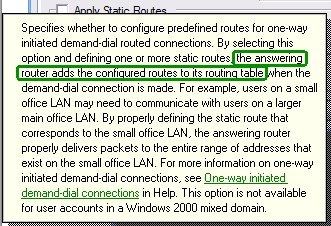
Hmmm, the answering server – the ISA server in this case – does this. It is not handed to the client. Bad luck!
The worse part of this – and the reason I’m writing this – is to warn you. If you grant you helpdesk, decentral admins etc. the permissions to change these settings on your user objects having VPN access, you risk they make your ISA server unavailable!
The GUI settings corresponds to these LDAP properties –
1> msRADIUSFramedRoute: 8.8.8.0/24 0.0.0.0 1;
1> msRASSavedFramedRoute: 8.8.8.0/24 0.0.0.0 1;
So if someone has change access to these properties – i.e. they have full permissions on the user, explicit permissions for the properties or implicit permissions you are at risk. Beware that the RAS-Information a.k.a “Remote Access Information” property set includes these properties. Note that the default for Active Directory is to give the built-in Account Operators group permissions to update these.
“I wonder if it is possible to hand out a static route to a user, when a VPN is established?”
So this admin found his user object, tabbed to Dial-in, enabled Apply Static Routes and clicked Static Routes. Added the wanted route and saved it all. Next, the user reconnected the VPN – and things started to go wrong…
After messing things back to normal, I – sorry, the admin - began reading the help text –
Hmmm, the answering server – the ISA server in this case – does this. It is not handed to the client. Bad luck!
The worse part of this – and the reason I’m writing this – is to warn you. If you grant you helpdesk, decentral admins etc. the permissions to change these settings on your user objects having VPN access, you risk they make your ISA server unavailable!
The GUI settings corresponds to these LDAP properties –
1> msRADIUSFramedRoute: 8.8.8.0/24 0.0.0.0 1;
1> msRASSavedFramedRoute: 8.8.8.0/24 0.0.0.0 1;
So if someone has change access to these properties – i.e. they have full permissions on the user, explicit permissions for the properties or implicit permissions you are at risk. Beware that the RAS-Information a.k.a “Remote Access Information” property set includes these properties. Note that the default for Active Directory is to give the built-in Account Operators group permissions to update these.
Tuesday, March 07, 2006
Blocking MSN Messenger traffic by using HTTP filtering in ISA
FYI: Tom Shinder at www.isaserver.org has published a nice little step-by-step guide to blocking MSN Messenger traffic in ISA with the short name - ISA Firewall Quick Tip: Blocking MSN Messenger Access through the ISA Firewall while Enabling Access to Some Users.
In this article we'll go over the following procedures: Create the HTTP/HTTPS Access Rule to Deny Access to MSN Messenger; Configure the User Group Exception and the HTTP Security Filter on the Deny Rule; Create the Allow Rule for the Excepted Users.
Thursday, March 02, 2006
Populating users in Office Communicator / LCS
OK - so now you've setup your Live Communications Server environment and login to Office Communicator 2005 or Windows Messenger just to see an empty list of users. Then the next questions come into mind - how do you populate users?
In Inceptio we initially used dsquery and some of the scripts that are part of the LCS 2005 SP1 Resource Kit.
First of I used dsquery to create a file with contacts (Check dsquery /? for further commands e.g. for traversing more OU's)
dsquery * "OU=Users,OU=Inceptio,DC=domain,DC=com" -attr msRTCSIP-PrimaryUserAddress -filter (msRTCSIP-UserEnabled=TRUE) > contacts.txt
Then I used the LCSAddcontacts.wsf script that will add contacts to a list of LCS users (The contacts.txt created earlier) - the script can be found in "%Programfiles%\Microsoft LC 2005\ResKit\WMI Samples" and information on the use can be found in LCSAddcontacts_readme.htm file
CScript LCSAddContacts.wsf /usersfile:contacts.txt /contactsfile:contacts.txt /contactsgroup:Inceptio
As you can se I use the same file twice for both the user and contact list, thereby adding all users to all users contacts list (Thanks to Ray Breen / Google for this trick).
Then I need to auto allow the users. This is (in my case) easily done by using LCSAddACEs.wsf (Also from the reskit)
CScript LCSAddACEs.wsf /usersfile:contacts.txt /acesfile:Acesfile.txt
I reuse the same contacts.txt file used earlier, but I now use also use an Acesfile.txt file containing the following text (Notice that Allow, Prompt, Block and Deny are case sensitive) -
domain inceptio.dk Allow Allow
As we are a small consulting company there is no problem in auto allowing all users to see each other, I recognize that this will not be useful in most larger companies (Certainly not in our customers), in these cases I would manipulate the contacts.txt file to create a new file looking like this -
user: sip:alice@inceptio.dk Allow Allow
user: sip:bob@inceptio.dk Allow Allow
etc.
I would not recommend using All Allow Allow as acesfile.txt input as it also gives All Other Contacts allow rights (Instead of notifying as usual), which probably isn't a desirable behavior for PIC or Federation contacts.
The above is just an example of how to use the sample scripts to populate users. It would be a good idea to join and refine the scripts into a single script taking e.g. OU or AD Group as input and then populating organization groups etc. with each other contacts.
Btw. the above scripts should be run from the LCS Home Server
In Inceptio we initially used dsquery and some of the scripts that are part of the LCS 2005 SP1 Resource Kit.
First of I used dsquery to create a file with contacts (Check dsquery /? for further commands e.g. for traversing more OU's)
dsquery * "OU=Users,OU=Inceptio,DC=domain,DC=com" -attr msRTCSIP-PrimaryUserAddress -filter (msRTCSIP-UserEnabled=TRUE) > contacts.txt
Then I used the LCSAddcontacts.wsf script that will add contacts to a list of LCS users (The contacts.txt created earlier) - the script can be found in "%Programfiles%\Microsoft LC 2005\ResKit\WMI Samples" and information on the use can be found in LCSAddcontacts_readme.htm file
CScript LCSAddContacts.wsf /usersfile:contacts.txt /contactsfile:contacts.txt /contactsgroup:Inceptio
As you can se I use the same file twice for both the user and contact list, thereby adding all users to all users contacts list (Thanks to Ray Breen / Google for this trick).
Then I need to auto allow the users. This is (in my case) easily done by using LCSAddACEs.wsf (Also from the reskit)
CScript LCSAddACEs.wsf /usersfile:contacts.txt /acesfile:Acesfile.txt
I reuse the same contacts.txt file used earlier, but I now use also use an Acesfile.txt file containing the following text (Notice that Allow, Prompt, Block and Deny are case sensitive) -
domain inceptio.dk Allow Allow
As we are a small consulting company there is no problem in auto allowing all users to see each other, I recognize that this will not be useful in most larger companies (Certainly not in our customers), in these cases I would manipulate the contacts.txt file to create a new file looking like this -
user: sip:alice@inceptio.dk Allow Allow
user: sip:bob@inceptio.dk Allow Allow
etc.
I would not recommend using All Allow Allow as acesfile.txt input as it also gives All Other Contacts allow rights (Instead of notifying as usual), which probably isn't a desirable behavior for PIC or Federation contacts.
The above is just an example of how to use the sample scripts to populate users. It would be a good idea to join and refine the scripts into a single script taking e.g. OU or AD Group as input and then populating organization groups etc. with each other contacts.
Btw. the above scripts should be run from the LCS Home Server
Tuesday, February 14, 2006
Use Group Policy Software Restrictions to control LUA
The least-privileged user account (LUA) principle is great - but in some situations very hard to implement. One of these places is my home computer :) shared by all the family members. Running games etc. without admin permissions is almost impossible.
While reading the Applying the Principle of Least Privilege to User Accounts on Windows XP article, I was linked to Browsing the Web and Reading E-mail Safely as an Administrator, Part 2 and discovered something new about the Software Restriction feature of Group Policy. I have been using Software Restriction for a while. I use it for preventing spyware from starting as Software Restrictions is 'stronger' than administrative permissions.
What I discovered, reading the article, was that there is a hidden feature, that can be enabled. This feature called 'Basic User', gives Group Policy control over programs. This means that you can force programs - like Internet Explorer - to start in restricted mode (same as using runas + protect my computer and data from unauthorized program activity) without any user intervention.
Right now, I have implemented it and is giving it a go. Let's see if my kids start to scream...
While reading the Applying the Principle of Least Privilege to User Accounts on Windows XP article, I was linked to Browsing the Web and Reading E-mail Safely as an Administrator, Part 2 and discovered something new about the Software Restriction feature of Group Policy. I have been using Software Restriction for a while. I use it for preventing spyware from starting as Software Restrictions is 'stronger' than administrative permissions.
What I discovered, reading the article, was that there is a hidden feature, that can be enabled. This feature called 'Basic User', gives Group Policy control over programs. This means that you can force programs - like Internet Explorer - to start in restricted mode (same as using runas + protect my computer and data from unauthorized program activity) without any user intervention.
Right now, I have implemented it and is giving it a go. Let's see if my kids start to scream...
Saturday, February 04, 2006
Choosing a new EASI passport domain for MSN
As I wrote in my earlier post on "Issues with EASI passport domains, LCS and MSN Messenger" a change of the EASI passport domain is sometimes necessary when implementing LCS PIC. But the link provided in the post will only allow you to change the domain to either hotmail.com or messengeruser.com - if say you would like to change from dlt@inceptio.dk to dlt@inceptio.org, then it is possible through https://accountservices.passport.net/. Just choose Credentials and then Change your e-mail address. From there you will be able to choose your new EASI domain address (Thanks to Per the hint).
HMC 3.5 Feature Pack 1 released
HMC 3.5 Feature Pack One includes additional resource management feature capabilities and some partner-requested solution fixes for the Hosted Messaging and Collaboration version 3.5 solution. It is strongly recommended that any service provider deploying Hosted Messaging and Collaboration version 3.5 download and install this feature pack, once they have installed HMC version 3.5.
Microsoft just released Feature Pack 1 for Hosted Messaging and Collaboration 3.5. The "most wanted" feature of Feature Pack 1 must be the new more flexible resource allocation for Mailboxes / Organizations. Prior to this release we we're required to allocate mailbox space at the organization level, but now it can be allocated at the time you provision mailbox users (Which fits most serviceproviders plans/packaging better).
Find the Feature Pack 1 ISO here.
Wednesday, February 01, 2006
ISA 2004 SP2 released
Friday, January 27, 2006
Using Oxios ToDo List for SmartPhone
Just wanted to update you on my earlier post as promised.
I just bought Oxios ToDo List for SmartPhone for my Qtek 8310 as a substitute for the built-in. This one is much better - I can edit my tasks - and very important - works on the same database and thus synchronizes with Outlook/Exchange.
I just bought Oxios ToDo List for SmartPhone for my Qtek 8310 as a substitute for the built-in. This one is much better - I can edit my tasks - and very important - works on the same database and thus synchronizes with Outlook/Exchange.
Thursday, January 26, 2006
AKU2 / MSFP and SP2 DirectPush configuration
The requirements are an Exchange Server 2003 with SP2 and a Mobile Device with Windows Mobile 2005 that includes the Messaging Security Feature Pack (MSFP aka Adaption Kit Update 2 (AKU2)) and for sync via USB with your machine you need ActiveSync 4.1 (Although this is not absolutely required). Furthermore for administration of the remote wipe features you will need the ActiveSync Web Administration tool.
The MSFP is actually a new version of the Windows Mobile OS so you need to wipe the device completely - with WM5 it is a pretty straight forward process; I started the phone in bootloader mode, connected it to USB and started the upgrade process. There's a very good TechNet Webcast called "Managing Windows Mobile-based Devices with the Messaging and Security Feature Pack" that includes very detailed info on security in Windows Mobile 5, the new features in MSFP and how upgrades can be done.
On the server side you need to change the IIS and Firewall timeout values. This is due to the fact that "DirectPush" works by keeping an http connection open to the server (Through a concept called heartbeats, where the mobile device periodically pings the server). If the firewall timeouts before the periodic ping, the device will need to ping/reconnect more frequently and errors might turn up in your eventlog. KB Article 905013 on "Enterprise firewall configuration for Exchange ActiveSync Direct Push Technology" explains more on this subject.
If you are using ISA server as a firewall you can change the timeout on the Web listener for your Front End mail server (Find it under properties for the web listener, Preferences, Advanced) and also you need to change the IIS timeouts on your Exchange Servers to a corresponding value (I'm currently using 30 minutes or 1800 seconds, which seems to work fine in a small environment).
It will be interesting to measure the scalability effects of these connections in Exchange 2003, where many users now not only will have an Outlook 2003 connection but also (almost always?) an active connection to their mobile devices - according to Microsoft its part of the reasoning that Exchange 12 will be 64 bit only (Longer story - I'm part of the beta program so I'm preparing to test it on my newly acquired AMD x64 Acer Ferrari 4000 notebook).
In overall the MSFP/DirectPush experience is great (Mail at times arrive on my mobile device before RPC/HTTPS syncs ;-), configuring the security policies and applying them to the devices also works fine, I can’t understand how I ever lived without GAL Lookup and I only have a few negative comments. The most annoying part is that the phone insists on informing me that a new mail has arrived, also when I’m at my desk. If I change my profile to “No sound” on mail arrival it will also turn of sound from SMS messages.
Another annoyance is the fact that the keyboard lock and device lock features doesn’t work together. So when the device is locked by the security policies and the phone is in my pocket – It doesn’t lock the keyboard and after x failed attempts it will wipe the device (Guess the rest of the story yourself ;-)
The MSFP is actually a new version of the Windows Mobile OS so you need to wipe the device completely - with WM5 it is a pretty straight forward process; I started the phone in bootloader mode, connected it to USB and started the upgrade process. There's a very good TechNet Webcast called "Managing Windows Mobile-based Devices with the Messaging and Security Feature Pack" that includes very detailed info on security in Windows Mobile 5, the new features in MSFP and how upgrades can be done.
On the server side you need to change the IIS and Firewall timeout values. This is due to the fact that "DirectPush" works by keeping an http connection open to the server (Through a concept called heartbeats, where the mobile device periodically pings the server). If the firewall timeouts before the periodic ping, the device will need to ping/reconnect more frequently and errors might turn up in your eventlog. KB Article 905013 on "Enterprise firewall configuration for Exchange ActiveSync Direct Push Technology" explains more on this subject.
If you are using ISA server as a firewall you can change the timeout on the Web listener for your Front End mail server (Find it under properties for the web listener, Preferences, Advanced) and also you need to change the IIS timeouts on your Exchange Servers to a corresponding value (I'm currently using 30 minutes or 1800 seconds, which seems to work fine in a small environment).
It will be interesting to measure the scalability effects of these connections in Exchange 2003, where many users now not only will have an Outlook 2003 connection but also (almost always?) an active connection to their mobile devices - according to Microsoft its part of the reasoning that Exchange 12 will be 64 bit only (Longer story - I'm part of the beta program so I'm preparing to test it on my newly acquired AMD x64 Acer Ferrari 4000 notebook).
In overall the MSFP/DirectPush experience is great (Mail at times arrive on my mobile device before RPC/HTTPS syncs ;-), configuring the security policies and applying them to the devices also works fine, I can’t understand how I ever lived without GAL Lookup and I only have a few negative comments. The most annoying part is that the phone insists on informing me that a new mail has arrived, also when I’m at my desk. If I change my profile to “No sound” on mail arrival it will also turn of sound from SMS messages.
Another annoyance is the fact that the keyboard lock and device lock features doesn’t work together. So when the device is locked by the security policies and the phone is in my pocket – It doesn’t lock the keyboard and after x failed attempts it will wipe the device (Guess the rest of the story yourself ;-)
Friday, January 20, 2006
Monad beta 3 is out
As a follow up to my previous post, I just wanted to tell you that beta 3 is available for download.
Hibernate - and I mean it!
I have a server for running Virtual Server. The server uses a wireless network card to connect to my home LAN. This gives me a problem as the wireless specifications disallow inserting other MAC adresses. To give my guest OSs internet network access, I'm running Routing and RAS on the host.
This all works fine except one thing: I cannot hibernate my server anymore.
RRAS pops up a message telling me, that it will not allow that-

For a while I have stopped the service, hibernated and remembered to restart the service on resume, but I just found another solution.
Simply write -
shutdown /h /f
The /f ignores RRAS and hibernates right away.
Now, I haven't used this much, so use it at your own risk. There could be a reason for RRAS not supporting hibernation - and if you know it, please share the knowledge.
This all works fine except one thing: I cannot hibernate my server anymore.
RRAS pops up a message telling me, that it will not allow that-

For a while I have stopped the service, hibernated and remembered to restart the service on resume, but I just found another solution.
Simply write -
shutdown /h /f
The /f ignores RRAS and hibernates right away.
Now, I haven't used this much, so use it at your own risk. There could be a reason for RRAS not supporting hibernation - and if you know it, please share the knowledge.
Thursday, January 19, 2006
How to add a loopback device from the command line
This is easy -
devcon install %windir%\INF\netloop.inf *msloop
devcon.exe is found in Support Tools.
Have fun
devcon install %windir%\INF\netloop.inf *msloop
devcon.exe is found in Support Tools.
Have fun
Friday, January 13, 2006
LCS PIC troubleshooting
The LCSKid has posted a good article on LCS PIC troubleshooting. It contains the kind of questions that you will be asked when calling PSS. It can also be used for checking requirements/troubleshooting before bothering PSS with a call ;-)
Thursday, January 12, 2006
Issues with EASI passport domains, LCS and MSN Messenger
When implementing Live Communications Server (LCS) in your organization with Public IM Connectivity (PIC) support, you need to change your EASI passports (e.g. dlt@inceptio.dk) to either a @messengeruser.com or @hotmail.com address - if the domain name (in this case inceptio.dk) is used in your LCS implementation.
The background/details are described in this article and the change can be completed directly through this link.
That was the easy part - but according to Will Robinson at Intense Collabage there are intermittent problems where, after the transition, contacts remain offline. The solutions is according to Will/MSN Support -
Furthermore, there are problems with Windows Live Custom Domains and EASI passports (Might be that MS regrets ever offering EASI passport domain support ;-)
The background/details are described in this article and the change can be completed directly through this link.
That was the easy part - but according to Will Robinson at Intense Collabage there are intermittent problems where, after the transition, contacts remain offline. The solutions is according to Will/MSN Support -
- Log in to MSN messenger with new account name.
- Export your contacts to a file (Option in Menus)
- Delete all your contacts manually
- Import the contacts file.
Furthermore, there are problems with Windows Live Custom Domains and EASI passports (Might be that MS regrets ever offering EASI passport domain support ;-)
Monday, January 02, 2006
Hunting a better task list for my QTek 8310
I've been hunting a better solution for a while. My QTek 8310 does not allow me to edit my tasks etc., so the usefulness is limited...
I gave Oxios ToDo List 5.10 a run - it works on the same tasks as the built-in task applet and thus on my Exchange/Outlook tasks - but it could not open the task database.
Returning to the Oxios page, I found the solution. A 6.0a4 version - alpha - can be downloaded.
It seems to work. I now have 15 days to figure out whether it is worth the 13€. I'll let you know in a later post.
Check also the Today plugin. This enabled you to access tasks directory from the Home Screen and is freeware.
I gave Oxios ToDo List 5.10 a run - it works on the same tasks as the built-in task applet and thus on my Exchange/Outlook tasks - but it could not open the task database.
Returning to the Oxios page, I found the solution. A 6.0a4 version - alpha - can be downloaded.
It seems to work. I now have 15 days to figure out whether it is worth the 13€. I'll let you know in a later post.
Check also the Today plugin. This enabled you to access tasks directory from the Home Screen and is freeware.
Remote Mobile Registry Editor
Just been referred to this tool from a friend of mine. It is called Mobile Registry Editor and can be found here. It lets you modify the registry of your mobile device from you PC. Much easier than using the limited keyboard on my phone.
BTW: I was talking to him about debugging my Qtek 8310 problem. It would not boot after my - ahem - cleaning up. I was suspecting that I deleted some files for my custom home screen. Luckily, I should just let it stay stay turned on for a looong time - and finally, it came up with an error message and I could switch it to another home screen layout.
BTW: I was talking to him about debugging my Qtek 8310 problem. It would not boot after my - ahem - cleaning up. I was suspecting that I deleted some files for my custom home screen. Luckily, I should just let it stay stay turned on for a looong time - and finally, it came up with an error message and I could switch it to another home screen layout.
Friday, December 23, 2005
Sender ID Framework troubleshooting
Per has earlier written about SenderID and we of course implemented the required SPF records at Inceptio. But then we needed to change our E-mail server publishing to another Firewall with another IP Scope / ISP and the trouble began. Usually changing the IP address of a DNS record takes some time to replicate (Actually technically it needs to expire in the cache on the DNS servers around the world, but that’s another story).
So changing the IP address required changing our A record for mail.inceptio.dk - which should be enough as our SPF record points to mail.inceptio.dk (And all A records) –
"v=spf1 a mx mx:mail.inceptio.dk -all"
After changing the firewall configuration, the A record and waiting a few hours everything seemed to work fine, email was flowing in- and outbound and rpc/https worked - I was happy ;-)
Then I received an e-mail with the text "Sender is forged (SPF Fail)" appended to the subject line. At first I thought it was a matter of DNS cache expiration and that time would solve the problem – but then a few hours later a mail bounced with the error “**Message you sent blocked by our bulk email filter**”.
For troubleshooting I used the SPF testing tool from dnsstuff (That provides other great tools as well) and a few others with only positive results. After a bit of troubleshooting I decided that synthetic testing method of dnsstuff wouldn’t give me an answer to the problem. Instead I used port25’s automated testing tool, which basically is an e-mail address called check-auth@verifier.port25.com that you send an e-mail to. A few minutes later you will receive an authentication report that includes compliance checks for the Sender ID standard and Yahoo’s DomainKeys (Also check their site for other resources).
In my case the problem was that the new firewall used a different outbound IP address than I expected. Changing the configuration of the firewall solved the problem and now its working fine again (Actually the whole situation reminded me about the problems we had back in the NT4/W2K and Exchange 5.5. days, with e-mails bouncing due to Exchange clusters using the Host IP address instead of the Exchange Virtual IP address because of problems with the gethostbyname() method as I described in my old article Tips for Clustering Exchange Successfully).
So changing the IP address required changing our A record for mail.inceptio.dk - which should be enough as our SPF record points to mail.inceptio.dk (And all A records) –
"v=spf1 a mx mx:mail.inceptio.dk -all"
After changing the firewall configuration, the A record and waiting a few hours everything seemed to work fine, email was flowing in- and outbound and rpc/https worked - I was happy ;-)
Then I received an e-mail with the text "Sender is forged (SPF Fail)" appended to the subject line. At first I thought it was a matter of DNS cache expiration and that time would solve the problem – but then a few hours later a mail bounced with the error “**Message you sent blocked by our bulk email filter**”.
For troubleshooting I used the SPF testing tool from dnsstuff (That provides other great tools as well) and a few others with only positive results. After a bit of troubleshooting I decided that synthetic testing method of dnsstuff wouldn’t give me an answer to the problem. Instead I used port25’s automated testing tool, which basically is an e-mail address called check-auth@verifier.port25.com that you send an e-mail to. A few minutes later you will receive an authentication report that includes compliance checks for the Sender ID standard and Yahoo’s DomainKeys (Also check their site for other resources).
In my case the problem was that the new firewall used a different outbound IP address than I expected. Changing the configuration of the firewall solved the problem and now its working fine again (Actually the whole situation reminded me about the problems we had back in the NT4/W2K and Exchange 5.5. days, with e-mails bouncing due to Exchange clusters using the Host IP address instead of the Exchange Virtual IP address because of problems with the gethostbyname() method as I described in my old article Tips for Clustering Exchange Successfully).
Wednesday, December 21, 2005
LCS 2005 Configuring Certificates guide updated
Microsoft has updated their "Microsoft Office Live Communications Server 2005 Certificate Configuration" deployment guide to version 2.2. Comparing the old with the new version shows that it’s mostly clarifications and removal of some references to using client certificates that were required in earlier versions of LCS.
Find the guide here.
Find the guide here.
Santa IM Worm hits MSN (And AOL / Yahoo)
A new worm called IM.GiftCom.All tricks users into installing a rootkit on their computer, that in turn will IM the users other contacts with links to an image of Santa. Quote -
This is just one more reasons for companies to block Public IM communications and move to Live Communications Server 2005 with PIC and IMLogic/Sybari for their RTC needs.
Read more at source and thanks to bink.nu for pointing to the info.
"This worm is a medium threat in terms of its distribution, but in terms of the damage it can create, it's a more severe threat," said Art Gilliland, vice president of products for IMlogic."It's not a very happy delivery," he added.
This is just one more reasons for companies to block Public IM communications and move to Live Communications Server 2005 with PIC and IMLogic/Sybari for their RTC needs.
Read more at source and thanks to bink.nu for pointing to the info.
Tuesday, December 20, 2005
IMF Updates explained
Alexander at EHLO has posted a very good description of how to enable automatic updates of IMF v2 and the functionality of IMF updates
Find it here
IMF updates are twice per month
IMF updates are only supported on Exchange 2003 Servers with SP2 where IMF is enabled
IMF updates are supported on all Exchange server languages
IMF updates are available from Microsoft Update via both manual and AU
IMF updates supports uninstall through Add/Remove Programs and manual rollback
Find it here
Friday, December 16, 2005
Microsoft Command Shell "Monad" Videos
Monad - or msh as the exe is called - is still in the works. Currently, it is in public beta 2 (September
2005). You can get a version for .Net Framework 2 RC/RTM at MS Downloads. Click this link to search for your version.
If you want to get a little deeper into this, look at the Channel 9 videos on Monad. They feature Jeffrey Snover, are short and useful.
Getting Started documentation is available here.
Monad can do the same stuff in a few commands like you can do in many lines of VBScript (or similar) - it will hit you some day!
Being an old (Open)VMS user, it really like the nice words he uses about its DCL. Even though it can be better, it is very good owing to it consistent syntax, error handling and lots of other features. Man, I spent a lot of time using that...
2005). You can get a version for .Net Framework 2 RC/RTM at MS Downloads. Click this link to search for your version.
If you want to get a little deeper into this, look at the Channel 9 videos on Monad. They feature Jeffrey Snover, are short and useful.
Getting Started documentation is available here.
Monad can do the same stuff in a few commands like you can do in many lines of VBScript (or similar) - it will hit you some day!
Being an old (Open)VMS user, it really like the nice words he uses about its DCL. Even though it can be better, it is very good owing to it consistent syntax, error handling and lots of other features. Man, I spent a lot of time using that...
Thursday, December 15, 2005
Exchange DirectPush notifications to WM5 may be delayed / stopped
Several sources including msmobiles reports that a company called Visto has filed a lawsuit against microsoft for infringing three of their patents
Read Visto's press release here.
(Redwood Shores, CA, December 15, 2005) - Visto Corporation has filed a legal action against Microsoft (NASDAQ: MSFT) for misappropriating Visto’s intellectual property. The complaint asserts that Microsoft has infringed upon multiple patents Visto holds regarding proprietary technology that provides enterprises and consumers with mobile access to their email and other data. The company is seeking a permanent injunction that would prohibit Microsoft from misappropriating the technology that Visto and its cofounder helped develop nearly a decade ago.
Read Visto's press release here.
Wednesday, December 14, 2005
Microsoft Office Communicator Web Access has been released
"OWA" for Live Communications Server 2005 SP1 has been released to the web. It's an interesting product that support for example external users and those whose platforms aren't supported by Office Communicator (E.g. Windows 2000) and it contains the following features -
Web access – Users can access the IM and presence features in Live Communications Server 2005 SP1 through any supported Web browser.
Presence – Communicator Web Access users can determine the status of other SIP users and update their own presence information.
Personal notes – A user can publish a personal note that is displayed along with the user’s presence information.
Extensive contact management – Users can add contacts to a contact list, tag contacts to be notified when those contacts’ presence status changes, and organize listed contacts into groups.
Federation – When federation is enabled in Microsoft Office Live Communications Server 2005 with SP1, Communicator Web Access users can view the presence of users in external organizations and send instant messages to those users.
Multiple browser and operating system support – Users with Windows-based and non-Windows-based browsers and operating systems can use Communicator Web AccessUser search – The Communicator Web Access server connects to the Microsoft Active Directory® directory service. Unlike Communicator, however, Communicator Web Access does not query the Live Communications Server Address Book.
Tuesday, December 13, 2005
Circumventing Group Policy as a Limited User
Just a warning :)
Read it all at Mark's Sysinternals blog. As always, you have to be impressed by Mark.
Read it all at Mark's Sysinternals blog. As always, you have to be impressed by Mark.
Wednesday, November 30, 2005
New RTC blog by the RTC product team
We've heard loud and clear that many people want a better connection with the RTC product team. We're excited to do something about it. The primary goal of this blog is to establish two way communication between the product team and our customers and partners. We will also use this blog as an educational channel to provide additional product information.
Find the blog here or the RSS feed here
Sunday, November 20, 2005
Microsoft ActiveSync 4.1 has been released - updated for clarity
Most notably it will support devices running the upcoming Messaging and Security Feature Pack (MSFP a.k.a. AKU2) with the following feature enhancements (From MSFP) supported in Microsoft ActiveSync -
Btw. besides the integration to MSFP there also are a few new features to ActiveSync 4.1 -
- DirectPush Mail
- Local device wipe
- Certificate-based authentication
Btw. besides the integration to MSFP there also are a few new features to ActiveSync 4.1 -
- New partnership wizard to help customers more easily setup a sync partnership
- Faster transfer of data files including media
- Ability to sync photos assigned to contacts from Outlook on the desktop
Friday, November 18, 2005
LCS 2005 - why NLB is not recommended
As I wrote a couple of days ago in LCS and Network Load Balancing software based Load Balancing isn't recommended for anything else than test environments.
Well it turns out that the LCS Kid has a post on the subject named LCS 2005 - Reasons why NLB is not recommended but instead a Hardware Load Balancer that contains even more reasons to avoid NLB.
Well it turns out that the LCS Kid has a post on the subject named LCS 2005 - Reasons why NLB is not recommended but instead a Hardware Load Balancer that contains even more reasons to avoid NLB.
Live Communications Server resources - updated
So you are looking for Live Communications Server resources but finding that a bit hard? That might be because there aren't that many around. I have collected some of the resources I'm currently using or have been using in the past here -
Microsoft
Microsoft
- General – Homepage for Microsoft LCS
- Deployment - resources on LCS and Office Communicator - loads of info but a bit unstructured
- Community - Links to blogs but not all are LCS related.
- Product support - How-to articles, downloads and top KB articles
- RTC Webcasts - On-demand and Live webcasts
Community pages
- LCS Kid – Tom is a MS employee. Great info on LCS and its clients
- Intense Collabage - Will Robinsons real world experiences with LCS/PIC
- Joe Schurman – LCS MVP has a good FAQ that’s excellent for newcomers to LCS
- Eileen Brown – Microsoft evangelist focusing on LCS, MOM and Exchange (A must read!)
- The Goldfish Bowl – Graham Tylers blog on LCS, Sharepoint (Developer oriented)
- The Collaboration Blog – General collaboration info including a few LCS articles
- Realtime Blog – Mostly VoIP but also a little LCS
- Bob’s Blog – LCS MVP mostly Exchange news
If you have other good resources (including your own blog) please feel free to write a comment!
Thursday, November 17, 2005
Citrix Presentation Server now integrated with MOM 2005
According to a press release from Citrix, they have just released a new MP integrating Presentation Server 4 and MetaFrame (Presentation Server 3) with MOM 2005.
This is great news for customers having both products.
This is great news for customers having both products.
Exchange 12 will be 64 bit only
Microsoft announced yesterday that it will be 64 bit only as they have seen significant performance gains on this platform -
Read more at Eileen's post and in the official press release.
They tested Exchange on 64 bit and found almost a 75% reduction in IOs per second compared with Exchange 2003. This could result in almost a 4X increase in the number of users on the same disks or require 1/4 the disks to support the same users from a throughput perspective.
Read more at Eileen's post and in the official press release.
Wednesday, November 16, 2005
Enabling Exchange 2003 SP2 IMF v2
So you've uninstalled IMF v1, installed SP2, set the SCL thresholds and actions correctly and everything should be fine but UCE keeps arriving at your inbox?
Well it might be because you forgot the last bit - namely setting the Default SMTP Virtual Server properties for each SMTP server correctly. Under the General tab, IP Address, Advanced, Edit there’s a checkbox called "Apply Intelligent Message Filter".
If you can't find it then visit Vladimir’s blog, which contains detailed instructions (with pictures ;-) for enabling IMF v2.
Well it might be because you forgot the last bit - namely setting the Default SMTP Virtual Server properties for each SMTP server correctly. Under the General tab, IP Address, Advanced, Edit there’s a checkbox called "Apply Intelligent Message Filter".
If you can't find it then visit Vladimir’s blog, which contains detailed instructions (with pictures ;-) for enabling IMF v2.
New whitepaper on HMC use of privileged users, security groups and permission
Conrad Agramont has written an interesting whitepaper that tries to accomplish the following -
The HMC solution includes documentation and deployment tools that will provide instructions for or will automate the creation of user accounts, security groups, and permissions. However, there isn’t a single view for all of the accounts and their "final” implementation. The purpose of this document is to provide such a view.For anyone new to HMC it gives a good overview of the solutions use of accounts and security groups. It is based on HMC 3.0 - but so far that I can se it will also be applicable for the upcoming HMC 3.5 release (I'm in Redmond on HMC 3.5 training but we have been explicitly asked not to blog about the new features in HMC 3.5).
LCS and Network Load Balancing
I've have had a few questions on using hardware load balancers versus using Windows Server 2003 Network Load balancing. The important note is the following quote from the "Live Communications Server 2005 Enterprise Pools and Windows 2003 Network Load Balancing" deployment guide -
Using hardware load balancers is strongly recommended. Microsoft Windows® NLB may be used for evaluation, test, and pilot systems or for small, nonmission critical deployments.Furthermore there are the following limitations with using NLB -
So the short answer is - don't do it !1. Remote administration using the Live Communications Server snap-in is not supported. The front-end Enterprise Servers will have to be managed by running the administrative snap-in locally and not from a remote computer.
2. Multiple pools within an organization are not supported.
Sony XCP uninstaller opens a new security hole!
The first version of the uninstall software that Sony has delivered opens yet another security hole according to a Princeton researcher -
Read more here Update: Sony Uninstaller Hole Stays Open
Due to a serious design flaw, the CodeSupport component allows any web site you visit to download and run software on your computer. A malicious web site author can write an evil program, package up that program appropriately, put the packaged code at some URL, and then write a web page that causes CodeSupport to download and run code from that URL.
Read more here Update: Sony Uninstaller Hole Stays Open
Saturday, November 12, 2005
Mark won the "war" against Sony BMG - update #3
Last update #3 - read Marks post Victory! (No further explanation required ;-)
According to eWeek Mark Russinovich apparently won the "war" against Sony in the combat against the cloaking methods used in their DRM software (Source).
If you haven't followed the story then go to his blog and read the first post Sony, Rootkits and Digital Rights Management Gone Too Far - there are a lot of interesting insights and comments to his his first and the following posts on the subject (1, 2, 3)
UPDATE - Mark has written a follow-up story after Sony's retreat Sony: No More Rootkit - For Now also Microsoft is going to include detection and removal of the rootkit in Windows AntiSpyware and the upcoming Windows Defender (Source). Congratulations to Mark and all who will benefit from his fight !!!
UPDATE #2 - Someone actually sat down, read the EULA and summed up the result of it; check out these examples -
According to eWeek Mark Russinovich apparently won the "war" against Sony in the combat against the cloaking methods used in their DRM software (Source).
If you haven't followed the story then go to his blog and read the first post Sony, Rootkits and Digital Rights Management Gone Too Far - there are a lot of interesting insights and comments to his his first and the following posts on the subject (1, 2, 3)
UPDATE - Mark has written a follow-up story after Sony's retreat Sony: No More Rootkit - For Now also Microsoft is going to include detection and removal of the rootkit in Windows AntiSpyware and the upcoming Windows Defender (Source). Congratulations to Mark and all who will benefit from his fight !!!
UPDATE #2 - Someone actually sat down, read the EULA and summed up the result of it; check out these examples -
If your house gets burgled, you have to delete all your music from your laptop when you get home. That's because the EULA says that your rights to any copies terminate as soon as you no longer possess the original CD.
You must install any and all updates, or else lose the music on your computer. The EULA immediately terminates if you fail to install any update. No more holding out on those hobble-ware downgrades masquerading as updates.
Sony-BMG can install and use backdoors in the copy protection software or media player to "enforce their rights" against you, at any time, without notice. And Sony-BMG disclaims any liability if this "self help" crashes your computer, exposes you to security risks, or any other harm.
If you file for bankruptcy, you have to delete all the music on your computer. Seriously.
Friday, November 11, 2005
Solution for adding own root certificates to Windows Mobile 5 devices - Updated
Per and I just received our new Qtek 8310 mobile devices today and got into trouble when we tried to add our own root certificate.
On Pocket devices and in Windows Mobile 2003 SE you just copy the certificate to the device and doubleclick it from File Explorer. But on the Qtek 8310 we got the error "Security permission was insufficient to update your device". In desperation, we also tried to use the SPAddcert.exe utility for Windows Mobile 2002 and 2003 Smartphone edition and received the message "The phone may be locked".
The problem were due to changes in the security model in Windows Mobile 5. Although it is very interesting/innovative in terms of mobile device security (Protecting from malicious software) it isn’t something we like when we want our new gadgets to work with WPA and Exchange Server ActiveSync.
Using Google intensively, I finally found the direction for solving the problem (the first version of this post) and using MSDN I found a better solution as follows -
First you need to get a copy of regeditSTG.exe (Apparently a HTC signed registry editor with an issuer CN that equals HTCCanary) zip it and move it to your device (You get an error if you copy the .exe directly). Now unzip it by double clicking it from File Explorer (on your device) and run the program. Then change the Grant Manager Policy registry key (Remember to note the old value) -
HKLM\Security\Policies\Policies\00001017 = 144
After setting the registry key above reboot your device, copy your root certificate to the File Explorer and click to install it (There’s no feedback that the operation was successful – check settings, security, certificates, root certificates for the existence of your certificate).
Before proceeding, we choose to set the registry setting back to the original values so the Phone was once again protected and finally Exchange ActiveSync and WPA worked like a charm ;-)
The solution apparently works on several different devices like i-Mate, C550, Qtek 8310 (Thats the only one we tested - don't ask about the others but do feel free to comment on those that works ;-) and probably most Windows Mobile 2005 Smartphone devices.
A utility called SDA_ApplicationUnlock.exe can also be found on the Internet but our testing shows us that it does the same as the Grant Manager Policy registry key. The problem with this application is that it only has a "Remove Lock" feature and no "Enable Lock" feature. Different posts/websites show the solution for other phones that include the use of SDA_ApplicationUnlock.exe utility; so if you run into problems you might want to try it.
Disclaimer - We don't know the copyrights on the mentioned utilities - so this posting is only meant for informational purposes and be sure to get correctly licensed versions of these!
On Pocket devices and in Windows Mobile 2003 SE you just copy the certificate to the device and doubleclick it from File Explorer. But on the Qtek 8310 we got the error "Security permission was insufficient to update your device". In desperation, we also tried to use the SPAddcert.exe utility for Windows Mobile 2002 and 2003 Smartphone edition and received the message "The phone may be locked".
The problem were due to changes in the security model in Windows Mobile 5. Although it is very interesting/innovative in terms of mobile device security (Protecting from malicious software) it isn’t something we like when we want our new gadgets to work with WPA and Exchange Server ActiveSync.
Using Google intensively, I finally found the direction for solving the problem (the first version of this post) and using MSDN I found a better solution as follows -
First you need to get a copy of regeditSTG.exe (Apparently a HTC signed registry editor with an issuer CN that equals HTCCanary) zip it and move it to your device (You get an error if you copy the .exe directly). Now unzip it by double clicking it from File Explorer (on your device) and run the program. Then change the Grant Manager Policy registry key (Remember to note the old value) -
HKLM\Security\Policies\Policies\00001017 = 144
After setting the registry key above reboot your device, copy your root certificate to the File Explorer and click to install it (There’s no feedback that the operation was successful – check settings, security, certificates, root certificates for the existence of your certificate).
Before proceeding, we choose to set the registry setting back to the original values so the Phone was once again protected and finally Exchange ActiveSync and WPA worked like a charm ;-)
The solution apparently works on several different devices like i-Mate, C550, Qtek 8310 (Thats the only one we tested - don't ask about the others but do feel free to comment on those that works ;-) and probably most Windows Mobile 2005 Smartphone devices.
A utility called SDA_ApplicationUnlock.exe can also be found on the Internet but our testing shows us that it does the same as the Grant Manager Policy registry key. The problem with this application is that it only has a "Remove Lock" feature and no "Enable Lock" feature. Different posts/websites show the solution for other phones that include the use of SDA_ApplicationUnlock.exe utility; so if you run into problems you might want to try it.
Disclaimer - We don't know the copyrights on the mentioned utilities - so this posting is only meant for informational purposes and be sure to get correctly licensed versions of these!
Thursday, November 10, 2005
EASI passport domains support in PIC / LCS 2005 SP1
As opposed to the information in KB897567 Rev. 3.0 with the short name "Known issues that occur with public instant messaging after you install Office Live Communications Server Service Pack 1" EASI domains are supported by now (Actually by October 11th). Earlier only domains like hotmail.com, messengeruser.com etc. were supported with MSN Messenger connectivity but now domains/addresses like dlt@inceptio.dk are also fully supported (I've just tested it together with a Microsoft contact of mine).
You will have to add EASI passports using a special syntax of user(easidomain.com)@msn.com e.g. the EASI passport msnuser@inceptio.dk would translate to msnuser(inceptio.dk)@msn.com.
If you are considering using PIC then there are many interesting quirks documented in the KB article. One of them is that the MPOP functionality doesn’t work together with MSN/Yahoo/AOL (MPOP is Multiple Points Of Presence where Office Communicator 2005 supports being logged on to several devices at the same time - including the upcoming Microsoft Office Communicator Mobile).
Furthermore, if you're using multiple domains in LCS then be sure to get a public certificate from a provider that supports Subject Alternative Names (Source).
You will have to add EASI passports using a special syntax of user(easidomain.com)@msn.com e.g. the EASI passport msnuser@inceptio.dk would translate to msnuser(inceptio.dk)@msn.com.
If you are considering using PIC then there are many interesting quirks documented in the KB article. One of them is that the MPOP functionality doesn’t work together with MSN/Yahoo/AOL (MPOP is Multiple Points Of Presence where Office Communicator 2005 supports being logged on to several devices at the same time - including the upcoming Microsoft Office Communicator Mobile).
Furthermore, if you're using multiple domains in LCS then be sure to get a public certificate from a provider that supports Subject Alternative Names (Source).
Wednesday, November 09, 2005
Mobile Communicator Beta 1 released
I just received an e-mail that the Beta 1 for Mobile Communicator has been released. This product is a "mobile" version of Office Communicator 2005 designed for Windows Mobile 2003 SE and Windows Mobile 2005 and it appearently includes VoIP functionality and remote call control. I personally look forward to testing this product and I'm already downloading it - but I will have to wait for my new Qtek 8310 (a.k.a. HTC Tornado) that arrives Thursday this week :-)
This is the first version of Next Gen line of products that also will include new versions of Live Meeting with multipoint audio/video and VoIP as the significant enhancements.
I will get back to you with a small review of the product and also information on Live Communications Server 2005 in the near future.
This is the first version of Next Gen line of products that also will include new versions of Live Meeting with multipoint audio/video and VoIP as the significant enhancements.
I will get back to you with a small review of the product and also information on Live Communications Server 2005 in the near future.
Tuesday, November 01, 2005
Changes to Virtual Server and VMWare support
There’s a couple of new changes on support for virtualization software one of them is the change to support for Exchange Server under Virtual Server that we've earlier reported would happen as part of Exchange 2003 Sp2, this is still true but apparently Virtual Server R2 or later will also be required.
On another story Microsoft also changed the support policy for other non-Microsoft hardware virtualization software (a.k.a. VMWare). Now they will provide “commercially reasonable efforts” to test the software - but only for Premier Support customers and furthermore they may require a reproduction "independently from the non-Microsoft hardware virtualization software" ;-)
On another story Microsoft also changed the support policy for other non-Microsoft hardware virtualization software (a.k.a. VMWare). Now they will provide “commercially reasonable efforts” to test the software - but only for Premier Support customers and furthermore they may require a reproduction "independently from the non-Microsoft hardware virtualization software" ;-)
Tuesday, October 11, 2005
Limits of search categories
Blogger does not have categories as a standard feature but Amy has found an interesting way to use Blogger Search for this, which I have implemented in the sidebar.
Note that the search has Limited capabilities and won't find all posts in a given category. Especially older posts before mid 2005 won't be a part of the searches. Check out Blogger Help on Blog Search for further info.
Note that the search has Limited capabilities and won't find all posts in a given category. Especially older posts before mid 2005 won't be a part of the searches. Check out Blogger Help on Blog Search for further info.
Monday, October 03, 2005
Setting SMS 2003 Cache Tombstone Duration
If you are downloading before running a lot in SMS - i.e. making SMS copy the package down to its cache before running the program - you may have come across the problem that the cache is full, even though all your programs have finished and you'd expected that it had freed the cache entries.
Well, SMS keeps the cache entries around for at least a day - just in case you need it again, I guess. In normal circumstances, that could be ok, but if you are installing a fresh PC with a lot of packages, this cache strategy can get you in space problems.
Microsoft writes about it in KB 839513 - How the Systems Management Server 2003 Advanced Client manages its cache. Microsoft states that the cache tombstone duration is 24 hours.
Microsoft draws you attention to the SDK, especially the CacheInfo object. But this object only allows you to read the tombstone duration.
What they do not mention, is that you can simply tweak the cache tombstone duration, so the problem is gone or at least highly reduced. You do that by creating a MOF file - say SetCacheTombstoneDuration.mof - with these lines (sorry about the tiny font - I try to prevent the lines from wrapping)
#pragma namespace("\\\\.\\root\\ccm\\policy\\machine\\requestedconfig") [CCM_Policy_PartialPolicy(true)]
instance of CCM_SoftwareDistributionClientConfig
{
SiteSettingsKey = 1;
// Override only this property,
// all others come from the Site/Management Point
PolicySource = "Local";
// 5 min, default 86400 - one day
[CCM_Policy_Override(true)] CacheTombstoneContentMinDuration = 300;
};
Send the program to the relevant clients and execute it with -
mofcomp SetCacheTombstoneDuration.mof
That is all these is to it.
I cannot see that this method give any side-effects - but I also cannot guarantee it. If you experience any problems, please feel free to share your experience as comments to this entry.
Well, SMS keeps the cache entries around for at least a day - just in case you need it again, I guess. In normal circumstances, that could be ok, but if you are installing a fresh PC with a lot of packages, this cache strategy can get you in space problems.
Microsoft writes about it in KB 839513 - How the Systems Management Server 2003 Advanced Client manages its cache. Microsoft states that the cache tombstone duration is 24 hours.
Microsoft draws you attention to the SDK, especially the CacheInfo object. But this object only allows you to read the tombstone duration.
What they do not mention, is that you can simply tweak the cache tombstone duration, so the problem is gone or at least highly reduced. You do that by creating a MOF file - say SetCacheTombstoneDuration.mof - with these lines (sorry about the tiny font - I try to prevent the lines from wrapping)
#pragma namespace("\\\\.\\root\\ccm\\policy\\machine\\requestedconfig") [CCM_Policy_PartialPolicy(true)]
instance of CCM_SoftwareDistributionClientConfig
{
SiteSettingsKey = 1;
// Override only this property,
// all others come from the Site/Management Point
PolicySource = "Local";
// 5 min, default 86400 - one day
[CCM_Policy_Override(true)] CacheTombstoneContentMinDuration = 300;
};
Send the program to the relevant clients and execute it with -
mofcomp SetCacheTombstoneDuration.mof
That is all these is to it.
I cannot see that this method give any side-effects - but I also cannot guarantee it. If you experience any problems, please feel free to share your experience as comments to this entry.
Wednesday, September 28, 2005
netstat -b (and -v)
I just learned something useful - so this day is not completely wasted ;)
On Windows XP SP2 and Windows Server 2003 SP1 netstat got a new -b argument.
So what does it do? It lists the executable using the connection. No more need to consolidate information between netstat -o and task manager or such :D
Example output:
TCP MyPC:4137 baym-cs344.msgr.hotmail.com:1863 ESTABLISHED 1532
[msnmsgr.exe]
-v gives even more information (and is quite slow):
TCP MyPC:4137 baym-cs344.msgr.hotmail.com:1863 ESTABLISHED 1532
C:\WINDOWS\System32\mswsock.dll
C:\WINDOWS\system32\WS2_32.dll
C:\Program Files\MSN Messenger\msnmsgr.exe
C:\WINDOWS\system32\USER32.dll
[msnmsgr.exe]
Try it for yourself...
On Windows XP SP2 and Windows Server 2003 SP1 netstat got a new -b argument.
So what does it do? It lists the executable using the connection. No more need to consolidate information between netstat -o and task manager or such :D
Example output:
TCP MyPC:4137 baym-cs344.msgr.hotmail.com:1863 ESTABLISHED 1532
[msnmsgr.exe]
-v gives even more information (and is quite slow):
TCP MyPC:4137 baym-cs344.msgr.hotmail.com:1863 ESTABLISHED 1532
C:\WINDOWS\System32\mswsock.dll
C:\WINDOWS\system32\WS2_32.dll
C:\Program Files\MSN Messenger\msnmsgr.exe
C:\WINDOWS\system32\USER32.dll
[msnmsgr.exe]
Try it for yourself...
Sunday, September 25, 2005
Granting access to eventlogs on Windows Server 2003
When Windows Server 2003 came out, a more flexible method for granting access to eventlogs was made available. A REG_SZ called CustomSD below HKLM\System\CCS\Services\Eventlog\NameOfLog contains an SDDL string with the specified access. This can be automated using the suggested Group Policy changes or you can use a script like the one below. This script attempts to find a local admin for a given AD site and grant this person and a global Security Reviewer role read access to the server at hand. This script could be used as a startup script on the servers, you want to delegate access to.
The WSF script -
<job>
<script language="vbscript">
Option explicit
main
sub main
dim strLocalAdminSid
dim strSecurityReviewerSid
strLocalAdminSid = GetSidForGroup("Local Admin for " & GetSite)
strSecurityReviewerSid = GetSidForGroup("Security Reviewer Role")
UpdateEventlogAccess strLocalAdminSid
UpdateEventlogAccess strSecurityReviewerSid
end sub
sub UpdateEventlogAccess(strSID)
' Give user read access to eventlog
const ROOTKEY="HKLM\SYSTEM\CurrentControlSet\Services\Eventlog"
dim objShell
dim strSDDLKey
dim strSDDL
dim strReadAccessSDDL
const NOSUCHKEY=&h80070002
dim objEventLog
dim lngError
set objShell = CreateObject("wscript.shell")
for each objEventlog in GetObject("winmgmts:")._
InstancesOf("win32_NTeventlogFile")
wscript.echo objEventlog.Logfilename
strSDDLKey=ROOTKEY & "\" & _
objEventlog.Logfilename & "\CustomSD"
on error resume next
strSDDL=objShell.RegRead(strSDDLKey)
lngError=err
on error goto 0
if lngError<>0 then
' Key not found - so we can’t do anything
else
wscript.echo "Existing SDDL - " & strSDDL
' check if key needs to be updated
strReadAccessSDDL = "(A;;0x01;;;" & strSID & ")"
if instr(strSDDL,strReadAccessSDDL)=0 then
strSDDL=strSDDL & strReadAccessSDDL
objShell.RegWrite strSDDLKey, strSDDL, "REG_SZ"
wscript.echo "New SDDL - " & strSDDL
end if
end if
next
end sub
function GetSite
dim objInfo
set objInfo = CreateObject("ADSystemInfo")
GetSite = objInfo.SiteName
end function
function GetSidForGroup(strName)
dim objWMIService
dim objItems
dim objItem
dim strSID
Set objWMIService = GetObject("winmgmts:\\.\root\cimv2")
Set objItems = objWMIService.ExecQuery _
("Select * from Win32_Group Where name='" & strName & "'")
For Each objItem in objItems
strSID = objItem.SID
Next
GetSidForGroup=strSID
end function
</script>
</job>
Use it at your own risk - but have fun!
The WSF script -
<job>
<script language="vbscript">
Option explicit
main
sub main
dim strLocalAdminSid
dim strSecurityReviewerSid
strLocalAdminSid = GetSidForGroup("Local Admin for " & GetSite)
strSecurityReviewerSid = GetSidForGroup("Security Reviewer Role")
UpdateEventlogAccess strLocalAdminSid
UpdateEventlogAccess strSecurityReviewerSid
end sub
sub UpdateEventlogAccess(strSID)
' Give user read access to eventlog
const ROOTKEY="HKLM\SYSTEM\CurrentControlSet\Services\Eventlog"
dim objShell
dim strSDDLKey
dim strSDDL
dim strReadAccessSDDL
const NOSUCHKEY=&h80070002
dim objEventLog
dim lngError
set objShell = CreateObject("wscript.shell")
for each objEventlog in GetObject("winmgmts:")._
InstancesOf("win32_NTeventlogFile")
wscript.echo objEventlog.Logfilename
strSDDLKey=ROOTKEY & "\" & _
objEventlog.Logfilename & "\CustomSD"
on error resume next
strSDDL=objShell.RegRead(strSDDLKey)
lngError=err
on error goto 0
if lngError<>0 then
' Key not found - so we can’t do anything
else
wscript.echo "Existing SDDL - " & strSDDL
' check if key needs to be updated
strReadAccessSDDL = "(A;;0x01;;;" & strSID & ")"
if instr(strSDDL,strReadAccessSDDL)=0 then
strSDDL=strSDDL & strReadAccessSDDL
objShell.RegWrite strSDDLKey, strSDDL, "REG_SZ"
wscript.echo "New SDDL - " & strSDDL
end if
end if
next
end sub
function GetSite
dim objInfo
set objInfo = CreateObject("ADSystemInfo")
GetSite = objInfo.SiteName
end function
function GetSidForGroup(strName)
dim objWMIService
dim objItems
dim objItem
dim strSID
Set objWMIService = GetObject("winmgmts:\\.\root\cimv2")
Set objItems = objWMIService.ExecQuery _
("Select * from Win32_Group Where name='" & strName & "'")
For Each objItem in objItems
strSID = objItem.SID
Next
GetSidForGroup=strSID
end function
</script>
</job>
Use it at your own risk - but have fun!
Wednesday, September 14, 2005
Microsoft re-issues SP4 Rollup 1
As reported earlier Microsoft has now re-released Windows 2000 SP4 Rollup 1 due to customers problems with the Rollup. Some of these can be found in the comments part of my first posting - but according to the KB it doesn't seem to address the problems regarding SNMP reporter by our readers (Source can be found here)
Thursday, August 18, 2005
One Management Pack to Monitor them all...
The management pack called Microsoft Management Pack Notifier is very useful as you do not have to monitor the Microsoft sites to get the latest MPs. This MP will do the job for you. Unfortunately, it does not monitor report versions.
To benefit from it, first download and install the MSI package. It creates Microsoft Management Pack Notifier.akm (and an EULA and a readme) below %programfiles%\MOM 2005 Management Packs\Microsoft Management Pack Notifier.
It seems to be old stuff, now being released for the public. The file is dated November 11th 2004.
Next import this MP from the administrator console using the Management Pack Import/Export Wizard. Remember to select 'Import Management Packs only' or you may be stuck in the Wizard when you must specify report to import (you can though step back).
The MP creates a new rule group called Microsoft Operations Manager MPNotifier, creates a new computer group called Microsoft Operation Manager MPNotifier MOM Server. The rule group contains a rule that check the versions against microsoft.com. This rule has a provider called MPNotifier-Schedule daily which runs the Microsoft MPNotifier Version Check script daily. Another rule fires off an alert when the versions mismatch. Finally an alert rule forwards the alerts to the Operation Manager Administrators notification group. I do not know why, but on my RTM test system, it does not fire off any alerts - I only get events.
An event looks like this -
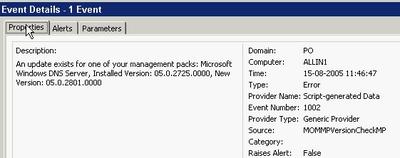
You must manually add the server you want to check microsoft.com for updates to the new computer group. Keep in mind that the agent account on the server in question must have http access to microsoft.com across any firewall in the path. The actual URL it uses can be found in the script and is http://www.microsoft.com/management/mma/momnotifier.xml.
Unfortunately, the XML does not provide a direct download link. Let us hope, that will be added in the next release. Ideally, it should provide the option of downloading the files and even upgrade the MPs. The latter for test environments only naturally ;).
To benefit from it, first download and install the MSI package. It creates Microsoft Management Pack Notifier.akm (and an EULA and a readme) below %programfiles%\MOM 2005 Management Packs\Microsoft Management Pack Notifier.
It seems to be old stuff, now being released for the public. The file is dated November 11th 2004.
Next import this MP from the administrator console using the Management Pack Import/Export Wizard. Remember to select 'Import Management Packs only' or you may be stuck in the Wizard when you must specify report to import (you can though step back).
The MP creates a new rule group called Microsoft Operations Manager MPNotifier, creates a new computer group called Microsoft Operation Manager MPNotifier MOM Server. The rule group contains a rule that check the versions against microsoft.com. This rule has a provider called MPNotifier-Schedule daily which runs the Microsoft MPNotifier Version Check script daily. Another rule fires off an alert when the versions mismatch. Finally an alert rule forwards the alerts to the Operation Manager Administrators notification group. I do not know why, but on my RTM test system, it does not fire off any alerts - I only get events.
An event looks like this -

You must manually add the server you want to check microsoft.com for updates to the new computer group. Keep in mind that the agent account on the server in question must have http access to microsoft.com across any firewall in the path. The actual URL it uses can be found in the script and is http://www.microsoft.com/management/mma/momnotifier.xml.
Unfortunately, the XML does not provide a direct download link. Let us hope, that will be added in the next release. Ideally, it should provide the option of downloading the files and even upgrade the MPs. The latter for test environments only naturally ;).
Wednesday, August 03, 2005
And I thought Power Users were a wise choice...
A lot of discussion is going on about the level of permissions one has when runing day-to-day tasks. This is not one day too early. The discussion has at least two branches: A) Administrators running without permissions and only having them when necessary and B) Standard users running as users, power users or local administrators.
Continuing on the B branch, I always thought that Power User were a pretty safe choice - at least it prevented the user from tampering with Group Policies.
This turns out to be a false feeling - even Microsoft warns us in this KB that Power Users are not safe: A member of the Power Users group may be able to gain administrator rights and permissions in Windows Server 2003, Windows 2000, or Windows XP.
Unfortunately, there are no - useful - resolution to avoid this. I would have wanted a way to tweak Power Users, so it is safe. Microsoft claims that Power Users are intended for legacy stuff and wants you to only run software certified for Windows. Get real - LOL!
Well, anyway, I think Power User is still better than local administrators - i. e. until some easy-to-use tool makes elevating to administrator easy. You could also read this post and its comments to get a feeling of how easy it is for an installation program to jeopardize the security of the system.
I came across the KB from the Hall of Shame site.
BTW: Discussion A is covered here.
Let us hope they get it right in Vista a. k. a. Longhorn as they intent.
Continuing on the B branch, I always thought that Power User were a pretty safe choice - at least it prevented the user from tampering with Group Policies.
This turns out to be a false feeling - even Microsoft warns us in this KB that Power Users are not safe: A member of the Power Users group may be able to gain administrator rights and permissions in Windows Server 2003, Windows 2000, or Windows XP.
Unfortunately, there are no - useful - resolution to avoid this. I would have wanted a way to tweak Power Users, so it is safe. Microsoft claims that Power Users are intended for legacy stuff and wants you to only run software certified for Windows. Get real - LOL!
Well, anyway, I think Power User is still better than local administrators - i. e. until some easy-to-use tool makes elevating to administrator easy. You could also read this post and its comments to get a feeling of how easy it is for an installation program to jeopardize the security of the system.
I came across the KB from the Hall of Shame site.
BTW: Discussion A is covered here.
Let us hope they get it right in Vista a. k. a. Longhorn as they intent.
Vista and Virtual PC / Server
Now that Windows Vista is the hottest news, I just want to direct you attention to the excellent Virtual PC Guy blog. Especially these two entries contains valuable information: Running Virtual Server / Virtual PC on Windows Vista Beta 1 and the opposite Running Windows Vista Beta 1 under Virtual PC / Virtual Server.
SMS 2003 SP2 Beta starts
Vacation done...
Just got the invitation to join i.e. nominate myself. It is going to be interesting to see if they drop in new features just like they did for SP1 and in that case what they will improve.
Just got the invitation to join i.e. nominate myself. It is going to be interesting to see if they drop in new features just like they did for SP1 and in that case what they will improve.
Saturday, July 09, 2005
There's no place like 127.0.0.1
Home at last from an exciting week at TechEd Europe. My feet are aching and I’m tired – but luckily the weather in Denmark is sunny and warm (30.5 degrees Celsius) as opposed to the rainy weather in Amsterdam. I guess my lawnmower needs some exercise (At the very least I won’t sit down all weekend after all the “sitting” I’ve done this week). I have a lot of blogging to catch up on so expect to see more tidbits from TechEd - but for now I will shutdown my notebook and enjoy the weekend.
Thanks to you all for a great week!
Thanks to you all for a great week!
Thursday, July 07, 2005
Hardware management in Windows Server 2003 R2 - tidbits from TechEd Europe
A new feature of R2 is the ability to manage hardware through something called WS-Management. WS-Management uses the WS-* Web Service architecture to support a consistent method for remote management of devices (e.g. servers). It does this by exposing a set of functionalities to consume hardware management information on top of the Intelligent Platform Management Interface (IPMI). In addition to hardware it also interfaces with WMI so you can accomplish management tasks both through IPMI-enabled devices and WMI.Functions exposed are Read and Set information. Execute methods, create and delete objects and retrieve collections of objects. By default it uses certificate-based authentication but R2 also provides basic authentication (over SSL of course).
An example would be enabling Remote Desktops through wsman as I've demonstrated earlier through WMI and through the registry -
wsman invoke http://schemas.microsoft.com/wsman/2005/
02/wmi/cimv2/Win32_TerminalServiceSetting?
ServerName=HOSTNAME -machine:FQDN @{AllowTSConnections="1"}
(Wrapped for readability)
The wsman command line tool itself is actually a script, so you can use this as a basis for your own scripts, furthermore it "only" needs port 443 open on the target system.
For more information check out the TechNet scriptcenter article or this whitepaper.
An example would be enabling Remote Desktops through wsman as I've demonstrated earlier through WMI and through the registry -
wsman invoke http://schemas.microsoft.com/wsman/2005/
02/wmi/cimv2/Win32_TerminalServiceSetting?
ServerName=HOSTNAME -machine:FQDN @{AllowTSConnections="1"}
(Wrapped for readability)
The wsman command line tool itself is actually a script, so you can use this as a basis for your own scripts, furthermore it "only" needs port 443 open on the target system.
For more information check out the TechNet scriptcenter article or this whitepaper.
Wednesday, July 06, 2005
Microsoft's stance on third-party replication technologies in connection with Exchange
Third day at Tech-Ed. Need sleep / time off.
Attended a Chalk&Talk instead on Windows Server x64... Exchange was discussed - maybe a little off subject - but someone mentioned a KB on how Microsoft support third-party replication/clustering technologies. As that sounded interesting, I set off to find the KB. You can read it here. Required reading, if you have one of those systems, I think.
Attended a Chalk&Talk instead on Windows Server x64... Exchange was discussed - maybe a little off subject - but someone mentioned a KB on how Microsoft support third-party replication/clustering technologies. As that sounded interesting, I set off to find the KB. You can read it here. Required reading, if you have one of those systems, I think.
Tuesday, July 05, 2005
Tidbits on security and Windows 2003 SP1 - TechEd Europe day #1
As I wrote earlier I attended the "Active Directory Internals: the Sequel" a couple of hours in the late morning and there were a couple of interesting topics.
As you may know Windows Server 2003 contains a reanimation (undelete) API which recovers objects without buying third-party tools. SP1 now also recovers the sIDHistory of an object. Restore is quite easy if you know the ldp tool - just set LDAP control flags in LDP to show deleted objects, find the object and in one operation set the isDeleted attribute to NULL and set the DN appropriately (To where you want to locate your object). Find more on the subject of reanimation in KB 840001 under the topic "How to manually undelete objects".
Also SP1 introduces the notion of confidential attributes that can't be seen by default by Authenticated Users (As most attributes can). Just set the searchFlags bit 7 to 1 (Confidential / True) or 0 (False).
Steve Riley and Jesper Johansson on security
The presentation wasn't by anyway boring - I kept my eyes open all day (a first ;-) - but I'm sad to say that the overall technical content wasn't satisfactory. Most of the day wen't with plain vanilla stuff on security based on the Implementing Client/Server Security presentations used earlier, administrative templates and other plain/old information. Luckily it was nicely beefed up with good stories, discussions and provocating thoughts by Steve and Jesper.
So what was interesting? -Well "Passwords has passed the end of their useful lifetime." I do agree with that and it has also been discussed by other security experts than Jesper and the solution isn't always just to buy a two factor authentication device as Schneier discusses in his essay - To Little, To Late. But personally I do prefer to use Password Safe instead of jotting down my password ;-)
There was an interesting discussion on security and outsourcing and they stated that China doesn't even have the concept of Intellectual Property and that outsourcing companies that may have loads of internal information on their customers probably will be the next point of attack.
ISA 2004 was as usual well appraised especially the fact that Application Proxy’s are much more usable than standard Packet filtering firewalls. I do agree that ISA 2004 is a great firewall with one exemption - the application filters aren't updated on a frequent basis and there are no new ones coming unless there is a product upgrade. Like MOM Management Packs it should be a requirement that each product group, if applicable, should release a new/updated application filter at the same time or just after releasing their product (E.g. for Live Communications Server). I discussed this with Steve and he told me that there are no plans for this (And he already had a discussion with the product group around this without luck).
On the point of SP1 it was emphasized that in an Exchange scenario SCW is used to secure the OS itself - NOT exchange so we should still use the Exchange 2003 Security Hardening Guide to secure Exchange.
Also I discussed with Steve on when the Firewall actually is disabled; a discussion I’ve had earlier with Susan Bradley on my article Microsoft Security Initiatives in SP1 and SP2 - nothing but a complex toy? (Check the comments). There’s apparently some confusion on this topic – in my experience with the RTM release the Firewall is always disabled after an upgrade or on in case of a new slipstreamed SP1 installation after you press Finish in the Post Setup Security Updates (PSSU) wizard.
As I mentioned in the start I wasn't bored at anytime but each time a topic looked a bit interesting (Like on Network Isolation or Wireless Security) the comment was We have a session during the week on X and X go listen to that instead and we want to make sure that we have enough attendees to our other sessions - Well why do you think we paid for a pre-conference day ? To listen to security for one day so that we could follow other tracks or the hands on labs the rest of the week! (To Steve and Jespers defence they were provided with a set of standard slideware that they were required to follow).
As you may know Windows Server 2003 contains a reanimation (undelete) API which recovers objects without buying third-party tools. SP1 now also recovers the sIDHistory of an object. Restore is quite easy if you know the ldp tool - just set LDAP control flags in LDP to show deleted objects, find the object and in one operation set the isDeleted attribute to NULL and set the DN appropriately (To where you want to locate your object). Find more on the subject of reanimation in KB 840001 under the topic "How to manually undelete objects".
Also SP1 introduces the notion of confidential attributes that can't be seen by default by Authenticated Users (As most attributes can). Just set the searchFlags bit 7 to 1 (Confidential / True) or 0 (False).
Steve Riley and Jesper Johansson on security
The presentation wasn't by anyway boring - I kept my eyes open all day (a first ;-) - but I'm sad to say that the overall technical content wasn't satisfactory. Most of the day wen't with plain vanilla stuff on security based on the Implementing Client/Server Security presentations used earlier, administrative templates and other plain/old information. Luckily it was nicely beefed up with good stories, discussions and provocating thoughts by Steve and Jesper.
So what was interesting? -Well "Passwords has passed the end of their useful lifetime." I do agree with that and it has also been discussed by other security experts than Jesper and the solution isn't always just to buy a two factor authentication device as Schneier discusses in his essay - To Little, To Late. But personally I do prefer to use Password Safe instead of jotting down my password ;-)
There was an interesting discussion on security and outsourcing and they stated that China doesn't even have the concept of Intellectual Property and that outsourcing companies that may have loads of internal information on their customers probably will be the next point of attack.
ISA 2004 was as usual well appraised especially the fact that Application Proxy’s are much more usable than standard Packet filtering firewalls. I do agree that ISA 2004 is a great firewall with one exemption - the application filters aren't updated on a frequent basis and there are no new ones coming unless there is a product upgrade. Like MOM Management Packs it should be a requirement that each product group, if applicable, should release a new/updated application filter at the same time or just after releasing their product (E.g. for Live Communications Server). I discussed this with Steve and he told me that there are no plans for this (And he already had a discussion with the product group around this without luck).
On the point of SP1 it was emphasized that in an Exchange scenario SCW is used to secure the OS itself - NOT exchange so we should still use the Exchange 2003 Security Hardening Guide to secure Exchange.
Also I discussed with Steve on when the Firewall actually is disabled; a discussion I’ve had earlier with Susan Bradley on my article Microsoft Security Initiatives in SP1 and SP2 - nothing but a complex toy? (Check the comments). There’s apparently some confusion on this topic – in my experience with the RTM release the Firewall is always disabled after an upgrade or on in case of a new slipstreamed SP1 installation after you press Finish in the Post Setup Security Updates (PSSU) wizard.
As I mentioned in the start I wasn't bored at anytime but each time a topic looked a bit interesting (Like on Network Isolation or Wireless Security) the comment was We have a session during the week on X and X go listen to that instead and we want to make sure that we have enough attendees to our other sessions - Well why do you think we paid for a pre-conference day ? To listen to security for one day so that we could follow other tracks or the hands on labs the rest of the week! (To Steve and Jespers defence they were provided with a set of standard slideware that they were required to follow).
Monday, July 04, 2005
The hunt for non-PC SMS programs (SMS 2003 SDK v3)
Having created an SMS script late yesterday, setting the MOM flag on the programs for one of my customers, he came back and told me, he had to do an SMS restore as it trashed the image packages.
Bad, bad.
Ok, I said to myself. I'll just modify the program to skip those image package programs - and exclude any device management programs as well.
But this was easier than done. First of all, I'm at Tech-Ed in Amsterdam with my fellow blogger Dennis. Secondly, the battery of my Dell is bad and finding power for charging is difficult here at the RAI.
Having come across all those obstacles, I went on...
First I stumbled across v3 of the SMS SDK. It was released June 21st. Get it from MS downloads. This is a must-have for all doing SMS automation. The official voice says: New for the SMS V3 SDK is a .NET server side library which simplifies access to the SMS WMI site provider, and Device Management inventory extensibility information.
So I looked to the program flags and found that bit 9 indicates a device program. But how do I see, that the program is an OS installation?
That it NOT documented.
Found it myself though. The SMS_Package class has an ImageFlags property. It seems to be zero - remember this is undocumented and at your own risk - for normal packages.
So I redid my script and can now first filter away the image packages and then the device programs.
I hope my customer does not have to do a new restore tomorrow...
Bad, bad.
Ok, I said to myself. I'll just modify the program to skip those image package programs - and exclude any device management programs as well.
But this was easier than done. First of all, I'm at Tech-Ed in Amsterdam with my fellow blogger Dennis. Secondly, the battery of my Dell is bad and finding power for charging is difficult here at the RAI.
Having come across all those obstacles, I went on...
First I stumbled across v3 of the SMS SDK. It was released June 21st. Get it from MS downloads. This is a must-have for all doing SMS automation. The official voice says: New for the SMS V3 SDK is a .NET server side library which simplifies access to the SMS WMI site provider, and Device Management inventory extensibility information.
So I looked to the program flags and found that bit 9 indicates a device program. But how do I see, that the program is an OS installation?
That it NOT documented.
Found it myself though. The SMS_Package class has an ImageFlags property. It seems to be zero - remember this is undocumented and at your own risk - for normal packages.
So I redid my script and can now first filter away the image packages and then the device programs.
I hope my customer does not have to do a new restore tomorrow...
Arrived at Teched Europe and looking forward to a interesting week
I arrived Sunday at the Golden Tulip Inntel which is nicely situated between the Dam place and the Central Station. Beside being a nice hotel it has free wireless and lots of shopping/restaurants and the Tram nearby as some of the best features.
I originally meant to follow the pre-conference day on security with Steve Riley and Jesper Johansson. Primarily because they both are hilarious speakers and their views on security are interesting - but the first two items on their agenda were Implementing server/client security on Windows. Those specific sessions I delivered as a speaker a year ago on one of the TechNet days in Denmark - so probably nothing new there :- Instead I joined John Craddock and Sally Storey on "Active Directory Internals the Sequel" for the morning (ldp tool advanced topics usually ;-) and then I'll probably switch back to Steve and Jesper for the afternoon sessions.
When I'm at TechEd I usually find some of the subjects that's in the future or that I don't normally specialize in myself and also I like to use quite a lot of time in the Hands On Labs. I personally use TechEd as a possibility of delving into Technology a whole week without thinking on colleagues, customers and family and this year is business as usual.
My agenda for this week contains playing in the Hands On Labs with Windows Server 2003 R2, Enterprise Project Management Solutions (EPM), Microsoft Identity and Integration Server (MIIS), NLB/CARP Load Balancing with ISA Server 2004, Indigo and the new Data Protection Manager - sometimes I follow the lab guidelines (E.g. for Indigo) but most times I don't.
For the Sessions I look forward to hearing about the Network Isolation that Microsoft uses (As a Microsoft vendor I've had all the hassles during their initial roll-out when connecting a non-Microsoft domain joined computer to their network through RAS). Also I'm attending sessions on Scripting with R2, Longhorn Client Security, Microsoft ITs administration of Windows Mobiles, MIIS, Active Directory Federation Services (Including Web SSO), System Center Reporting and not least Running Windows with least privileges by Aaron Margosis (I really enjoy reading his blog - its a 'recommended').
Btw. my postings on TechEd Europe are cross-blogged on the MS Exchange Blog.
I originally meant to follow the pre-conference day on security with Steve Riley and Jesper Johansson. Primarily because they both are hilarious speakers and their views on security are interesting - but the first two items on their agenda were Implementing server/client security on Windows. Those specific sessions I delivered as a speaker a year ago on one of the TechNet days in Denmark - so probably nothing new there :- Instead I joined John Craddock and Sally Storey on "Active Directory Internals the Sequel" for the morning (ldp tool advanced topics usually ;-) and then I'll probably switch back to Steve and Jesper for the afternoon sessions.
When I'm at TechEd I usually find some of the subjects that's in the future or that I don't normally specialize in myself and also I like to use quite a lot of time in the Hands On Labs. I personally use TechEd as a possibility of delving into Technology a whole week without thinking on colleagues, customers and family and this year is business as usual.
My agenda for this week contains playing in the Hands On Labs with Windows Server 2003 R2, Enterprise Project Management Solutions (EPM), Microsoft Identity and Integration Server (MIIS), NLB/CARP Load Balancing with ISA Server 2004, Indigo and the new Data Protection Manager - sometimes I follow the lab guidelines (E.g. for Indigo) but most times I don't.
For the Sessions I look forward to hearing about the Network Isolation that Microsoft uses (As a Microsoft vendor I've had all the hassles during their initial roll-out when connecting a non-Microsoft domain joined computer to their network through RAS). Also I'm attending sessions on Scripting with R2, Longhorn Client Security, Microsoft ITs administration of Windows Mobiles, MIIS, Active Directory Federation Services (Including Web SSO), System Center Reporting and not least Running Windows with least privileges by Aaron Margosis (I really enjoy reading his blog - its a 'recommended').
Btw. my postings on TechEd Europe are cross-blogged on the MS Exchange Blog.
Wednesday, June 29, 2005
ExBPA v2.1 Released
According to You Had Me At EHLO... a new version of Exchange Server Best Practices Analyzer has been released. If you don't know ExBPA by now then it's time to get acquainted with it. IMHO it should be part of every Exchange Admins toolbox!
Check the overview or the Microsoft Exchange teams blogs about it here and here and also you can find the history behind the tool here.
Check the overview or the Microsoft Exchange teams blogs about it here and here and also you can find the history behind the tool here.
Update Rollup 1 for Windows 2000 SP4
has finally been released -
Interestingly it won't be delivered to Windows 2000 through automatic updates until each server has been moved to Windows Update v6. See more info here and in the KB.
The Update Rollup contains all security updates produced for Windows 2000 between the time SP4 was released and April 30, 2005... The Update Rollup also contains a number of updates that increase system security, reliability, reduce support costs, and support the current generation of PC hardware.
Interestingly it won't be delivered to Windows 2000 through automatic updates until each server has been moved to Windows Update v6. See more info here and in the KB.
Sunday, June 26, 2005
Windows AntiSpyware beta update
The beta 1 just got updated. The second beta refresh (!) build is 1.0.614. The Microsoft AntiSpyware Update start menu shortcut does not seem to update it despite what the download page claims. Maybe I'm just too fast...
The update is a genuine Microsoft Windows update - which reminds me of an article on slashdot.org claiming that the check was cracked by the Indian researcher Debasis Mohanty.
The update is a genuine Microsoft Windows update - which reminds me of an article on slashdot.org claiming that the check was cracked by the Indian researcher Debasis Mohanty.
Friday, June 24, 2005
TechEd Europe T minus 9 days
Per and I will both be at TechEd Europe in Amsterdam. I'm personally looking forward to the Pre-Conference day with Jesper Johansson and Steve Riley on the topic "Be Secure: How to Build a Defense-in-Depth Strategy for your Environment - Today!" they are both great speakers and always fun to listen to (Even though they also can be busted as you can hear approx 17 minutes into this webcast where Steve just has been 'taught' by an MVP why 802.1x on Wired Lans isn't perfect and why a personal firewall in this case will lower your security ;-)
Anyway we look forward to seeing both former and current customers/colleagues and maybe even a reader or two (If its two its probably all of our readers ;-) My e-mail at TechEd will be My.Initials@mseventseurope.com or as usual My.Initials@inceptio.dk.
Anyway we look forward to seeing both former and current customers/colleagues and maybe even a reader or two (If its two its probably all of our readers ;-) My e-mail at TechEd will be My.Initials@mseventseurope.com or as usual My.Initials@inceptio.dk.
Top client/server support issues in Microsoft Exchange
PSS has gathered a good list of KB's / their top issues in the following areas -
You can find the KB article here
• Microsoft Outlook. This includes topics that are related to Microsoft
Exchange connectivity.
• Microsoft Outlook Web Access.
• Exchange Mobility. This includes topics that are related to remote
procedure call (RPC) over HTTP.
You can find the KB article here
Wednesday, June 15, 2005
Nasty stuff - Vulnerability in SMB Could Allow Remote Code
This is bad news. Even though most systems will be protected from internet attacks, this opens up for a new worm flooding your internal network.
Get the update distributed right away!
For those of you with NT4 systems - hmmm - bad luck??
Get the update distributed right away!
For those of you with NT4 systems - hmmm - bad luck??
Customers who require additional support for Windows NT 4.0 SP6a must contact their Microsoft account team representative, their Technical Account Manager, or the appropriate Microsoft partner representative for custom support options.
Customers without an Alliance, Premier, or Authorized Contract can contact their local Microsoft sales office.
Tuesday, June 14, 2005
Microsoft Security Initiatives in SP1 and SP2 - nothing but a complex toy?
I've written an essay on the security initiatives in SP1 and SP2 for the Industry insiders forum and it can be found here or in this post -
I recently read Kevin Day's book "Inside a Security Mind" - not because I pretend or intend to be a security guru but because I'm aware of the fact that we as a industry need to change focus in terms of security.
Working as a Solution Architect and Managing Consultant I've been pushing security focus to my customers for a long time - both in term of technology itself and more importantly around the processes involved in implementing and supporting technology - and it's quite frankly at times an uphill process. The comment from Kevin Day's book that triggered me to write this article was –
The same applies to the security initiatives in Windows Server 2003 SP1. These includes the Windows Server Post-Setup Security Updates (PSSU) that works as a firewall blocking all incoming traffic during OS installation until all required security updates has been installed and the person installing the server presses "Finish" in the wizard that pops up after logon. PSSU is luckily on by default in slipstreamed Windows 2003 SP1 installations.
Furthermore the Security Configuration Wizard and its 50+ role-based configurations allows us to create templates/roles for all servers in a organization – allowing us to take a role-based approach towards the security configuration on servers. Using the “scwcmd transform” command takes SCW to the next step by converting our templates to group policies that now can be linked to our OU structure and further enhancing the roll-out of our security policies to servers that are domain members (Be aware though that IIS settings aren’t deployable through group polices and therefore NOT part of the transformation).
One of the main advantages of the enhancements in both service packs is that when properly implemented they are a good start towards the “principle of least privilege”; in terms of OS hardening almost everything incoming is blocked by default – except the settings/roles you have defined as allowed.
This essay is not meant to be a review of all the security enhancements in SP1/SP2 but I feel the need to comment that I’m not saying SCW or the firewall in SP2 are perfect. An important feature missing in the firewall is outgoing connections – including which applications are allowed to initiate these (Although I recognize the fact that it would be hard to implement and manage in a corporate environment) another is the many different tools used for security configuration. Furthermore, I think it’s disappointing that Microsoft didn’t have the nerve to enable the firewall by default in a slipstreamed Windows Server 2003 SP1 installation (Although I’m sure they had good reasons for this) – so that “everything” was blocked by default and you had to use SCW to open the server for the necessary applications/usages. Last but not least I’m painfully aware of the work required to actually making these technologies work in an existing production environment (But I personally think it’s worth the effort).
Back to the point that relates to one of the Ten Immutable Laws of Security "Technology is not a panacea" and Kevin’s point about expensive/complex toys. If the full functionality of the Service packs isn’t implemented in your organization or if they are implemented in a environment where the proper processes around security isn’t in place or where simple things as password protected screensavers are disabled (as I’ve seen in our of my enterprise clients, due to a Managing Director that was annoyed with having to unlock Windows when returning to his desk) and/or the rest of the organization isn’t security aware – then whatever security initiatives Microsoft makes it’s almost a dead end game.
I do believe however that the enhancements in SP1/SP2 are much more than toys and that you and I can use it to make a difference - they are way better than the current situation where machines are often attacked during installation or before they are fully patched – and I do believe that if we all try to influence the people around, below and/or above us that we can help to raise the security bar and awareness in our respective companies and in the industry (Just to be clear - I don't think its Kevin’s point either that we should give up on security if all processes/systems aren’t in place ;-)
So come on – let’s join forces and go and test and design the firewall for our XP clients and role-based security based on GPO and SCW for all our servers (Btw. don’t use it with SBS 2003 and do try this Google search for other known issues).
I recently read Kevin Day's book "Inside a Security Mind" - not because I pretend or intend to be a security guru but because I'm aware of the fact that we as a industry need to change focus in terms of security.
Working as a Solution Architect and Managing Consultant I've been pushing security focus to my customers for a long time - both in term of technology itself and more importantly around the processes involved in implementing and supporting technology - and it's quite frankly at times an uphill process. The comment from Kevin Day's book that triggered me to write this article was –
“.. a security device, no matter how expensive or complex, is nothing more than a toy if it does not function within a greater security framework.”I principally agree with this statement as it relates directly to some of the solutions I have seen at customers and in terms of XP SP2 it reminds me of one of the first customer comments I heard about the Windows XP SP2 firewall - "Very fine – but how do we disable it?". From a short-sighted manageability point of view, I understand the comment, but from a security Point of View the possibility of implementing a managed firewall is an opportunity that I personally would not let go.
The same applies to the security initiatives in Windows Server 2003 SP1. These includes the Windows Server Post-Setup Security Updates (PSSU) that works as a firewall blocking all incoming traffic during OS installation until all required security updates has been installed and the person installing the server presses "Finish" in the wizard that pops up after logon. PSSU is luckily on by default in slipstreamed Windows 2003 SP1 installations.
Furthermore the Security Configuration Wizard and its 50+ role-based configurations allows us to create templates/roles for all servers in a organization – allowing us to take a role-based approach towards the security configuration on servers. Using the “scwcmd transform” command takes SCW to the next step by converting our templates to group policies that now can be linked to our OU structure and further enhancing the roll-out of our security policies to servers that are domain members (Be aware though that IIS settings aren’t deployable through group polices and therefore NOT part of the transformation).
One of the main advantages of the enhancements in both service packs is that when properly implemented they are a good start towards the “principle of least privilege”; in terms of OS hardening almost everything incoming is blocked by default – except the settings/roles you have defined as allowed.
This essay is not meant to be a review of all the security enhancements in SP1/SP2 but I feel the need to comment that I’m not saying SCW or the firewall in SP2 are perfect. An important feature missing in the firewall is outgoing connections – including which applications are allowed to initiate these (Although I recognize the fact that it would be hard to implement and manage in a corporate environment) another is the many different tools used for security configuration. Furthermore, I think it’s disappointing that Microsoft didn’t have the nerve to enable the firewall by default in a slipstreamed Windows Server 2003 SP1 installation (Although I’m sure they had good reasons for this) – so that “everything” was blocked by default and you had to use SCW to open the server for the necessary applications/usages. Last but not least I’m painfully aware of the work required to actually making these technologies work in an existing production environment (But I personally think it’s worth the effort).
Back to the point that relates to one of the Ten Immutable Laws of Security "Technology is not a panacea" and Kevin’s point about expensive/complex toys. If the full functionality of the Service packs isn’t implemented in your organization or if they are implemented in a environment where the proper processes around security isn’t in place or where simple things as password protected screensavers are disabled (as I’ve seen in our of my enterprise clients, due to a Managing Director that was annoyed with having to unlock Windows when returning to his desk) and/or the rest of the organization isn’t security aware – then whatever security initiatives Microsoft makes it’s almost a dead end game.
I do believe however that the enhancements in SP1/SP2 are much more than toys and that you and I can use it to make a difference - they are way better than the current situation where machines are often attacked during installation or before they are fully patched – and I do believe that if we all try to influence the people around, below and/or above us that we can help to raise the security bar and awareness in our respective companies and in the industry (Just to be clear - I don't think its Kevin’s point either that we should give up on security if all processes/systems aren’t in place ;-)
So come on – let’s join forces and go and test and design the firewall for our XP clients and role-based security based on GPO and SCW for all our servers (Btw. don’t use it with SBS 2003 and do try this Google search for other known issues).
Friday, June 10, 2005
Good overview of AD enhancements in SP1
Just a quick note - I found a nice overview of the New Active Directory features in Windows Server 2003 with Service Pack 1 (SP1).
Wednesday, June 08, 2005
SAP Enterprise Portal 5.0 / AD Schema conflict
SAP Enterprise Portal 5.0 requires schema changes in Active Directory and if you have SAP installed with EP 5.0 SP5 Patch 3 hotfix 2 and higher or EP 5.0 SP6 Patch 1 then it is supported on Windows 2003 - but the schema changes made by SAP Portal conflicts with the Windows 2003 schema upgrade process. During the adprep /forestprep process you will get a failure with an error like "cn=uid,cn=schema,cn=configuration windows 2000 schema and extended schema does not match" and a message to contact your supplier/vendor responsible for the schema changes for assistance.
SAP Note Number 640923 addresses this and the solution is basically to change the DN from uid to SAP-UID and add some entries to SAP Portal that tells it where to look for its usergroupmap.
SAP Note Number 640923 addresses this and the solution is basically to change the DN from uid to SAP-UID and add some entries to SAP Portal that tells it where to look for its usergroupmap.
Thursday, May 26, 2005
Reports on Microsoft Update v6 release !
Just a quick notice - it just thought that Microsoft Update v6 was released including updates Office 2003 (That I hadn't seen as part of the Beta) and through automatic updates. Typing http://windowsupdate.microsoft.com forwarded me to http://update.microsoft.com/microsoftupdate/v6/default.aspx?ln=en-us. Also I found a few similar reports on Google. But in my case it related to the fact that I'm testing MBSA 2.0 which has a checkmark for Configure computers for Microsoft Update and scanning prerequisites under Check for security updates - these checkboxes causes computers scanned to use Microsoft Update v6 ;-)
Wednesday, May 25, 2005
DNS Zone Transfer from Bind to Windows Server 2003 "silently" fails
It seems there are a few "interesting" oddities with DNS on Windows Server 2003 (See my earlier post on replication problems during a domain upgrade).
The last one I encountered is replication of secondaries from Bind DNS servers to Windows Server 2003 that fails (Its also a problem with SP1 according to my sources - but I haven’t tested that yet).
After the first successful replication of a secondary zone or after a Reload from Master (Full Zone Transfer / AXFR) Windows will request Incremental Zone Transfers (IXFR) from the BIND server. Windows then expects to receive an IXFR back but instead receives an AXFR that starts and ends with an SOA - Windows then (correctly IMHO) detects the first SOA as a "bad packet" as it should have been a record instead and drops the zone transfer.
The problem is further described in KB 841467 but there is an error in the KB as it states that a Transfer from Master will work - this isn't correct as only a Reload from Master will work (At least in the environment I worked with - Windows 2003 without Servicepack 1 and Borderware firewall with Bind 8.x).
The hotfix itselfs contains a new version of dns.exe and you don't have to boot after applying this hotfix if you manually stop the DNS service before installing it (IMHO the package should do this for you - but thats just my opinion ;-)
Furthermore according to THE book on DNS (DNS and BIND from O'reilly - if in doubt) IXFR didn't work well in BIND until version 8.2.3 (And better yet 9.x)
The last one I encountered is replication of secondaries from Bind DNS servers to Windows Server 2003 that fails (Its also a problem with SP1 according to my sources - but I haven’t tested that yet).
After the first successful replication of a secondary zone or after a Reload from Master (Full Zone Transfer / AXFR) Windows will request Incremental Zone Transfers (IXFR) from the BIND server. Windows then expects to receive an IXFR back but instead receives an AXFR that starts and ends with an SOA - Windows then (correctly IMHO) detects the first SOA as a "bad packet" as it should have been a record instead and drops the zone transfer.
The problem is further described in KB 841467 but there is an error in the KB as it states that a Transfer from Master will work - this isn't correct as only a Reload from Master will work (At least in the environment I worked with - Windows 2003 without Servicepack 1 and Borderware firewall with Bind 8.x).
The hotfix itselfs contains a new version of dns.exe and you don't have to boot after applying this hotfix if you manually stop the DNS service before installing it (IMHO the package should do this for you - but thats just my opinion ;-)
Furthermore according to THE book on DNS (DNS and BIND from O'reilly - if in doubt) IXFR didn't work well in BIND until version 8.2.3 (And better yet 9.x)
Sunday, May 22, 2005
Two new public patches for MPS
According to Conrad there are two new patches released for MPS (Microsoft Provisioning System) -
FIX: Event ID 5896 is logged every 15 to 60 seconds on a server that is running the Provisioning Audit and Recovery Service component in Microsoft Provisioning System 2.0
FIX: You receive a "The parameter is incorrect" error message, and the CreateMailbox procedure does not succeed in Microsoft Provisioning System
Thanks to Conrad for telling us about these ;-)
FIX: Event ID 5896 is logged every 15 to 60 seconds on a server that is running the Provisioning Audit and Recovery Service component in Microsoft Provisioning System 2.0
FIX: You receive a "The parameter is incorrect" error message, and the CreateMailbox procedure does not succeed in Microsoft Provisioning System
Thanks to Conrad for telling us about these ;-)
Thursday, May 19, 2005
SP1 for SBS 2003 has been released
Microsoft has finally released SP1 for SBS 2003. This contains among other updates/fixes support for these server components -
Service Pack 1 for Windows Server 2003
Service Pack 1 for Exchange Server 2003
Service Pack 1 for Windows SharePoint Services 2.0
Service Pack 4 for WMSDE
Service Pack 4 for MSDE
Service Pack 4 for SQL Server 2000
ISA Server 2004 with Service Pack 1
Windows SBS 2003 SP1
Windows SBS Upgrade Best Practices
Installation Instructions
Release Notes
Setup for Microsoft Windows SBS Premium
What's new for SP1
The ISA 2004 bits needs to be ordered on CD from here (The link is currently broken - I will update if its changed).
For gotchas with SP1 and general tips and tricks for SBS i would recommend that you check out the SBS Diva's blog. It so happens that I'm responsible for two small instalations of SBS 2003 - so I guess I need to take the time to read all these papers :-
Service Pack 1 for Windows Server 2003
Service Pack 1 for Exchange Server 2003
Service Pack 1 for Windows SharePoint Services 2.0
Service Pack 4 for WMSDE
Service Pack 4 for MSDE
Service Pack 4 for SQL Server 2000
ISA Server 2004 with Service Pack 1
Windows SBS 2003 SP1
Windows SBS Upgrade Best Practices
Installation Instructions
Release Notes
Setup for Microsoft Windows SBS Premium
What's new for SP1
The ISA 2004 bits needs to be ordered on CD from here (The link is currently broken - I will update if its changed).
For gotchas with SP1 and general tips and tricks for SBS i would recommend that you check out the SBS Diva's blog. It so happens that I'm responsible for two small instalations of SBS 2003 - so I guess I need to take the time to read all these papers :-
Slow blogging ahead
My blogging rate has slowed down lately. I'm using a lot of time trying to buy a new home and getting my old one sold..
Self-Service Password Reset Solutions with Microsoft Speech Server
Stumbled across this interesting webcast. I have discussed self-service password reset solutions numerous times with customers. This is an interesting new method using the phone system and your voice.
To see the webcast, you have to start here (incredible long URL). Most solutions are based on answers to enrolled questions, but VOICE.TRUST is using the voice itself as biometric! The VOICE.TRUST is the worst presentation - but the most interesting product.
To the techies: Do not ignore it just because it is a level 200 session.
To see the webcast, you have to start here (incredible long URL). Most solutions are based on answers to enrolled questions, but VOICE.TRUST is using the voice itself as biometric! The VOICE.TRUST is the worst presentation - but the most interesting product.
To the techies: Do not ignore it just because it is a level 200 session.
Installing Windows 2003 SP1 may cause network connectivity to fail - updated
I have run into this problem a couple of times and after discussing with PSS and a few of my colleagues it seems to be a problem that many users run into. The symptoms are -
Appearantly MS05-019 will be rereleased with a fix to the problem - I havent received any info on what happens to SP1.
Update - Microsoft has published a Security Advisory with further info and it states that the fix will be rereleased in June 2005.
You can find the KB article with more info here.
- Inability to connect to terminal servers or to file share access.
- Failure of domain controller replication across WAN links.
- Inability of Microsoft Exchange servers to connect to domain controllers.
Appearantly MS05-019 will be rereleased with a fix to the problem - I havent received any info on what happens to SP1.
Update - Microsoft has published a Security Advisory with further info and it states that the fix will be rereleased in June 2005.
You can find the KB article with more info here.
Wednesday, May 11, 2005
WPA2
With support from Microsoft for WPA2 on Windows XP Service Pack 2, you can secure your wireless network even further. Read this article from the Cable Guy explaining WPA2. I have already come across the 3Com wireless switches wx1200 and wx4400 supporting it. I have even come across a solution for a Leveno (former IBM) ThinkPad T42, supporting it on Windows 2000 Professional! It consists of a driver and the Access Connections package.
Wednesday, May 04, 2005
Changes to Functionality in Windows 2003 SP1
Microsoft has released an updated whitepaper on the changes in Windows Server 2003 SP1 (You can find the corresponding paper on XP SP2 here) - it contains some interesting information on e.g. updates to DFS and enhanced DNS tests in a new version of DCDIAG. Also if you are installing/testing SP1 then don't forget to download the updated Adminpak for SP1 from here.
Subscribe to:
Posts (Atom)