Here’s some shameless advertising for a friend of mine ;-) Rico Raja, and some of his friends, has started a blog/forum/website, that centers mainly around Windows Deployment, Preinstallation and unattended installation. His expertise is, amongst others, Vista Deployment and he (and his friends) has produced some very exciting records in installation time for Windows Vista Deployments.
Check out www.windows-admin.com and since they haven't implemented a RSS or Atom feed (Hint, hint!) you need to bookmark it for future updates (I have seen some of the upcoming content and it looks promising).
Wednesday, March 29, 2006


Sunday, March 26, 2006
Unified Communications presentations
As promised, here are the presentations from the Unified Communications event -
Friday, March 24, 2006
IM Culture
Along with new ways of communicating, there will be new do's and don’ts. I personally have more than 100 persons on my IM lists, but I prefer to have most of my private contacts on a separate IM client, namely Live Messenger, and first when Office Communicator implements Spheres as per the RFC's (a.k.a. selective per group availability) will I move them to OC. And why is that you may ask? Well mainly because my family (Including my 79 years old grandmother) has a habit of "disturbing" me during my work time, and my business contacts tends to be more into the IM way of doing things, with only occasional, important and short IM conversations.
Heather Leigh wrote an interesting blog about her opinion on this subject called IM Angst, quote
Suffice to say new habits and cultures will arise. Quickly, if appropriate, moving from e-mail to IM with Office Communicator has certainly lessened the amount of e-mails in my inbox and also moving from IM to phone or video/VoIP conferencing has shortened the amount of time in the IM space for my sake.
Heather Leigh wrote an interesting blog about her opinion on this subject called IM Angst, quote
"What’s the deal with people you have never met before IMing you? This is analogous to interrupting a potentially important conversation (let’s not pretend all of my conversations are important but some of them are...some are even important AND interesting). In my opinion, IMing basically says, “I know you well enough to do this” (among friends) or “this is urgent” (among business associates). I cannot tell you how many times I receive IMs that fall into neither category. When a simple e-mail would suffice, IM is chosen for the immediacy (of the sender) without regard to the time of the receiver."
Suffice to say new habits and cultures will arise. Quickly, if appropriate, moving from e-mail to IM with Office Communicator has certainly lessened the amount of e-mails in my inbox and also moving from IM to phone or video/VoIP conferencing has shortened the amount of time in the IM space for my sake.
Thursday, March 23, 2006
Migrating RSS feeds from RssReader to Outlook 2007
Adding more than 100 feeds manually into Outlook 2007 wasn't an option and RssReader does import OPML, but doesn't export to it. So I did a little Googling and found a nice script, with an accompanying XSLT transform file. It will take RssReaders XML based export file as an input and create an OPML compliant XML file. The only thing missing here is Groups, so I had to manually regroup all my feeds :-
You can find the script here
Btw. Outlook 2007 RSS implementation in Beta1 TR is way better that the last version I've tested - but there is still room for enhancement (Remember its still beta, so it will probably change). The concept of groups is badly implemented (Especially when adding new feeds), the formatting of the posts is nothing compared to RssReaders and there's missing a "View all Unread Posts" and a "Mark all Unread Posts as Read" (It can be accomplished under Unread Mail - but I personally don't like to mix these in the same folder).
You can find the script here
Btw. Outlook 2007 RSS implementation in Beta1 TR is way better that the last version I've tested - but there is still room for enhancement (Remember its still beta, so it will probably change). The concept of groups is badly implemented (Especially when adding new feeds), the formatting of the posts is nothing compared to RssReaders and there's missing a "View all Unread Posts" and a "Mark all Unread Posts as Read" (It can be accomplished under Unread Mail - but I personally don't like to mix these in the same folder).
Tuesday, March 21, 2006
Whitepaper/resources on Exchange 2003 Mobility and MSFP / AKU2
As several different Telcos are releasing WM5 AKU2 / MSFP updates to their devices, there's also a need to setup the environment to support these new devices. I have earlier described a "Quick Guide" to upgrading the device, and configuring the website and ISA for DirectPush. But, as reported by several sources, Mr. Mobile a.k.a. Jason Langridge has released a large whitepaper on configuring all the aspects of mobility including web sites, certificates, ISA, certificate login and configuring the device. His excellent whitepaper can be found here.
Furthermore Vlad has posted a very good set of resources in a post called Advanced Mobility and Stalking with WM5.
Furthermore Vlad has posted a very good set of resources in a post called Advanced Mobility and Stalking with WM5.
Office Communicator now available in new languages
Friday, March 17, 2006
Microsoft Connect and SMS 4 Beta
Wanted to join the SMS 4 Beta program - and consequently got into a new (for me at least) site called Microsoft Connect. Connect is a kind of new betaplace. Browsing the available programs page, I found another interesting product called Certificate Lifecycle Manager Beta 1. You can check it out yourself - I will when I have a little time to spare.
Communicator Web Access guides released
Three new Communicator Web Access guides has been released -
Microsoft Office Communicator Web Access Getting Started Guide
This guide describes how to use the instant messaging (IM) and presence features of Microsoft® Office Communicator Web Access.
Microsoft Office Communicator Web Access Technical Reference Guide
This guide provides reference and troubleshooting information for administrators who are deploying or have deployed Microsoft® Office Communicator Web Access.
Factors Affecting User Capacity of Microsoft Office Communicator Web Access
This white paper discusses the factors that affect the number of users that can be supported on a Microsoft® Office Communicator Web Access server.
Also Don't forget the "old" guide on (With the pace Microsoft is announcing VoIP, SIP and UC news 3 months must be considered old ;-)
Microsoft Office Communicator Web Access Planning and Deployment Guide
This guide helps you plan and deploy Communicator Web Access for your organization.
Microsoft Office Communicator Web Access Getting Started Guide
This guide describes how to use the instant messaging (IM) and presence features of Microsoft® Office Communicator Web Access.
Microsoft Office Communicator Web Access Technical Reference Guide
This guide provides reference and troubleshooting information for administrators who are deploying or have deployed Microsoft® Office Communicator Web Access.
Factors Affecting User Capacity of Microsoft Office Communicator Web Access
This white paper discusses the factors that affect the number of users that can be supported on a Microsoft® Office Communicator Web Access server.
Also Don't forget the "old" guide on (With the pace Microsoft is announcing VoIP, SIP and UC news 3 months must be considered old ;-)
Microsoft Office Communicator Web Access Planning and Deployment Guide
This guide helps you plan and deploy Communicator Web Access for your organization.
Thursday, March 16, 2006
Thursday, March 09, 2006
Live Communications Server Snap-in cannot open the certificate store
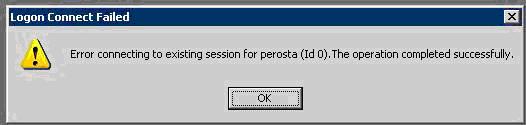
OK – now Per is at it, I also want to confess about one of my “mistakes”. I want to tell a story about LCS and the certificates snap-in that eventually made me rip my hair off (figuratively speaking that is – I need a magnifier and a pair of tweezers to find some) and calling PSS (It’s not a shame to do so btw … I keep telling myself).
As usual in LCS deployments I started by installing a LCS Home Server, implemented the necessary internal DNS records and then tested the functionality with TCP (Everything worked like a breeze). I then installed my LCS Access Proxy, used LCSCertUtil from the resource kit to request a public certificate and installed this on the Public Interface and our own certificate on the Internal Interface.
Then on my LCS Home Server I requested the necessary certificate and started the Live Communications Server 2005 MMC. I dribbled down through Forest, LCS Servers and pools, Server and right-clicked Properties on my server. I then clicked add and received the error message Live Communications Server Snap-in cannot open the certificate store followed by a Live Communications Server Snap-in cannot read the certificate information associated with this entry and a greyed out Add Connection Window. The same happened when I clicked the Security tab.
Googling the error message showed me that there was a known issue, whereby Sysadmins had installed the certificate in the user store (Checking, double and triple checking this made me certain that this wasn’t the problem) also the certificates checked out fine. Eventually (A day later) I ended up reinstalling the server, and it had no effect what so ever (Thinking that missing security rights or something the like was an issue).
To cut the story short(er) then I’m a geek so when I install new servers, I disable everything I can. One of the things I like to disable is File and Printer Sharing for Microsoft Networks on servers/network cards that doesn’t need it.
With the assistance of a skilled PSS guy from Turkey, named Fadi, it turned out, that when a LCS Home Server needs to find certificates in the GUI of the LCS MMC; it needs File and Printer sharing enabled on the server! But this isn’t the case on Access Proxies – so in the beginning I had no clue what to look for. Disabling File and Printer Sharing again, after installing and verifying the certificates, works fine so it must be a “feature” in the LCS 2005 MMC.
As usual in LCS deployments I started by installing a LCS Home Server, implemented the necessary internal DNS records and then tested the functionality with TCP (Everything worked like a breeze). I then installed my LCS Access Proxy, used LCSCertUtil from the resource kit to request a public certificate and installed this on the Public Interface and our own certificate on the Internal Interface.
Then on my LCS Home Server I requested the necessary certificate and started the Live Communications Server 2005 MMC. I dribbled down through Forest, LCS Servers and pools, Server and right-clicked Properties on my server. I then clicked add and received the error message Live Communications Server Snap-in cannot open the certificate store followed by a Live Communications Server Snap-in cannot read the certificate information associated with this entry and a greyed out Add Connection Window. The same happened when I clicked the Security tab.
Googling the error message showed me that there was a known issue, whereby Sysadmins had installed the certificate in the user store (Checking, double and triple checking this made me certain that this wasn’t the problem) also the certificates checked out fine. Eventually (A day later) I ended up reinstalling the server, and it had no effect what so ever (Thinking that missing security rights or something the like was an issue).
To cut the story short(er) then I’m a geek so when I install new servers, I disable everything I can. One of the things I like to disable is File and Printer Sharing for Microsoft Networks on servers/network cards that doesn’t need it.
With the assistance of a skilled PSS guy from Turkey, named Fadi, it turned out, that when a LCS Home Server needs to find certificates in the GUI of the LCS MMC; it needs File and Printer sharing enabled on the server! But this isn’t the case on Access Proxies – so in the beginning I had no clue what to look for. Disabling File and Printer Sharing again, after installing and verifying the certificates, works fine so it must be a “feature” in the LCS 2005 MMC.
Wednesday, March 08, 2006
DoS'ing ISA by modifying a user object in AD
The other day, one of the contributers to this blog unwillingly made a Denial-of-Service on our ISA server. It went on like this –
“I wonder if it is possible to hand out a static route to a user, when a VPN is established?”
So this admin found his user object, tabbed to Dial-in, enabled Apply Static Routes and clicked Static Routes. Added the wanted route and saved it all. Next, the user reconnected the VPN – and things started to go wrong…
After messing things back to normal, I – sorry, the admin - began reading the help text –
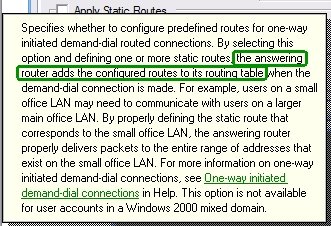
Hmmm, the answering server – the ISA server in this case – does this. It is not handed to the client. Bad luck!
The worse part of this – and the reason I’m writing this – is to warn you. If you grant you helpdesk, decentral admins etc. the permissions to change these settings on your user objects having VPN access, you risk they make your ISA server unavailable!
The GUI settings corresponds to these LDAP properties –
1> msRADIUSFramedRoute: 8.8.8.0/24 0.0.0.0 1;
1> msRASSavedFramedRoute: 8.8.8.0/24 0.0.0.0 1;
So if someone has change access to these properties – i.e. they have full permissions on the user, explicit permissions for the properties or implicit permissions you are at risk. Beware that the RAS-Information a.k.a “Remote Access Information” property set includes these properties. Note that the default for Active Directory is to give the built-in Account Operators group permissions to update these.
“I wonder if it is possible to hand out a static route to a user, when a VPN is established?”
So this admin found his user object, tabbed to Dial-in, enabled Apply Static Routes and clicked Static Routes. Added the wanted route and saved it all. Next, the user reconnected the VPN – and things started to go wrong…
After messing things back to normal, I – sorry, the admin - began reading the help text –
Hmmm, the answering server – the ISA server in this case – does this. It is not handed to the client. Bad luck!
The worse part of this – and the reason I’m writing this – is to warn you. If you grant you helpdesk, decentral admins etc. the permissions to change these settings on your user objects having VPN access, you risk they make your ISA server unavailable!
The GUI settings corresponds to these LDAP properties –
1> msRADIUSFramedRoute: 8.8.8.0/24 0.0.0.0 1;
1> msRASSavedFramedRoute: 8.8.8.0/24 0.0.0.0 1;
So if someone has change access to these properties – i.e. they have full permissions on the user, explicit permissions for the properties or implicit permissions you are at risk. Beware that the RAS-Information a.k.a “Remote Access Information” property set includes these properties. Note that the default for Active Directory is to give the built-in Account Operators group permissions to update these.
Tuesday, March 07, 2006
Blocking MSN Messenger traffic by using HTTP filtering in ISA
FYI: Tom Shinder at www.isaserver.org has published a nice little step-by-step guide to blocking MSN Messenger traffic in ISA with the short name - ISA Firewall Quick Tip: Blocking MSN Messenger Access through the ISA Firewall while Enabling Access to Some Users.
In this article we'll go over the following procedures: Create the HTTP/HTTPS Access Rule to Deny Access to MSN Messenger; Configure the User Group Exception and the HTTP Security Filter on the Deny Rule; Create the Allow Rule for the Excepted Users.
Thursday, March 02, 2006
Populating users in Office Communicator / LCS
OK - so now you've setup your Live Communications Server environment and login to Office Communicator 2005 or Windows Messenger just to see an empty list of users. Then the next questions come into mind - how do you populate users?
In Inceptio we initially used dsquery and some of the scripts that are part of the LCS 2005 SP1 Resource Kit.
First of I used dsquery to create a file with contacts (Check dsquery /? for further commands e.g. for traversing more OU's)
dsquery * "OU=Users,OU=Inceptio,DC=domain,DC=com" -attr msRTCSIP-PrimaryUserAddress -filter (msRTCSIP-UserEnabled=TRUE) > contacts.txt
Then I used the LCSAddcontacts.wsf script that will add contacts to a list of LCS users (The contacts.txt created earlier) - the script can be found in "%Programfiles%\Microsoft LC 2005\ResKit\WMI Samples" and information on the use can be found in LCSAddcontacts_readme.htm file
CScript LCSAddContacts.wsf /usersfile:contacts.txt /contactsfile:contacts.txt /contactsgroup:Inceptio
As you can se I use the same file twice for both the user and contact list, thereby adding all users to all users contacts list (Thanks to Ray Breen / Google for this trick).
Then I need to auto allow the users. This is (in my case) easily done by using LCSAddACEs.wsf (Also from the reskit)
CScript LCSAddACEs.wsf /usersfile:contacts.txt /acesfile:Acesfile.txt
I reuse the same contacts.txt file used earlier, but I now use also use an Acesfile.txt file containing the following text (Notice that Allow, Prompt, Block and Deny are case sensitive) -
domain inceptio.dk Allow Allow
As we are a small consulting company there is no problem in auto allowing all users to see each other, I recognize that this will not be useful in most larger companies (Certainly not in our customers), in these cases I would manipulate the contacts.txt file to create a new file looking like this -
user: sip:alice@inceptio.dk Allow Allow
user: sip:bob@inceptio.dk Allow Allow
etc.
I would not recommend using All Allow Allow as acesfile.txt input as it also gives All Other Contacts allow rights (Instead of notifying as usual), which probably isn't a desirable behavior for PIC or Federation contacts.
The above is just an example of how to use the sample scripts to populate users. It would be a good idea to join and refine the scripts into a single script taking e.g. OU or AD Group as input and then populating organization groups etc. with each other contacts.
Btw. the above scripts should be run from the LCS Home Server
In Inceptio we initially used dsquery and some of the scripts that are part of the LCS 2005 SP1 Resource Kit.
First of I used dsquery to create a file with contacts (Check dsquery /? for further commands e.g. for traversing more OU's)
dsquery * "OU=Users,OU=Inceptio,DC=domain,DC=com" -attr msRTCSIP-PrimaryUserAddress -filter (msRTCSIP-UserEnabled=TRUE) > contacts.txt
Then I used the LCSAddcontacts.wsf script that will add contacts to a list of LCS users (The contacts.txt created earlier) - the script can be found in "%Programfiles%\Microsoft LC 2005\ResKit\WMI Samples" and information on the use can be found in LCSAddcontacts_readme.htm file
CScript LCSAddContacts.wsf /usersfile:contacts.txt /contactsfile:contacts.txt /contactsgroup:Inceptio
As you can se I use the same file twice for both the user and contact list, thereby adding all users to all users contacts list (Thanks to Ray Breen / Google for this trick).
Then I need to auto allow the users. This is (in my case) easily done by using LCSAddACEs.wsf (Also from the reskit)
CScript LCSAddACEs.wsf /usersfile:contacts.txt /acesfile:Acesfile.txt
I reuse the same contacts.txt file used earlier, but I now use also use an Acesfile.txt file containing the following text (Notice that Allow, Prompt, Block and Deny are case sensitive) -
domain inceptio.dk Allow Allow
As we are a small consulting company there is no problem in auto allowing all users to see each other, I recognize that this will not be useful in most larger companies (Certainly not in our customers), in these cases I would manipulate the contacts.txt file to create a new file looking like this -
user: sip:alice@inceptio.dk Allow Allow
user: sip:bob@inceptio.dk Allow Allow
etc.
I would not recommend using All Allow Allow as acesfile.txt input as it also gives All Other Contacts allow rights (Instead of notifying as usual), which probably isn't a desirable behavior for PIC or Federation contacts.
The above is just an example of how to use the sample scripts to populate users. It would be a good idea to join and refine the scripts into a single script taking e.g. OU or AD Group as input and then populating organization groups etc. with each other contacts.
Btw. the above scripts should be run from the LCS Home Server
Tuesday, February 14, 2006
Use Group Policy Software Restrictions to control LUA
The least-privileged user account (LUA) principle is great - but in some situations very hard to implement. One of these places is my home computer :) shared by all the family members. Running games etc. without admin permissions is almost impossible.
While reading the Applying the Principle of Least Privilege to User Accounts on Windows XP article, I was linked to Browsing the Web and Reading E-mail Safely as an Administrator, Part 2 and discovered something new about the Software Restriction feature of Group Policy. I have been using Software Restriction for a while. I use it for preventing spyware from starting as Software Restrictions is 'stronger' than administrative permissions.
What I discovered, reading the article, was that there is a hidden feature, that can be enabled. This feature called 'Basic User', gives Group Policy control over programs. This means that you can force programs - like Internet Explorer - to start in restricted mode (same as using runas + protect my computer and data from unauthorized program activity) without any user intervention.
Right now, I have implemented it and is giving it a go. Let's see if my kids start to scream...
While reading the Applying the Principle of Least Privilege to User Accounts on Windows XP article, I was linked to Browsing the Web and Reading E-mail Safely as an Administrator, Part 2 and discovered something new about the Software Restriction feature of Group Policy. I have been using Software Restriction for a while. I use it for preventing spyware from starting as Software Restrictions is 'stronger' than administrative permissions.
What I discovered, reading the article, was that there is a hidden feature, that can be enabled. This feature called 'Basic User', gives Group Policy control over programs. This means that you can force programs - like Internet Explorer - to start in restricted mode (same as using runas + protect my computer and data from unauthorized program activity) without any user intervention.
Right now, I have implemented it and is giving it a go. Let's see if my kids start to scream...
Saturday, February 04, 2006
Choosing a new EASI passport domain for MSN
As I wrote in my earlier post on "Issues with EASI passport domains, LCS and MSN Messenger" a change of the EASI passport domain is sometimes necessary when implementing LCS PIC. But the link provided in the post will only allow you to change the domain to either hotmail.com or messengeruser.com - if say you would like to change from dlt@inceptio.dk to dlt@inceptio.org, then it is possible through https://accountservices.passport.net/. Just choose Credentials and then Change your e-mail address. From there you will be able to choose your new EASI domain address (Thanks to Per the hint).
HMC 3.5 Feature Pack 1 released
HMC 3.5 Feature Pack One includes additional resource management feature capabilities and some partner-requested solution fixes for the Hosted Messaging and Collaboration version 3.5 solution. It is strongly recommended that any service provider deploying Hosted Messaging and Collaboration version 3.5 download and install this feature pack, once they have installed HMC version 3.5.
Microsoft just released Feature Pack 1 for Hosted Messaging and Collaboration 3.5. The "most wanted" feature of Feature Pack 1 must be the new more flexible resource allocation for Mailboxes / Organizations. Prior to this release we we're required to allocate mailbox space at the organization level, but now it can be allocated at the time you provision mailbox users (Which fits most serviceproviders plans/packaging better).
Find the Feature Pack 1 ISO here.
Wednesday, February 01, 2006
ISA 2004 SP2 released
Friday, January 27, 2006
Using Oxios ToDo List for SmartPhone
Just wanted to update you on my earlier post as promised.
I just bought Oxios ToDo List for SmartPhone for my Qtek 8310 as a substitute for the built-in. This one is much better - I can edit my tasks - and very important - works on the same database and thus synchronizes with Outlook/Exchange.
I just bought Oxios ToDo List for SmartPhone for my Qtek 8310 as a substitute for the built-in. This one is much better - I can edit my tasks - and very important - works on the same database and thus synchronizes with Outlook/Exchange.
Thursday, January 26, 2006
AKU2 / MSFP and SP2 DirectPush configuration
The requirements are an Exchange Server 2003 with SP2 and a Mobile Device with Windows Mobile 2005 that includes the Messaging Security Feature Pack (MSFP aka Adaption Kit Update 2 (AKU2)) and for sync via USB with your machine you need ActiveSync 4.1 (Although this is not absolutely required). Furthermore for administration of the remote wipe features you will need the ActiveSync Web Administration tool.
The MSFP is actually a new version of the Windows Mobile OS so you need to wipe the device completely - with WM5 it is a pretty straight forward process; I started the phone in bootloader mode, connected it to USB and started the upgrade process. There's a very good TechNet Webcast called "Managing Windows Mobile-based Devices with the Messaging and Security Feature Pack" that includes very detailed info on security in Windows Mobile 5, the new features in MSFP and how upgrades can be done.
On the server side you need to change the IIS and Firewall timeout values. This is due to the fact that "DirectPush" works by keeping an http connection open to the server (Through a concept called heartbeats, where the mobile device periodically pings the server). If the firewall timeouts before the periodic ping, the device will need to ping/reconnect more frequently and errors might turn up in your eventlog. KB Article 905013 on "Enterprise firewall configuration for Exchange ActiveSync Direct Push Technology" explains more on this subject.
If you are using ISA server as a firewall you can change the timeout on the Web listener for your Front End mail server (Find it under properties for the web listener, Preferences, Advanced) and also you need to change the IIS timeouts on your Exchange Servers to a corresponding value (I'm currently using 30 minutes or 1800 seconds, which seems to work fine in a small environment).
It will be interesting to measure the scalability effects of these connections in Exchange 2003, where many users now not only will have an Outlook 2003 connection but also (almost always?) an active connection to their mobile devices - according to Microsoft its part of the reasoning that Exchange 12 will be 64 bit only (Longer story - I'm part of the beta program so I'm preparing to test it on my newly acquired AMD x64 Acer Ferrari 4000 notebook).
In overall the MSFP/DirectPush experience is great (Mail at times arrive on my mobile device before RPC/HTTPS syncs ;-), configuring the security policies and applying them to the devices also works fine, I can’t understand how I ever lived without GAL Lookup and I only have a few negative comments. The most annoying part is that the phone insists on informing me that a new mail has arrived, also when I’m at my desk. If I change my profile to “No sound” on mail arrival it will also turn of sound from SMS messages.
Another annoyance is the fact that the keyboard lock and device lock features doesn’t work together. So when the device is locked by the security policies and the phone is in my pocket – It doesn’t lock the keyboard and after x failed attempts it will wipe the device (Guess the rest of the story yourself ;-)
The MSFP is actually a new version of the Windows Mobile OS so you need to wipe the device completely - with WM5 it is a pretty straight forward process; I started the phone in bootloader mode, connected it to USB and started the upgrade process. There's a very good TechNet Webcast called "Managing Windows Mobile-based Devices with the Messaging and Security Feature Pack" that includes very detailed info on security in Windows Mobile 5, the new features in MSFP and how upgrades can be done.
On the server side you need to change the IIS and Firewall timeout values. This is due to the fact that "DirectPush" works by keeping an http connection open to the server (Through a concept called heartbeats, where the mobile device periodically pings the server). If the firewall timeouts before the periodic ping, the device will need to ping/reconnect more frequently and errors might turn up in your eventlog. KB Article 905013 on "Enterprise firewall configuration for Exchange ActiveSync Direct Push Technology" explains more on this subject.
If you are using ISA server as a firewall you can change the timeout on the Web listener for your Front End mail server (Find it under properties for the web listener, Preferences, Advanced) and also you need to change the IIS timeouts on your Exchange Servers to a corresponding value (I'm currently using 30 minutes or 1800 seconds, which seems to work fine in a small environment).
It will be interesting to measure the scalability effects of these connections in Exchange 2003, where many users now not only will have an Outlook 2003 connection but also (almost always?) an active connection to their mobile devices - according to Microsoft its part of the reasoning that Exchange 12 will be 64 bit only (Longer story - I'm part of the beta program so I'm preparing to test it on my newly acquired AMD x64 Acer Ferrari 4000 notebook).
In overall the MSFP/DirectPush experience is great (Mail at times arrive on my mobile device before RPC/HTTPS syncs ;-), configuring the security policies and applying them to the devices also works fine, I can’t understand how I ever lived without GAL Lookup and I only have a few negative comments. The most annoying part is that the phone insists on informing me that a new mail has arrived, also when I’m at my desk. If I change my profile to “No sound” on mail arrival it will also turn of sound from SMS messages.
Another annoyance is the fact that the keyboard lock and device lock features doesn’t work together. So when the device is locked by the security policies and the phone is in my pocket – It doesn’t lock the keyboard and after x failed attempts it will wipe the device (Guess the rest of the story yourself ;-)
Friday, January 20, 2006
Monad beta 3 is out
As a follow up to my previous post, I just wanted to tell you that beta 3 is available for download.
Subscribe to:
Posts (Atom)