Hi. Now that my summer vacation is approching the end (bad, bad), I just catched up on a few blogs including Virtual PC Guy. Ben has a good article on what the Hypervisor term actually is.
And while being there, I also followed his link to Wolfenstein 3D and took a little stroll down memory lane...
Tuesday, July 25, 2006


Saturday, July 15, 2006
Windows VistaBootPRO 2.0 Beta
PROnetworks has released their second version of VistaBootPRO. Its an editor for the Boot Configuration Store (BCD) store that replaces boot.ini in Windows and it works with Beta 2 and Build 5456 (Corrected build # - Reminds me not to blog while my wife is shouting "Dinner is ready" ;-) .
In my multiboot environment I have three partitions, one for Windows XP, one for Vista builds and one for my Data (Documents, redirected shell folders, my source code, drivers/applications etc.) and at one time I had to recover my system entirely from ground up after a failed install of an older build of Vista. The Vista version of the editor called Bcdedit is a pain in the .. to work with - at least when you need to have a working machine by the next day and don't have the time to research how its working (So VistaBootPRO comes to the rescue as a real life saver ;-)
Information on the new version found at bink.nu
Designed for both beginners and advanced users, VistaBootPRO can be used to make "cosmetic" changes to the Windows Vista boot Menu such as changing the name of the Operating Systems shown in the boot menu and make advanced "functional" changes like adding an Operating System to the boot menu and repairing the Windows Vista boot configuration data. Advanced settings include backing up and exporting your boot loader configuration and modifying various details for the entries. Included in this latest release are additional features, including a built-in help file and more advanced boot configuration options. VistaBootPRO 2.0 has been completely rewritten using Microsoft C# for improved stability and performance.
In my multiboot environment I have three partitions, one for Windows XP, one for Vista builds and one for my Data (Documents, redirected shell folders, my source code, drivers/applications etc.) and at one time I had to recover my system entirely from ground up after a failed install of an older build of Vista. The Vista version of the editor called Bcdedit is a pain in the .. to work with - at least when you need to have a working machine by the next day and don't have the time to research how its working (So VistaBootPRO comes to the rescue as a real life saver ;-)
Information on the new version found at bink.nu
Thursday, July 13, 2006
Service Level of Public Instant Messaging Connectivity (PIC) in LCS
When deploying Instant Messaging with Live Communications Server in your company you of course expect to get enterprise degree service levels out of it.
But what happens when you mix a consumer based service (Like Yahoo, MSN and AOL) with an enterprise level deployment of LCS with PIC federation?
Well for me the answer is obvious you get a Consumer degree service level out of it - and this is also what my experience shows me.
What is important here is that if you are a customer or a consultant talking to customers/decision makers, then its worth to emphasize the point that PIC isn't an enterprise level service.
Also if you are implementing and/or troubleshooting PIC then its worth to look at at the LCS PIC troubleshooting posting.
Yahoo! and Microsoft Instant Messaging connectivity
Microsoft has just announced their integration between Yahoo! and Live Messenger. You can sign up for the beta at either http://ideas.live.com or http://messenger.yahoo.com/ - Not avilable for Denmark though :-(
Read more at at the Inside Windows Live Messenger blog Talk to your Yahoo! friends from Windows Live Messenger or at the Press release Yahoo! and Microsoft Bridge Global Instant Messaging Communities.
Read more at at the Inside Windows Live Messenger blog Talk to your Yahoo! friends from Windows Live Messenger or at the Press release Yahoo! and Microsoft Bridge Global Instant Messaging Communities.
Tuesday, July 11, 2006
LCS Federation information
Microsoft has published a whitepaper with details on how both federation has been implemented in LCS. It includes details on how the proposed IETF standard "Best Current Practices for Interdomain Instant Messaging using SIP/SIMPLE" has been used as a model for federation in LCS. It includes which standards are followed and which aren't and how PIDF documents are used.
Some of the details of the implementation hasn't been described though as they are subject to "licensing" :-(
Some of the details of the implementation hasn't been described though as they are subject to "licensing" :-(
Thursday, July 06, 2006
ActiveSync 4.2 ready for download
You can find it here. The fixes include -
- Microsoft Outlook Improvements: Resolves issues relating to error code 85010014.
- Proxy/DTPT interaction Improvements: Improved auto configuration of device Connection Manager settings when desktop has no proxy path to the internet.
- Improved Desktop Pass Thru behavior with ISA proxy failures.
- Partnership improvements: Better resolution of multiple devices with the same name syncing with the same desktop.
- Connectivity Improvements: Better handling of VPN clients (resolve unbinding of protocols from our RNDIS adapter). New auto detection of connectivity failure with user diagnostic alerts.
Also there's a nice little troubleshooter tool, that will check your computer for problems and, given the pemission to do so, send the results to Microsoft.
It still seem to have a problem with setting up the synchronization of tasks directly with the Exchange Server from ActiveSync, this still needs to be setup from the device itself (On a new/wiped device that is, if it already has been setup, it recognizes it correctly).
Saturday, July 01, 2006
Remote Desktop goodies in Vista
When you use multiple monitors (Like I do) then this is nice little trick.
In Vista (Build 5456) there's a commandline switch called /span that will allow the remote desktop to span across multiple monitors (I often help Service Providers or manage our own network by using a single server/workstation as a jump-host to the rest of the systems, sometimes doing it while writing documentation in a Wordpad document or the like in the same Remote Desktop session, so this is a very useful addition to mstsc).
Other enhancements are two-way pre-authentication when connecting to Vista/Longhorn Terminal Services and the possibility of using a TS Gateway, that will allow you to connect through HTTPS/443 to a Gateway server, that again will connect to Terminal Services inside the network (Thereby avoiding the use of VPN and 3389 in and outgoing on the network - the latter being a real advantage when you are connected to e.g. a customers network).
In Vista (Build 5456) there's a commandline switch called /span that will allow the remote desktop to span across multiple monitors (I often help Service Providers or manage our own network by using a single server/workstation as a jump-host to the rest of the systems, sometimes doing it while writing documentation in a Wordpad document or the like in the same Remote Desktop session, so this is a very useful addition to mstsc).
Other enhancements are two-way pre-authentication when connecting to Vista/Longhorn Terminal Services and the possibility of using a TS Gateway, that will allow you to connect through HTTPS/443 to a Gateway server, that again will connect to Terminal Services inside the network (Thereby avoiding the use of VPN and 3389 in and outgoing on the network - the latter being a real advantage when you are connected to e.g. a customers network).
Thursday, June 29, 2006
WSUS SP1 upgrade issues
If you, like me, have had or are having problems with WSUS SP1 upgrade and MSDE databases that have been migrated to SQL, then look at the article named Known problems when you upgrade to Windows Software Update Services (WSUS) Service Pack 1
- Proxy server user name and password settings are reset
- WSUS SP1 does not update WSUS servers that are set up using remote SQL deployments
- Computer name changes after you install the original release version of WSUS and before you install WSUS SP1
- WSUS SP1 upgrade may fail when the Microsoft SQL Server 2000 Desktop Engine (Windows) (MSDE) database has been migrated to a local SQL Server 2000 computer
- WSUS SP1 upgrade may fail when the MSDE database has been migrated to a remote SQL Server 2000 computer
- WSUS database is in an inconsistent state after a failed upgrade
Wednesday, June 28, 2006
Joining a domain remotely through VPN in Windows Vista build 5456
If you have joined a domain remotely through VPN in Windows XP you probably know that the trick is to use the local user to create a VPN connection for everyone, dial-up to your company, join the domain, reboot and then use the logon using dial-up networking feature, when you first logon with your domain account (Thereby caching your credentials for future logons).
In Vista there is no Logon using dial-up networking option (Or at least I haven't found it ;-) instead the trick is to create a VPN connection, dial-up to your company, join the domain, reboot and then logon with the local user. Then dial-up to your VPN again and selest padlock icon, Switch User (While keeping you VPN connection open) and now logon to you domain account.
In Vista there is no Logon using dial-up networking option (Or at least I haven't found it ;-) instead the trick is to create a VPN connection, dial-up to your company, join the domain, reboot and then logon with the local user. Then dial-up to your VPN again and selest padlock icon, Switch User (While keeping you VPN connection open) and now logon to you domain account.
Office Communicator Mobile updated
Microsoft has released version 1.0.7.0.3 of Communicator Mobile (I was running 1.0.530.0 until now) and it includes the following fixes -
NOTE that the uninstall/install process is a bit quirky. You need to change the today screen away from the "Communicator Standard" to something else and then reboot your device, before uninstalling the old version of Communicator Mobile.
Remember to check out Tom Laciano's post on support issues, that still seems to apply to this version of CoMo (And may I ask, when are you, MS, releasing an updated version of Office Communicator, I hope we won't have to wait for the 2007 release).
- You are not notified that a "File Transfer" or a "Remote Assistance" request from Communicator 2005 to Communicator Mobile could not be delivered
- The home screen layout on a Moto Q device changes when Communicator Mobile is installed
- A "Call Computer" request in Communicator 2005 is not established when the recipient is a Communicator Mobile user
- Nothing occurs when you single-tap the "My Status" screen in Communicator Mobile on a Pocket PC
- ActiveSync may try to install the incorrect version of Communicator Mobile on a device
- Updated phone forward settings may not be displayed on a Windows Mobile-based Smartphone that uses Communicator Mobile
- The bottom of the text in the second row of a contact note is truncated in Communicator Mobile
NOTE that the uninstall/install process is a bit quirky. You need to change the today screen away from the "Communicator Standard" to something else and then reboot your device, before uninstalling the old version of Communicator Mobile.
Remember to check out Tom Laciano's post on support issues, that still seems to apply to this version of CoMo (And may I ask, when are you, MS, releasing an updated version of Office Communicator, I hope we won't have to wait for the 2007 release).
Read JPG email attachments on Qtek 8310
For some reason, the default setup does not work. The default is to open up Pocket Internet Explorer with a file://, but then PIE does not show the picture and whenever you try to do something, focus is forced back to PIE. Battery out&itt seems the only solution out of that…
Well, if you associate JPG with the picture viewer used by the camera app, everything works.
To make the association, follow these steps -
- Open File Manager
- Find any JPG file
- Select Menu, 1 File, 6 Associate (the actual wording may change as my phone runs Danish and I’m too lazy to change language)
- Associate the program called pimg.exe
Have fun!
Monday, June 26, 2006
Microsoft unveils Unified Communications Product Road Map
A quick note - the long awaited announcements on the next versions of Live Communications Server and Unified Messaging happens today. I'm actually joining a live webcast tonight held by Jeff Raikes (President, Microsoft Business Division), Anoop Gupta (Corporate Vice President, Unified Communications Group) og Gurdeep Singh Pall (Corporate Vice President, RTC roduct Group) but it seems that MS is already starting to announce the new products officially to the web -
- Microsoft Unveils Unified Communications Product Road Map and Partner Ecosystem
- Q&A: Microsoft’s Unified Communications Strategy and Solutions
- Microsoft Plans to Blend Phones With Computers (NY Times, Source Peter)
The interesting development here is the move towards integration of the desk and mobile phone with Office Communicator and also the integration of Live Meeting into Live Communications Server (And also the Ringcam now called "Microsoft Office RoundTable" is pretty nifty. I will be back with further info in the upcoming days, depending on how much information is disclosed publicly this evening.
Wednesday, June 21, 2006
Smart Spam
My spam filter removes most of the unwanted stuff, but today I got a spam message that uses a new method, I haven't seen before - and which reminds me of the good old days when printing was done on line printers (yes, I worked in IT back then).
When I previewed the message, I got this picture -
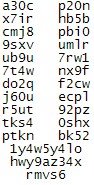 As you can see, the picture is drawn from different letters. I wonder how a antispam product will be able to detuct this kind of message, containing no 'nasty' word. I fact, the big letters could be made up of non-spamish sentences.
Spammers seem to be very creative.
When I previewed the message, I got this picture -
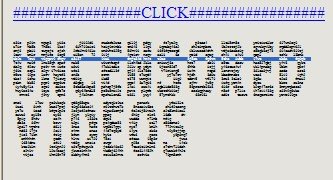
I was curious - not for the uncensored videos - I live in a country that liberated porn in 1969, so nothing is censored here - but for the funny graphics. Using the mouse, I realized that it was actually text, no a picture. The text is used for drawing larger letters, just like the banner pages on a line printer. I remember creating such a program once in Cobol...
Anyway I selected a line of text before taking the screen shot as you can see from the blue line. To get into more detail, I copied all the 'uncensored' lines, pasted them into notepad and isolated the U - to make this more readable for you -
 As you can see, the picture is drawn from different letters. I wonder how a antispam product will be able to detuct this kind of message, containing no 'nasty' word. I fact, the big letters could be made up of non-spamish sentences.
Spammers seem to be very creative.
Sunday, June 11, 2006
Windows Vista beta 2 testing
Just got a brand new Dell Latitude D820 with the necessary power to run Vista including Aero (NVIDIA GeForce Go 7400/Quadro NVS 120M). The aim is to use it for testing Vista and Office 2007 and to automate the installation, so I can rebuilt it with SMS whenever Vista, Office or the drivers get updated.
My first major obstacle was to get a grahics driver - the NVidia Forceware beta 88.61 did not recognize my hardware (even though the claim it is a universal driver).
Well today I browser the Dell forums and found this thread which linked be to the Nicke Anderson blog and finally it ended up at Laptop Video 2 Go, which have a modded nv_disp.inf that did the job. I included all the steps in my search, so you can get all the details yourself.
After installing the driver with the modded .inf, I just had to adjust the display resolution (1920x1200 nice!) and select the Aero color scheme.
So, now I'll continue my tests...
My first major obstacle was to get a grahics driver - the NVidia Forceware beta 88.61 did not recognize my hardware (even though the claim it is a universal driver).
Well today I browser the Dell forums and found this thread which linked be to the Nicke Anderson blog and finally it ended up at Laptop Video 2 Go, which have a modded nv_disp.inf that did the job. I included all the steps in my search, so you can get all the details yourself.
After installing the driver with the modded .inf, I just had to adjust the display resolution (1920x1200 nice!) and select the Aero color scheme.
So, now I'll continue my tests...
Thursday, May 25, 2006
LCS, Audio/video, file transfers and firewalls
I was responding to a question on the ASP.NET forums and thought it would be a good contribution to msgoodies (Almost unedited so maybe I will update it some day to be more thorough ;-)
The question was
What happens when a LCS solution sits behind a firewall/nat?
The answer is -
It is possible to do file transfers and audio/video in a hosted or enterprise LCS environment, where LCS sits behinds a NAT/firewall but it all depends on your configuration of LCS and/or Office Communicator and/or your firewall.
For a start LCS is basically a SIP Server and SIP is of course Session Initiation Protocol. In SIP you use what we refer to as a triangle. User A will initally communicate with User B through the LCS server and SIP, but when a user decides to start a session with e.g. audio/video or file transfers, the server will help the client negotiate the right protocols etc. and when this is in place the clients will communicate directly with each other (Thereby creating the SIP triangle between both User A, User B talking with each other and both talking with the LCS server). So only SIP is passed through the server and the rest is usually done peer to peer.
So why is it not working for you? A lot of reasons for this might apply, which I try to explain in the following -
Office Communicator
Well for one you need to check or set the relevant Group Policies. You can do this by importing the Communicator.adm file in to the Administrative Templates in the Computer Configuration part of the GPO (Or by setting the relevant registry keys manually). The interesting parts here are SIP Security mode, where High Security mode will require encrypted SIP communication but still allow P2P filetransfers and audio/video, but it disables the use of uPnP, which sometimes is necessary if one of the parties involved in the communication is sitting behind e.g. a Wireless ADSL Router/Packet filtering firewall. The other interesting policy is obviously the policy called "Prevent File Transfer".
Server
On the server side IMFilter.am is enabled by default on the Access Proxy and it disables file transfers and URLs in IM's, so instead I would deploy the LCS Intelligent IM Filter which is more configurable in terms of allowing certain file types.
Furthermore if you implement e.g. Sybari Antivirus on the server all file transfers are forced to go through the server (Thereby needing to open the ports used for TFTP through the Service Providers firewall).
Firewall
In the case of file transfers the protocol used is TFTP over TCP and it runs over port 6891-6900 (Allowing for 10 concurrent file transfers). For application sharing T.120 through Port 1503 is used and for audio/video a combination of RTP / RTCP is used. You can find more info in KB 903056 and in the article Windows Messenger in Windows XP (Note that Office Communicator uses the underlying technologies of Windows Messenger and thereby have the same restrictions).
Conclusion
The sum is that in a hosted or enterprise LCS scenario, all audio/video, file transfers and application sharing can work perfectly internally between desktops and mobile devices (Communicator Mobile) at the customer (Assuming they are not firewalling between internal network segments). But when a client needs to communicate with users outside their firewall, the same restrictions apply that apply for companies deploying their own LCS solution. NetMeeting is an old product and just doesn't handle traversing firewalls and NATs very well (even though some workarounds can be made) and this is probably why it is deprecated in Windows Vista (See RTC Client API's and Vista). The next version of LCS called Live Server and Office Communicator will supposedly handle this "in another way" but we will have to wait a couple of months until Microsoft will go public with more info in this product (Launching just after Office 2007).
The question was
What happens when a LCS solution sits behind a firewall/nat?
The answer is -
It is possible to do file transfers and audio/video in a hosted or enterprise LCS environment, where LCS sits behinds a NAT/firewall but it all depends on your configuration of LCS and/or Office Communicator and/or your firewall.
For a start LCS is basically a SIP Server and SIP is of course Session Initiation Protocol. In SIP you use what we refer to as a triangle. User A will initally communicate with User B through the LCS server and SIP, but when a user decides to start a session with e.g. audio/video or file transfers, the server will help the client negotiate the right protocols etc. and when this is in place the clients will communicate directly with each other (Thereby creating the SIP triangle between both User A, User B talking with each other and both talking with the LCS server). So only SIP is passed through the server and the rest is usually done peer to peer.
So why is it not working for you? A lot of reasons for this might apply, which I try to explain in the following -
Office Communicator
Well for one you need to check or set the relevant Group Policies. You can do this by importing the Communicator.adm file in to the Administrative Templates in the Computer Configuration part of the GPO (Or by setting the relevant registry keys manually). The interesting parts here are SIP Security mode, where High Security mode will require encrypted SIP communication but still allow P2P filetransfers and audio/video, but it disables the use of uPnP, which sometimes is necessary if one of the parties involved in the communication is sitting behind e.g. a Wireless ADSL Router/Packet filtering firewall. The other interesting policy is obviously the policy called "Prevent File Transfer".
Server
On the server side IMFilter.am is enabled by default on the Access Proxy and it disables file transfers and URLs in IM's, so instead I would deploy the LCS Intelligent IM Filter which is more configurable in terms of allowing certain file types.
Furthermore if you implement e.g. Sybari Antivirus on the server all file transfers are forced to go through the server (Thereby needing to open the ports used for TFTP through the Service Providers firewall).
Firewall
In the case of file transfers the protocol used is TFTP over TCP and it runs over port 6891-6900 (Allowing for 10 concurrent file transfers). For application sharing T.120 through Port 1503 is used and for audio/video a combination of RTP / RTCP is used. You can find more info in KB 903056 and in the article Windows Messenger in Windows XP (Note that Office Communicator uses the underlying technologies of Windows Messenger and thereby have the same restrictions).
Conclusion
The sum is that in a hosted or enterprise LCS scenario, all audio/video, file transfers and application sharing can work perfectly internally between desktops and mobile devices (Communicator Mobile) at the customer (Assuming they are not firewalling between internal network segments). But when a client needs to communicate with users outside their firewall, the same restrictions apply that apply for companies deploying their own LCS solution. NetMeeting is an old product and just doesn't handle traversing firewalls and NATs very well (even though some workarounds can be made) and this is probably why it is deprecated in Windows Vista (See RTC Client API's and Vista). The next version of LCS called Live Server and Office Communicator will supposedly handle this "in another way" but we will have to wait a couple of months until Microsoft will go public with more info in this product (Launching just after Office 2007).
Monday, May 22, 2006
How to delete a contact for several users in LCS / Office Communicator
A little follow-up to my earlier post on Populating Users in Office Communicator / LCS. If you want to delete a contact for all users (E.g. for a employee leaving the company) - you can remove the /contactsgroup parameter and instead use the /delete paramater e.g. -
cscript LCSAddContacts.wsf /usersfile:contacts.txt
/contactsfile:delete.txt /delete (Wrapped for readability)
The syntax of the contacts.txt and delete.txt input file is -
sip:jens@inceptio.dk
sip:peter@inceptio.dk
Check my earlier post for further info.
cscript LCSAddContacts.wsf /usersfile:contacts.txt
/contactsfile:delete.txt /delete (Wrapped for readability)
The syntax of the contacts.txt and delete.txt input file is -
sip:jens@inceptio.dk
sip:peter@inceptio.dk
Check my earlier post for further info.
Tuesday, May 02, 2006
What drink should I serve?
Friday, April 28, 2006
Support issues with Communicator Mobile
Tom has posted a Product Support Guide for Communicator Mobile on his blog, containing issues that isn't part of the release notes or accompanying documentation (As of yet).
One of the things he notes is that installation of Communicator Mobile isn’t supported on Storage Cards (As I enjoy to do with the limited memory on my Qtek 8310), also it explains why CoMO sometimes can be unresponsive.
Find the guide here.
One of the things he notes is that installation of Communicator Mobile isn’t supported on Storage Cards (As I enjoy to do with the limited memory on my Qtek 8310), also it explains why CoMO sometimes can be unresponsive.
Find the guide here.
Wednesday, April 26, 2006
Exchange 12 / Monad name changes
Just a quick note - At the MMS in San Diego there were a few announcements on this. Exchange 12 is now named Exchange Server 2007, and Monad is now Windows PowerShell.
Sunday, April 23, 2006
Where Vista Fails
Interesting article with some harsh comments from Paul Thurrot -
Read it all here (Btw. I'm downloading build 5365 for my x64 notebook now - lets hope it has improved since 5342, which IMHO was way to unstable to do any testing on). Originally seen on bink.nu
The company itself has turned into that thing it most hated (read:
IBM)
The bad news, then, is that UAP is a sad, sad joke. It's the most annoying feature that Microsoft has ever added to any software product, and yes, that
includes that ridiculous Clippy character from older Office versions.
On Media Center: It's a horrid update to a wonderful bit of software, an ugly stepchild of beautiful parents.
Feature complete, my butt
OK, let's not get silly here. I don't hate Windows Vista ... That's not
horrible. It's just not what was promised.
Read it all here (Btw. I'm downloading build 5365 for my x64 notebook now - lets hope it has improved since 5342, which IMHO was way to unstable to do any testing on). Originally seen on bink.nu
Microsoft Office Communicator Mobile released
I've been using Office Communicator Mobile since the first beta released last year and was happy to get an e-mail from the beta team, stating that it finally has been released to the web (And also last week I heard that the RC of Qtek 8310 AKU2 was released - so we will probably soon see the final version).
So what's in the product ?
So what's in the product ?
- A new Home/Today screen showing you availability
- Presence on your contacts including federated and PIC users (Including their icons)
- Contact information like "Idle since .." and Outlook calender information like "Free for next 2 hours"
- Escalation from IM conversation to phone calls
- VoIP calls through Wireless LANs (No firewall traversall though - so just internal within the companys network)
- 3rd Party Call Control like changing your desk/work phone forwarding settings
- E-mailing the content of an IM conversation
- And much more ;-)
- Overview (marketing)
- Frequently Asked Questions
- Getting Started Guide
- Release Notes
- Planning and Deployment Guide
- Troubleshooting Guide
Thursday, April 20, 2006
runas without domain trusts
Being a consultant, I often work from my own laptop on my customers computers. This often results in a lot of commands like these -
net use \\server\ipc$ /user:custdomain\account
Recently, I discovered, that I could actually create a new process with runas and use my customer credentials from that process. The trick is the /netonly argument. If I do a -
runas /user:custdomain\account /netonly cmd
I end up with a command prompt running as my normal user. But when I access network resources from that command prompt - or any child processes - I do it with my customer credentials. Needless to say, this saves a lot of tedious work.
Remember that if you do somethings, that invokes Explorer, you are often back to your default credentials - read more here.
When you use /netonly, you can actually specify any domain\user you like. The security check will - as always - be made when you try to access a resource.
net use \\server\ipc$ /user:custdomain\account
Recently, I discovered, that I could actually create a new process with runas and use my customer credentials from that process. The trick is the /netonly argument. If I do a -
runas /user:custdomain\account /netonly cmd
I end up with a command prompt running as my normal user. But when I access network resources from that command prompt - or any child processes - I do it with my customer credentials. Needless to say, this saves a lot of tedious work.
Remember that if you do somethings, that invokes Explorer, you are often back to your default credentials - read more here.
When you use /netonly, you can actually specify any domain\user you like. The security check will - as always - be made when you try to access a resource.
Finding and fixing those LUA problems
Back in 1997, I was working at LEGO doing a PC project based on Windows NT workstation. The goal was end-users without local administrative permissions. This made perfectly sense, as we came out of a OpenVMS environment where that was the norm.
Back then, we learned the hard way how difficult it was to do this and without regmon and filemon we never could have do it. Back then the problem was lack of documenation - today the problem is the waste amount of documentation - and when you finally hit the right spot you sometimes find that the detail you were looking for was left out of the documentation - or simply wrong.
Things have improved when it comes to using LUA but there are still a way to go before nirvana is reached.
Aaron Margosis created a series of articles on this - and the best is the prioritized approach he has taken - i.e. should I start tweaking the registry permissions first or should I copy parts of the class registry to HKCU? Read it all here and here.
Also read my LUA article about controlling permissions with Group Policy.
Back then, we learned the hard way how difficult it was to do this and without regmon and filemon we never could have do it. Back then the problem was lack of documenation - today the problem is the waste amount of documentation - and when you finally hit the right spot you sometimes find that the detail you were looking for was left out of the documentation - or simply wrong.
Things have improved when it comes to using LUA but there are still a way to go before nirvana is reached.
Aaron Margosis created a series of articles on this - and the best is the prioritized approach he has taken - i.e. should I start tweaking the registry permissions first or should I copy parts of the class registry to HKCU? Read it all here and here.
Also read my LUA article about controlling permissions with Group Policy.
Thursday, April 13, 2006
To be or not to be - really random
Having the flu - this is day #5 - I found energy to browse dibert.com to motion my cheeks. I saw Scott Adams blog and had to read it as I like his twisted mind. From there I came across a reference to real random numbers called HotBits. The most interesting part was the How HotBits Works. This explains parts of quantum physics in a really simple way - e.g. that a beta particle is simply an electron and that gamma ray is simply high energy photons.
So is this really 'in scope' of this blog? Hmmm - well random numbers are - else simply blame it on the flu.
So is this really 'in scope' of this blog? Hmmm - well random numbers are - else simply blame it on the flu.
Wednesday, April 12, 2006
Microsoft Exchange's 10 year anniversary
As one of my contacts at Microsoft just pointed out, Microsoft Exchange was released more than 10 years ago in March 1996. It also means that I now have been a MCP for 12 years (Since April 1994); time has certainly gone fast since Microsoft Advanced Server 3.1 was the new kid on the block and it was unique to be a MCSE (I still remember competing with Per to be the first MCSE+I). I personally started working with OS/2 LanServer and Lotus cc:Mail and variations of Microsoft Mail and later evolved to Exchange 4.0 and Exchange 5.0/5.5, where clustering were one of my specialities and also my first piece published to the web was on the subject of Tips for Clustering Exchange Successfully (In the days of NT 4.0 and Exchange 5.5).
Windows IT Pro has released a very good article series by well known Industry Experts like Tony Redmond, Kevin Laahs and Kieran McCorry (All former colleagues at Digital/Compaq), Eric Legault and Pierre Bijaoui. It’s called A Decade of Exchange and it is certainly worth a read.
More interesting, to me anyway, is the future of Exchange in the Unified Communications group. We are probably going to witness a unification of Exchange, Live Communications Server (SIP) and related Voice services (VoIP, PBX, Centrex etc.), the interesting part here will ultimately be which technologies will be delivered by Microsoft and which will be delivered by 3rd party products. Also the evolution of SIP and perhaps disruptive Peer-to-Peer SIP standards/products and its impact on e.g. Microsoft UC and telephony service providers (And vendors) will be interesting to follow on the side-/frontline.
In my world Live Communications Server and the upcoming Live Server and their integration in Exchange and to CSTA, VoIP and MCU’s will certainly continue to be a main focus.
Windows IT Pro has released a very good article series by well known Industry Experts like Tony Redmond, Kevin Laahs and Kieran McCorry (All former colleagues at Digital/Compaq), Eric Legault and Pierre Bijaoui. It’s called A Decade of Exchange and it is certainly worth a read.
More interesting, to me anyway, is the future of Exchange in the Unified Communications group. We are probably going to witness a unification of Exchange, Live Communications Server (SIP) and related Voice services (VoIP, PBX, Centrex etc.), the interesting part here will ultimately be which technologies will be delivered by Microsoft and which will be delivered by 3rd party products. Also the evolution of SIP and perhaps disruptive Peer-to-Peer SIP standards/products and its impact on e.g. Microsoft UC and telephony service providers (And vendors) will be interesting to follow on the side-/frontline.
In my world Live Communications Server and the upcoming Live Server and their integration in Exchange and to CSTA, VoIP and MCU’s will certainly continue to be a main focus.
Monday, April 10, 2006
Sending IM messages through scripts
Would you like to send an instant message through script like this -
Then look no further than Glen's Exchange Dev Blog and his post on the subject, where he uses the newly announced AJAX SDK for the purpose (Btw. if your scripting against Exchange his blog is certainly worth a look; in this case I'm only sorry that I didn't get around to write the script ;-)
cscript lcsSendmsg.vbs administrator@managenet.com.au
"Hello world how are you doing”
Then look no further than Glen's Exchange Dev Blog and his post on the subject, where he uses the newly announced AJAX SDK for the purpose (Btw. if your scripting against Exchange his blog is certainly worth a look; in this case I'm only sorry that I didn't get around to write the script ;-)
Tuesday, April 04, 2006
Office Communicator Web Access AJAX Service SDK 1.0
Microsoft has released the Office Communicator AJAX Service SDK 1.0 including the following sample applications:
You can find it hereA simple instant messaging (IM) client written in JavaScript.
A simple instant messaging (IM) client written in C#.
A C# application that receives events from Communicator Web Access and displays them, as well as the methods that are being sent to the server, in JSON format.
Saturday, April 01, 2006
Corrupted logon Web page when you try to log on to Communicator Web Access
Friday, March 31, 2006
Vista feature summation
If you want to know what kind of beast Windows Vista is, then there is a nice summary to be found here -
http://en.wikipedia.org/wiki/Windows_Vista
Also if you want to know more about the new features (Including those features from XP not making it to Vista), there's a nice wiki here -
http://en.wikipedia.org/wiki/Features_new_to_Windows_Vista
(Thanks to Steffen Madsen from Inceptio A/S for the hint).
http://en.wikipedia.org/wiki/Windows_Vista
Also if you want to know more about the new features (Including those features from XP not making it to Vista), there's a nice wiki here -
http://en.wikipedia.org/wiki/Features_new_to_Windows_Vista
(Thanks to Steffen Madsen from Inceptio A/S for the hint).
Wednesday, March 29, 2006
Windows deployment resource
Here’s some shameless advertising for a friend of mine ;-) Rico Raja, and some of his friends, has started a blog/forum/website, that centers mainly around Windows Deployment, Preinstallation and unattended installation. His expertise is, amongst others, Vista Deployment and he (and his friends) has produced some very exciting records in installation time for Windows Vista Deployments.
Check out www.windows-admin.com and since they haven't implemented a RSS or Atom feed (Hint, hint!) you need to bookmark it for future updates (I have seen some of the upcoming content and it looks promising).
Check out www.windows-admin.com and since they haven't implemented a RSS or Atom feed (Hint, hint!) you need to bookmark it for future updates (I have seen some of the upcoming content and it looks promising).
Sunday, March 26, 2006
Unified Communications presentations
As promised, here are the presentations from the Unified Communications event -
Friday, March 24, 2006
IM Culture
Along with new ways of communicating, there will be new do's and don’ts. I personally have more than 100 persons on my IM lists, but I prefer to have most of my private contacts on a separate IM client, namely Live Messenger, and first when Office Communicator implements Spheres as per the RFC's (a.k.a. selective per group availability) will I move them to OC. And why is that you may ask? Well mainly because my family (Including my 79 years old grandmother) has a habit of "disturbing" me during my work time, and my business contacts tends to be more into the IM way of doing things, with only occasional, important and short IM conversations.
Heather Leigh wrote an interesting blog about her opinion on this subject called IM Angst, quote
Suffice to say new habits and cultures will arise. Quickly, if appropriate, moving from e-mail to IM with Office Communicator has certainly lessened the amount of e-mails in my inbox and also moving from IM to phone or video/VoIP conferencing has shortened the amount of time in the IM space for my sake.
Heather Leigh wrote an interesting blog about her opinion on this subject called IM Angst, quote
"What’s the deal with people you have never met before IMing you? This is analogous to interrupting a potentially important conversation (let’s not pretend all of my conversations are important but some of them are...some are even important AND interesting). In my opinion, IMing basically says, “I know you well enough to do this” (among friends) or “this is urgent” (among business associates). I cannot tell you how many times I receive IMs that fall into neither category. When a simple e-mail would suffice, IM is chosen for the immediacy (of the sender) without regard to the time of the receiver."
Suffice to say new habits and cultures will arise. Quickly, if appropriate, moving from e-mail to IM with Office Communicator has certainly lessened the amount of e-mails in my inbox and also moving from IM to phone or video/VoIP conferencing has shortened the amount of time in the IM space for my sake.
Thursday, March 23, 2006
Migrating RSS feeds from RssReader to Outlook 2007
Adding more than 100 feeds manually into Outlook 2007 wasn't an option and RssReader does import OPML, but doesn't export to it. So I did a little Googling and found a nice script, with an accompanying XSLT transform file. It will take RssReaders XML based export file as an input and create an OPML compliant XML file. The only thing missing here is Groups, so I had to manually regroup all my feeds :-
You can find the script here
Btw. Outlook 2007 RSS implementation in Beta1 TR is way better that the last version I've tested - but there is still room for enhancement (Remember its still beta, so it will probably change). The concept of groups is badly implemented (Especially when adding new feeds), the formatting of the posts is nothing compared to RssReaders and there's missing a "View all Unread Posts" and a "Mark all Unread Posts as Read" (It can be accomplished under Unread Mail - but I personally don't like to mix these in the same folder).
You can find the script here
Btw. Outlook 2007 RSS implementation in Beta1 TR is way better that the last version I've tested - but there is still room for enhancement (Remember its still beta, so it will probably change). The concept of groups is badly implemented (Especially when adding new feeds), the formatting of the posts is nothing compared to RssReaders and there's missing a "View all Unread Posts" and a "Mark all Unread Posts as Read" (It can be accomplished under Unread Mail - but I personally don't like to mix these in the same folder).
Tuesday, March 21, 2006
Whitepaper/resources on Exchange 2003 Mobility and MSFP / AKU2
As several different Telcos are releasing WM5 AKU2 / MSFP updates to their devices, there's also a need to setup the environment to support these new devices. I have earlier described a "Quick Guide" to upgrading the device, and configuring the website and ISA for DirectPush. But, as reported by several sources, Mr. Mobile a.k.a. Jason Langridge has released a large whitepaper on configuring all the aspects of mobility including web sites, certificates, ISA, certificate login and configuring the device. His excellent whitepaper can be found here.
Furthermore Vlad has posted a very good set of resources in a post called Advanced Mobility and Stalking with WM5.
Furthermore Vlad has posted a very good set of resources in a post called Advanced Mobility and Stalking with WM5.
Office Communicator now available in new languages
Friday, March 17, 2006
Microsoft Connect and SMS 4 Beta
Wanted to join the SMS 4 Beta program - and consequently got into a new (for me at least) site called Microsoft Connect. Connect is a kind of new betaplace. Browsing the available programs page, I found another interesting product called Certificate Lifecycle Manager Beta 1. You can check it out yourself - I will when I have a little time to spare.
Communicator Web Access guides released
Three new Communicator Web Access guides has been released -
Microsoft Office Communicator Web Access Getting Started Guide
This guide describes how to use the instant messaging (IM) and presence features of Microsoft® Office Communicator Web Access.
Microsoft Office Communicator Web Access Technical Reference Guide
This guide provides reference and troubleshooting information for administrators who are deploying or have deployed Microsoft® Office Communicator Web Access.
Factors Affecting User Capacity of Microsoft Office Communicator Web Access
This white paper discusses the factors that affect the number of users that can be supported on a Microsoft® Office Communicator Web Access server.
Also Don't forget the "old" guide on (With the pace Microsoft is announcing VoIP, SIP and UC news 3 months must be considered old ;-)
Microsoft Office Communicator Web Access Planning and Deployment Guide
This guide helps you plan and deploy Communicator Web Access for your organization.
Microsoft Office Communicator Web Access Getting Started Guide
This guide describes how to use the instant messaging (IM) and presence features of Microsoft® Office Communicator Web Access.
Microsoft Office Communicator Web Access Technical Reference Guide
This guide provides reference and troubleshooting information for administrators who are deploying or have deployed Microsoft® Office Communicator Web Access.
Factors Affecting User Capacity of Microsoft Office Communicator Web Access
This white paper discusses the factors that affect the number of users that can be supported on a Microsoft® Office Communicator Web Access server.
Also Don't forget the "old" guide on (With the pace Microsoft is announcing VoIP, SIP and UC news 3 months must be considered old ;-)
Microsoft Office Communicator Web Access Planning and Deployment Guide
This guide helps you plan and deploy Communicator Web Access for your organization.
Thursday, March 16, 2006
Thursday, March 09, 2006
Live Communications Server Snap-in cannot open the certificate store
OK – now Per is at it, I also want to confess about one of my “mistakes”. I want to tell a story about LCS and the certificates snap-in that eventually made me rip my hair off (figuratively speaking that is – I need a magnifier and a pair of tweezers to find some) and calling PSS (It’s not a shame to do so btw … I keep telling myself).
As usual in LCS deployments I started by installing a LCS Home Server, implemented the necessary internal DNS records and then tested the functionality with TCP (Everything worked like a breeze). I then installed my LCS Access Proxy, used LCSCertUtil from the resource kit to request a public certificate and installed this on the Public Interface and our own certificate on the Internal Interface.
Then on my LCS Home Server I requested the necessary certificate and started the Live Communications Server 2005 MMC. I dribbled down through Forest, LCS Servers and pools, Server and right-clicked Properties on my server. I then clicked add and received the error message Live Communications Server Snap-in cannot open the certificate store followed by a Live Communications Server Snap-in cannot read the certificate information associated with this entry and a greyed out Add Connection Window. The same happened when I clicked the Security tab.
Googling the error message showed me that there was a known issue, whereby Sysadmins had installed the certificate in the user store (Checking, double and triple checking this made me certain that this wasn’t the problem) also the certificates checked out fine. Eventually (A day later) I ended up reinstalling the server, and it had no effect what so ever (Thinking that missing security rights or something the like was an issue).
To cut the story short(er) then I’m a geek so when I install new servers, I disable everything I can. One of the things I like to disable is File and Printer Sharing for Microsoft Networks on servers/network cards that doesn’t need it.
With the assistance of a skilled PSS guy from Turkey, named Fadi, it turned out, that when a LCS Home Server needs to find certificates in the GUI of the LCS MMC; it needs File and Printer sharing enabled on the server! But this isn’t the case on Access Proxies – so in the beginning I had no clue what to look for. Disabling File and Printer Sharing again, after installing and verifying the certificates, works fine so it must be a “feature” in the LCS 2005 MMC.
As usual in LCS deployments I started by installing a LCS Home Server, implemented the necessary internal DNS records and then tested the functionality with TCP (Everything worked like a breeze). I then installed my LCS Access Proxy, used LCSCertUtil from the resource kit to request a public certificate and installed this on the Public Interface and our own certificate on the Internal Interface.
Then on my LCS Home Server I requested the necessary certificate and started the Live Communications Server 2005 MMC. I dribbled down through Forest, LCS Servers and pools, Server and right-clicked Properties on my server. I then clicked add and received the error message Live Communications Server Snap-in cannot open the certificate store followed by a Live Communications Server Snap-in cannot read the certificate information associated with this entry and a greyed out Add Connection Window. The same happened when I clicked the Security tab.
Googling the error message showed me that there was a known issue, whereby Sysadmins had installed the certificate in the user store (Checking, double and triple checking this made me certain that this wasn’t the problem) also the certificates checked out fine. Eventually (A day later) I ended up reinstalling the server, and it had no effect what so ever (Thinking that missing security rights or something the like was an issue).
To cut the story short(er) then I’m a geek so when I install new servers, I disable everything I can. One of the things I like to disable is File and Printer Sharing for Microsoft Networks on servers/network cards that doesn’t need it.
With the assistance of a skilled PSS guy from Turkey, named Fadi, it turned out, that when a LCS Home Server needs to find certificates in the GUI of the LCS MMC; it needs File and Printer sharing enabled on the server! But this isn’t the case on Access Proxies – so in the beginning I had no clue what to look for. Disabling File and Printer Sharing again, after installing and verifying the certificates, works fine so it must be a “feature” in the LCS 2005 MMC.
Wednesday, March 08, 2006
DoS'ing ISA by modifying a user object in AD
The other day, one of the contributers to this blog unwillingly made a Denial-of-Service on our ISA server. It went on like this –
“I wonder if it is possible to hand out a static route to a user, when a VPN is established?”
So this admin found his user object, tabbed to Dial-in, enabled Apply Static Routes and clicked Static Routes. Added the wanted route and saved it all. Next, the user reconnected the VPN – and things started to go wrong…
After messing things back to normal, I – sorry, the admin - began reading the help text –
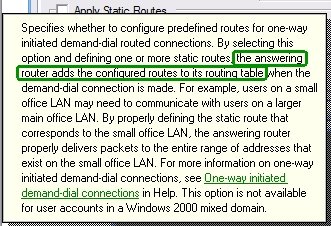
Hmmm, the answering server – the ISA server in this case – does this. It is not handed to the client. Bad luck!
The worse part of this – and the reason I’m writing this – is to warn you. If you grant you helpdesk, decentral admins etc. the permissions to change these settings on your user objects having VPN access, you risk they make your ISA server unavailable!
The GUI settings corresponds to these LDAP properties –
1> msRADIUSFramedRoute: 8.8.8.0/24 0.0.0.0 1;
1> msRASSavedFramedRoute: 8.8.8.0/24 0.0.0.0 1;
So if someone has change access to these properties – i.e. they have full permissions on the user, explicit permissions for the properties or implicit permissions you are at risk. Beware that the RAS-Information a.k.a “Remote Access Information” property set includes these properties. Note that the default for Active Directory is to give the built-in Account Operators group permissions to update these.
“I wonder if it is possible to hand out a static route to a user, when a VPN is established?”
So this admin found his user object, tabbed to Dial-in, enabled Apply Static Routes and clicked Static Routes. Added the wanted route and saved it all. Next, the user reconnected the VPN – and things started to go wrong…
After messing things back to normal, I – sorry, the admin - began reading the help text –
Hmmm, the answering server – the ISA server in this case – does this. It is not handed to the client. Bad luck!
The worse part of this – and the reason I’m writing this – is to warn you. If you grant you helpdesk, decentral admins etc. the permissions to change these settings on your user objects having VPN access, you risk they make your ISA server unavailable!
The GUI settings corresponds to these LDAP properties –
1> msRADIUSFramedRoute: 8.8.8.0/24 0.0.0.0 1;
1> msRASSavedFramedRoute: 8.8.8.0/24 0.0.0.0 1;
So if someone has change access to these properties – i.e. they have full permissions on the user, explicit permissions for the properties or implicit permissions you are at risk. Beware that the RAS-Information a.k.a “Remote Access Information” property set includes these properties. Note that the default for Active Directory is to give the built-in Account Operators group permissions to update these.
Tuesday, March 07, 2006
Blocking MSN Messenger traffic by using HTTP filtering in ISA
FYI: Tom Shinder at www.isaserver.org has published a nice little step-by-step guide to blocking MSN Messenger traffic in ISA with the short name - ISA Firewall Quick Tip: Blocking MSN Messenger Access through the ISA Firewall while Enabling Access to Some Users.
In this article we'll go over the following procedures: Create the HTTP/HTTPS Access Rule to Deny Access to MSN Messenger; Configure the User Group Exception and the HTTP Security Filter on the Deny Rule; Create the Allow Rule for the Excepted Users.
Thursday, March 02, 2006
Populating users in Office Communicator / LCS
OK - so now you've setup your Live Communications Server environment and login to Office Communicator 2005 or Windows Messenger just to see an empty list of users. Then the next questions come into mind - how do you populate users?
In Inceptio we initially used dsquery and some of the scripts that are part of the LCS 2005 SP1 Resource Kit.
First of I used dsquery to create a file with contacts (Check dsquery /? for further commands e.g. for traversing more OU's)
dsquery * "OU=Users,OU=Inceptio,DC=domain,DC=com" -attr msRTCSIP-PrimaryUserAddress -filter (msRTCSIP-UserEnabled=TRUE) > contacts.txt
Then I used the LCSAddcontacts.wsf script that will add contacts to a list of LCS users (The contacts.txt created earlier) - the script can be found in "%Programfiles%\Microsoft LC 2005\ResKit\WMI Samples" and information on the use can be found in LCSAddcontacts_readme.htm file
CScript LCSAddContacts.wsf /usersfile:contacts.txt /contactsfile:contacts.txt /contactsgroup:Inceptio
As you can se I use the same file twice for both the user and contact list, thereby adding all users to all users contacts list (Thanks to Ray Breen / Google for this trick).
Then I need to auto allow the users. This is (in my case) easily done by using LCSAddACEs.wsf (Also from the reskit)
CScript LCSAddACEs.wsf /usersfile:contacts.txt /acesfile:Acesfile.txt
I reuse the same contacts.txt file used earlier, but I now use also use an Acesfile.txt file containing the following text (Notice that Allow, Prompt, Block and Deny are case sensitive) -
domain inceptio.dk Allow Allow
As we are a small consulting company there is no problem in auto allowing all users to see each other, I recognize that this will not be useful in most larger companies (Certainly not in our customers), in these cases I would manipulate the contacts.txt file to create a new file looking like this -
user: sip:alice@inceptio.dk Allow Allow
user: sip:bob@inceptio.dk Allow Allow
etc.
I would not recommend using All Allow Allow as acesfile.txt input as it also gives All Other Contacts allow rights (Instead of notifying as usual), which probably isn't a desirable behavior for PIC or Federation contacts.
The above is just an example of how to use the sample scripts to populate users. It would be a good idea to join and refine the scripts into a single script taking e.g. OU or AD Group as input and then populating organization groups etc. with each other contacts.
Btw. the above scripts should be run from the LCS Home Server
In Inceptio we initially used dsquery and some of the scripts that are part of the LCS 2005 SP1 Resource Kit.
First of I used dsquery to create a file with contacts (Check dsquery /? for further commands e.g. for traversing more OU's)
dsquery * "OU=Users,OU=Inceptio,DC=domain,DC=com" -attr msRTCSIP-PrimaryUserAddress -filter (msRTCSIP-UserEnabled=TRUE) > contacts.txt
Then I used the LCSAddcontacts.wsf script that will add contacts to a list of LCS users (The contacts.txt created earlier) - the script can be found in "%Programfiles%\Microsoft LC 2005\ResKit\WMI Samples" and information on the use can be found in LCSAddcontacts_readme.htm file
CScript LCSAddContacts.wsf /usersfile:contacts.txt /contactsfile:contacts.txt /contactsgroup:Inceptio
As you can se I use the same file twice for both the user and contact list, thereby adding all users to all users contacts list (Thanks to Ray Breen / Google for this trick).
Then I need to auto allow the users. This is (in my case) easily done by using LCSAddACEs.wsf (Also from the reskit)
CScript LCSAddACEs.wsf /usersfile:contacts.txt /acesfile:Acesfile.txt
I reuse the same contacts.txt file used earlier, but I now use also use an Acesfile.txt file containing the following text (Notice that Allow, Prompt, Block and Deny are case sensitive) -
domain inceptio.dk Allow Allow
As we are a small consulting company there is no problem in auto allowing all users to see each other, I recognize that this will not be useful in most larger companies (Certainly not in our customers), in these cases I would manipulate the contacts.txt file to create a new file looking like this -
user: sip:alice@inceptio.dk Allow Allow
user: sip:bob@inceptio.dk Allow Allow
etc.
I would not recommend using All Allow Allow as acesfile.txt input as it also gives All Other Contacts allow rights (Instead of notifying as usual), which probably isn't a desirable behavior for PIC or Federation contacts.
The above is just an example of how to use the sample scripts to populate users. It would be a good idea to join and refine the scripts into a single script taking e.g. OU or AD Group as input and then populating organization groups etc. with each other contacts.
Btw. the above scripts should be run from the LCS Home Server
Tuesday, February 14, 2006
Use Group Policy Software Restrictions to control LUA
The least-privileged user account (LUA) principle is great - but in some situations very hard to implement. One of these places is my home computer :) shared by all the family members. Running games etc. without admin permissions is almost impossible.
While reading the Applying the Principle of Least Privilege to User Accounts on Windows XP article, I was linked to Browsing the Web and Reading E-mail Safely as an Administrator, Part 2 and discovered something new about the Software Restriction feature of Group Policy. I have been using Software Restriction for a while. I use it for preventing spyware from starting as Software Restrictions is 'stronger' than administrative permissions.
What I discovered, reading the article, was that there is a hidden feature, that can be enabled. This feature called 'Basic User', gives Group Policy control over programs. This means that you can force programs - like Internet Explorer - to start in restricted mode (same as using runas + protect my computer and data from unauthorized program activity) without any user intervention.
Right now, I have implemented it and is giving it a go. Let's see if my kids start to scream...
While reading the Applying the Principle of Least Privilege to User Accounts on Windows XP article, I was linked to Browsing the Web and Reading E-mail Safely as an Administrator, Part 2 and discovered something new about the Software Restriction feature of Group Policy. I have been using Software Restriction for a while. I use it for preventing spyware from starting as Software Restrictions is 'stronger' than administrative permissions.
What I discovered, reading the article, was that there is a hidden feature, that can be enabled. This feature called 'Basic User', gives Group Policy control over programs. This means that you can force programs - like Internet Explorer - to start in restricted mode (same as using runas + protect my computer and data from unauthorized program activity) without any user intervention.
Right now, I have implemented it and is giving it a go. Let's see if my kids start to scream...
Saturday, February 04, 2006
Choosing a new EASI passport domain for MSN
As I wrote in my earlier post on "Issues with EASI passport domains, LCS and MSN Messenger" a change of the EASI passport domain is sometimes necessary when implementing LCS PIC. But the link provided in the post will only allow you to change the domain to either hotmail.com or messengeruser.com - if say you would like to change from dlt@inceptio.dk to dlt@inceptio.org, then it is possible through https://accountservices.passport.net/. Just choose Credentials and then Change your e-mail address. From there you will be able to choose your new EASI domain address (Thanks to Per the hint).
HMC 3.5 Feature Pack 1 released
HMC 3.5 Feature Pack One includes additional resource management feature capabilities and some partner-requested solution fixes for the Hosted Messaging and Collaboration version 3.5 solution. It is strongly recommended that any service provider deploying Hosted Messaging and Collaboration version 3.5 download and install this feature pack, once they have installed HMC version 3.5.
Microsoft just released Feature Pack 1 for Hosted Messaging and Collaboration 3.5. The "most wanted" feature of Feature Pack 1 must be the new more flexible resource allocation for Mailboxes / Organizations. Prior to this release we we're required to allocate mailbox space at the organization level, but now it can be allocated at the time you provision mailbox users (Which fits most serviceproviders plans/packaging better).
Find the Feature Pack 1 ISO here.
Wednesday, February 01, 2006
ISA 2004 SP2 released
Friday, January 27, 2006
Using Oxios ToDo List for SmartPhone
Just wanted to update you on my earlier post as promised.
I just bought Oxios ToDo List for SmartPhone for my Qtek 8310 as a substitute for the built-in. This one is much better - I can edit my tasks - and very important - works on the same database and thus synchronizes with Outlook/Exchange.
I just bought Oxios ToDo List for SmartPhone for my Qtek 8310 as a substitute for the built-in. This one is much better - I can edit my tasks - and very important - works on the same database and thus synchronizes with Outlook/Exchange.
Thursday, January 26, 2006
AKU2 / MSFP and SP2 DirectPush configuration
The requirements are an Exchange Server 2003 with SP2 and a Mobile Device with Windows Mobile 2005 that includes the Messaging Security Feature Pack (MSFP aka Adaption Kit Update 2 (AKU2)) and for sync via USB with your machine you need ActiveSync 4.1 (Although this is not absolutely required). Furthermore for administration of the remote wipe features you will need the ActiveSync Web Administration tool.
The MSFP is actually a new version of the Windows Mobile OS so you need to wipe the device completely - with WM5 it is a pretty straight forward process; I started the phone in bootloader mode, connected it to USB and started the upgrade process. There's a very good TechNet Webcast called "Managing Windows Mobile-based Devices with the Messaging and Security Feature Pack" that includes very detailed info on security in Windows Mobile 5, the new features in MSFP and how upgrades can be done.
On the server side you need to change the IIS and Firewall timeout values. This is due to the fact that "DirectPush" works by keeping an http connection open to the server (Through a concept called heartbeats, where the mobile device periodically pings the server). If the firewall timeouts before the periodic ping, the device will need to ping/reconnect more frequently and errors might turn up in your eventlog. KB Article 905013 on "Enterprise firewall configuration for Exchange ActiveSync Direct Push Technology" explains more on this subject.
If you are using ISA server as a firewall you can change the timeout on the Web listener for your Front End mail server (Find it under properties for the web listener, Preferences, Advanced) and also you need to change the IIS timeouts on your Exchange Servers to a corresponding value (I'm currently using 30 minutes or 1800 seconds, which seems to work fine in a small environment).
It will be interesting to measure the scalability effects of these connections in Exchange 2003, where many users now not only will have an Outlook 2003 connection but also (almost always?) an active connection to their mobile devices - according to Microsoft its part of the reasoning that Exchange 12 will be 64 bit only (Longer story - I'm part of the beta program so I'm preparing to test it on my newly acquired AMD x64 Acer Ferrari 4000 notebook).
In overall the MSFP/DirectPush experience is great (Mail at times arrive on my mobile device before RPC/HTTPS syncs ;-), configuring the security policies and applying them to the devices also works fine, I can’t understand how I ever lived without GAL Lookup and I only have a few negative comments. The most annoying part is that the phone insists on informing me that a new mail has arrived, also when I’m at my desk. If I change my profile to “No sound” on mail arrival it will also turn of sound from SMS messages.
Another annoyance is the fact that the keyboard lock and device lock features doesn’t work together. So when the device is locked by the security policies and the phone is in my pocket – It doesn’t lock the keyboard and after x failed attempts it will wipe the device (Guess the rest of the story yourself ;-)
The MSFP is actually a new version of the Windows Mobile OS so you need to wipe the device completely - with WM5 it is a pretty straight forward process; I started the phone in bootloader mode, connected it to USB and started the upgrade process. There's a very good TechNet Webcast called "Managing Windows Mobile-based Devices with the Messaging and Security Feature Pack" that includes very detailed info on security in Windows Mobile 5, the new features in MSFP and how upgrades can be done.
On the server side you need to change the IIS and Firewall timeout values. This is due to the fact that "DirectPush" works by keeping an http connection open to the server (Through a concept called heartbeats, where the mobile device periodically pings the server). If the firewall timeouts before the periodic ping, the device will need to ping/reconnect more frequently and errors might turn up in your eventlog. KB Article 905013 on "Enterprise firewall configuration for Exchange ActiveSync Direct Push Technology" explains more on this subject.
If you are using ISA server as a firewall you can change the timeout on the Web listener for your Front End mail server (Find it under properties for the web listener, Preferences, Advanced) and also you need to change the IIS timeouts on your Exchange Servers to a corresponding value (I'm currently using 30 minutes or 1800 seconds, which seems to work fine in a small environment).
It will be interesting to measure the scalability effects of these connections in Exchange 2003, where many users now not only will have an Outlook 2003 connection but also (almost always?) an active connection to their mobile devices - according to Microsoft its part of the reasoning that Exchange 12 will be 64 bit only (Longer story - I'm part of the beta program so I'm preparing to test it on my newly acquired AMD x64 Acer Ferrari 4000 notebook).
In overall the MSFP/DirectPush experience is great (Mail at times arrive on my mobile device before RPC/HTTPS syncs ;-), configuring the security policies and applying them to the devices also works fine, I can’t understand how I ever lived without GAL Lookup and I only have a few negative comments. The most annoying part is that the phone insists on informing me that a new mail has arrived, also when I’m at my desk. If I change my profile to “No sound” on mail arrival it will also turn of sound from SMS messages.
Another annoyance is the fact that the keyboard lock and device lock features doesn’t work together. So when the device is locked by the security policies and the phone is in my pocket – It doesn’t lock the keyboard and after x failed attempts it will wipe the device (Guess the rest of the story yourself ;-)
Friday, January 20, 2006
Monad beta 3 is out
As a follow up to my previous post, I just wanted to tell you that beta 3 is available for download.
Hibernate - and I mean it!
I have a server for running Virtual Server. The server uses a wireless network card to connect to my home LAN. This gives me a problem as the wireless specifications disallow inserting other MAC adresses. To give my guest OSs internet network access, I'm running Routing and RAS on the host.
This all works fine except one thing: I cannot hibernate my server anymore.
RRAS pops up a message telling me, that it will not allow that-

For a while I have stopped the service, hibernated and remembered to restart the service on resume, but I just found another solution.
Simply write -
shutdown /h /f
The /f ignores RRAS and hibernates right away.
Now, I haven't used this much, so use it at your own risk. There could be a reason for RRAS not supporting hibernation - and if you know it, please share the knowledge.
This all works fine except one thing: I cannot hibernate my server anymore.
RRAS pops up a message telling me, that it will not allow that-

For a while I have stopped the service, hibernated and remembered to restart the service on resume, but I just found another solution.
Simply write -
shutdown /h /f
The /f ignores RRAS and hibernates right away.
Now, I haven't used this much, so use it at your own risk. There could be a reason for RRAS not supporting hibernation - and if you know it, please share the knowledge.
Thursday, January 19, 2006
How to add a loopback device from the command line
This is easy -
devcon install %windir%\INF\netloop.inf *msloop
devcon.exe is found in Support Tools.
Have fun
devcon install %windir%\INF\netloop.inf *msloop
devcon.exe is found in Support Tools.
Have fun
Friday, January 13, 2006
LCS PIC troubleshooting
The LCSKid has posted a good article on LCS PIC troubleshooting. It contains the kind of questions that you will be asked when calling PSS. It can also be used for checking requirements/troubleshooting before bothering PSS with a call ;-)
Thursday, January 12, 2006
Issues with EASI passport domains, LCS and MSN Messenger
When implementing Live Communications Server (LCS) in your organization with Public IM Connectivity (PIC) support, you need to change your EASI passports (e.g. dlt@inceptio.dk) to either a @messengeruser.com or @hotmail.com address - if the domain name (in this case inceptio.dk) is used in your LCS implementation.
The background/details are described in this article and the change can be completed directly through this link.
That was the easy part - but according to Will Robinson at Intense Collabage there are intermittent problems where, after the transition, contacts remain offline. The solutions is according to Will/MSN Support -
Furthermore, there are problems with Windows Live Custom Domains and EASI passports (Might be that MS regrets ever offering EASI passport domain support ;-)
The background/details are described in this article and the change can be completed directly through this link.
That was the easy part - but according to Will Robinson at Intense Collabage there are intermittent problems where, after the transition, contacts remain offline. The solutions is according to Will/MSN Support -
- Log in to MSN messenger with new account name.
- Export your contacts to a file (Option in Menus)
- Delete all your contacts manually
- Import the contacts file.
Furthermore, there are problems with Windows Live Custom Domains and EASI passports (Might be that MS regrets ever offering EASI passport domain support ;-)
Monday, January 02, 2006
Hunting a better task list for my QTek 8310
I've been hunting a better solution for a while. My QTek 8310 does not allow me to edit my tasks etc., so the usefulness is limited...
I gave Oxios ToDo List 5.10 a run - it works on the same tasks as the built-in task applet and thus on my Exchange/Outlook tasks - but it could not open the task database.
Returning to the Oxios page, I found the solution. A 6.0a4 version - alpha - can be downloaded.
It seems to work. I now have 15 days to figure out whether it is worth the 13€. I'll let you know in a later post.
Check also the Today plugin. This enabled you to access tasks directory from the Home Screen and is freeware.
I gave Oxios ToDo List 5.10 a run - it works on the same tasks as the built-in task applet and thus on my Exchange/Outlook tasks - but it could not open the task database.
Returning to the Oxios page, I found the solution. A 6.0a4 version - alpha - can be downloaded.
It seems to work. I now have 15 days to figure out whether it is worth the 13€. I'll let you know in a later post.
Check also the Today plugin. This enabled you to access tasks directory from the Home Screen and is freeware.
Remote Mobile Registry Editor
Just been referred to this tool from a friend of mine. It is called Mobile Registry Editor and can be found here. It lets you modify the registry of your mobile device from you PC. Much easier than using the limited keyboard on my phone.
BTW: I was talking to him about debugging my Qtek 8310 problem. It would not boot after my - ahem - cleaning up. I was suspecting that I deleted some files for my custom home screen. Luckily, I should just let it stay stay turned on for a looong time - and finally, it came up with an error message and I could switch it to another home screen layout.
BTW: I was talking to him about debugging my Qtek 8310 problem. It would not boot after my - ahem - cleaning up. I was suspecting that I deleted some files for my custom home screen. Luckily, I should just let it stay stay turned on for a looong time - and finally, it came up with an error message and I could switch it to another home screen layout.
Friday, December 23, 2005
Sender ID Framework troubleshooting
Per has earlier written about SenderID and we of course implemented the required SPF records at Inceptio. But then we needed to change our E-mail server publishing to another Firewall with another IP Scope / ISP and the trouble began. Usually changing the IP address of a DNS record takes some time to replicate (Actually technically it needs to expire in the cache on the DNS servers around the world, but that’s another story).
So changing the IP address required changing our A record for mail.inceptio.dk - which should be enough as our SPF record points to mail.inceptio.dk (And all A records) –
"v=spf1 a mx mx:mail.inceptio.dk -all"
After changing the firewall configuration, the A record and waiting a few hours everything seemed to work fine, email was flowing in- and outbound and rpc/https worked - I was happy ;-)
Then I received an e-mail with the text "Sender is forged (SPF Fail)" appended to the subject line. At first I thought it was a matter of DNS cache expiration and that time would solve the problem – but then a few hours later a mail bounced with the error “**Message you sent blocked by our bulk email filter**”.
For troubleshooting I used the SPF testing tool from dnsstuff (That provides other great tools as well) and a few others with only positive results. After a bit of troubleshooting I decided that synthetic testing method of dnsstuff wouldn’t give me an answer to the problem. Instead I used port25’s automated testing tool, which basically is an e-mail address called check-auth@verifier.port25.com that you send an e-mail to. A few minutes later you will receive an authentication report that includes compliance checks for the Sender ID standard and Yahoo’s DomainKeys (Also check their site for other resources).
In my case the problem was that the new firewall used a different outbound IP address than I expected. Changing the configuration of the firewall solved the problem and now its working fine again (Actually the whole situation reminded me about the problems we had back in the NT4/W2K and Exchange 5.5. days, with e-mails bouncing due to Exchange clusters using the Host IP address instead of the Exchange Virtual IP address because of problems with the gethostbyname() method as I described in my old article Tips for Clustering Exchange Successfully).
So changing the IP address required changing our A record for mail.inceptio.dk - which should be enough as our SPF record points to mail.inceptio.dk (And all A records) –
"v=spf1 a mx mx:mail.inceptio.dk -all"
After changing the firewall configuration, the A record and waiting a few hours everything seemed to work fine, email was flowing in- and outbound and rpc/https worked - I was happy ;-)
Then I received an e-mail with the text "Sender is forged (SPF Fail)" appended to the subject line. At first I thought it was a matter of DNS cache expiration and that time would solve the problem – but then a few hours later a mail bounced with the error “**Message you sent blocked by our bulk email filter**”.
For troubleshooting I used the SPF testing tool from dnsstuff (That provides other great tools as well) and a few others with only positive results. After a bit of troubleshooting I decided that synthetic testing method of dnsstuff wouldn’t give me an answer to the problem. Instead I used port25’s automated testing tool, which basically is an e-mail address called check-auth@verifier.port25.com that you send an e-mail to. A few minutes later you will receive an authentication report that includes compliance checks for the Sender ID standard and Yahoo’s DomainKeys (Also check their site for other resources).
In my case the problem was that the new firewall used a different outbound IP address than I expected. Changing the configuration of the firewall solved the problem and now its working fine again (Actually the whole situation reminded me about the problems we had back in the NT4/W2K and Exchange 5.5. days, with e-mails bouncing due to Exchange clusters using the Host IP address instead of the Exchange Virtual IP address because of problems with the gethostbyname() method as I described in my old article Tips for Clustering Exchange Successfully).
Wednesday, December 21, 2005
LCS 2005 Configuring Certificates guide updated
Microsoft has updated their "Microsoft Office Live Communications Server 2005 Certificate Configuration" deployment guide to version 2.2. Comparing the old with the new version shows that it’s mostly clarifications and removal of some references to using client certificates that were required in earlier versions of LCS.
Find the guide here.
Find the guide here.
Santa IM Worm hits MSN (And AOL / Yahoo)
A new worm called IM.GiftCom.All tricks users into installing a rootkit on their computer, that in turn will IM the users other contacts with links to an image of Santa. Quote -
This is just one more reasons for companies to block Public IM communications and move to Live Communications Server 2005 with PIC and IMLogic/Sybari for their RTC needs.
Read more at source and thanks to bink.nu for pointing to the info.
"This worm is a medium threat in terms of its distribution, but in terms of the damage it can create, it's a more severe threat," said Art Gilliland, vice president of products for IMlogic."It's not a very happy delivery," he added.
This is just one more reasons for companies to block Public IM communications and move to Live Communications Server 2005 with PIC and IMLogic/Sybari for their RTC needs.
Read more at source and thanks to bink.nu for pointing to the info.
Tuesday, December 20, 2005
IMF Updates explained
Alexander at EHLO has posted a very good description of how to enable automatic updates of IMF v2 and the functionality of IMF updates
Find it here
IMF updates are twice per month
IMF updates are only supported on Exchange 2003 Servers with SP2 where IMF is enabled
IMF updates are supported on all Exchange server languages
IMF updates are available from Microsoft Update via both manual and AU
IMF updates supports uninstall through Add/Remove Programs and manual rollback
Find it here
Friday, December 16, 2005
Microsoft Command Shell "Monad" Videos
Monad - or msh as the exe is called - is still in the works. Currently, it is in public beta 2 (September
2005). You can get a version for .Net Framework 2 RC/RTM at MS Downloads. Click this link to search for your version.
If you want to get a little deeper into this, look at the Channel 9 videos on Monad. They feature Jeffrey Snover, are short and useful.
Getting Started documentation is available here.
Monad can do the same stuff in a few commands like you can do in many lines of VBScript (or similar) - it will hit you some day!
Being an old (Open)VMS user, it really like the nice words he uses about its DCL. Even though it can be better, it is very good owing to it consistent syntax, error handling and lots of other features. Man, I spent a lot of time using that...
2005). You can get a version for .Net Framework 2 RC/RTM at MS Downloads. Click this link to search for your version.
If you want to get a little deeper into this, look at the Channel 9 videos on Monad. They feature Jeffrey Snover, are short and useful.
Getting Started documentation is available here.
Monad can do the same stuff in a few commands like you can do in many lines of VBScript (or similar) - it will hit you some day!
Being an old (Open)VMS user, it really like the nice words he uses about its DCL. Even though it can be better, it is very good owing to it consistent syntax, error handling and lots of other features. Man, I spent a lot of time using that...
Thursday, December 15, 2005
Exchange DirectPush notifications to WM5 may be delayed / stopped
Several sources including msmobiles reports that a company called Visto has filed a lawsuit against microsoft for infringing three of their patents
Read Visto's press release here.
(Redwood Shores, CA, December 15, 2005) - Visto Corporation has filed a legal action against Microsoft (NASDAQ: MSFT) for misappropriating Visto’s intellectual property. The complaint asserts that Microsoft has infringed upon multiple patents Visto holds regarding proprietary technology that provides enterprises and consumers with mobile access to their email and other data. The company is seeking a permanent injunction that would prohibit Microsoft from misappropriating the technology that Visto and its cofounder helped develop nearly a decade ago.
Read Visto's press release here.
Wednesday, December 14, 2005
Microsoft Office Communicator Web Access has been released
"OWA" for Live Communications Server 2005 SP1 has been released to the web. It's an interesting product that support for example external users and those whose platforms aren't supported by Office Communicator (E.g. Windows 2000) and it contains the following features -
Web access – Users can access the IM and presence features in Live Communications Server 2005 SP1 through any supported Web browser.
Presence – Communicator Web Access users can determine the status of other SIP users and update their own presence information.
Personal notes – A user can publish a personal note that is displayed along with the user’s presence information.
Extensive contact management – Users can add contacts to a contact list, tag contacts to be notified when those contacts’ presence status changes, and organize listed contacts into groups.
Federation – When federation is enabled in Microsoft Office Live Communications Server 2005 with SP1, Communicator Web Access users can view the presence of users in external organizations and send instant messages to those users.
Multiple browser and operating system support – Users with Windows-based and non-Windows-based browsers and operating systems can use Communicator Web AccessUser search – The Communicator Web Access server connects to the Microsoft Active Directory® directory service. Unlike Communicator, however, Communicator Web Access does not query the Live Communications Server Address Book.
Tuesday, December 13, 2005
Circumventing Group Policy as a Limited User
Just a warning :)
Read it all at Mark's Sysinternals blog. As always, you have to be impressed by Mark.
Read it all at Mark's Sysinternals blog. As always, you have to be impressed by Mark.
Wednesday, November 30, 2005
New RTC blog by the RTC product team
We've heard loud and clear that many people want a better connection with the RTC product team. We're excited to do something about it. The primary goal of this blog is to establish two way communication between the product team and our customers and partners. We will also use this blog as an educational channel to provide additional product information.
Find the blog here or the RSS feed here
Sunday, November 20, 2005
Microsoft ActiveSync 4.1 has been released - updated for clarity
Most notably it will support devices running the upcoming Messaging and Security Feature Pack (MSFP a.k.a. AKU2) with the following feature enhancements (From MSFP) supported in Microsoft ActiveSync -
Btw. besides the integration to MSFP there also are a few new features to ActiveSync 4.1 -
- DirectPush Mail
- Local device wipe
- Certificate-based authentication
Btw. besides the integration to MSFP there also are a few new features to ActiveSync 4.1 -
- New partnership wizard to help customers more easily setup a sync partnership
- Faster transfer of data files including media
- Ability to sync photos assigned to contacts from Outlook on the desktop
Friday, November 18, 2005
LCS 2005 - why NLB is not recommended
As I wrote a couple of days ago in LCS and Network Load Balancing software based Load Balancing isn't recommended for anything else than test environments.
Well it turns out that the LCS Kid has a post on the subject named LCS 2005 - Reasons why NLB is not recommended but instead a Hardware Load Balancer that contains even more reasons to avoid NLB.
Well it turns out that the LCS Kid has a post on the subject named LCS 2005 - Reasons why NLB is not recommended but instead a Hardware Load Balancer that contains even more reasons to avoid NLB.
Live Communications Server resources - updated
So you are looking for Live Communications Server resources but finding that a bit hard? That might be because there aren't that many around. I have collected some of the resources I'm currently using or have been using in the past here -
Microsoft
Microsoft
- General – Homepage for Microsoft LCS
- Deployment - resources on LCS and Office Communicator - loads of info but a bit unstructured
- Community - Links to blogs but not all are LCS related.
- Product support - How-to articles, downloads and top KB articles
- RTC Webcasts - On-demand and Live webcasts
Community pages
- LCS Kid – Tom is a MS employee. Great info on LCS and its clients
- Intense Collabage - Will Robinsons real world experiences with LCS/PIC
- Joe Schurman – LCS MVP has a good FAQ that’s excellent for newcomers to LCS
- Eileen Brown – Microsoft evangelist focusing on LCS, MOM and Exchange (A must read!)
- The Goldfish Bowl – Graham Tylers blog on LCS, Sharepoint (Developer oriented)
- The Collaboration Blog – General collaboration info including a few LCS articles
- Realtime Blog – Mostly VoIP but also a little LCS
- Bob’s Blog – LCS MVP mostly Exchange news
If you have other good resources (including your own blog) please feel free to write a comment!
Thursday, November 17, 2005
Citrix Presentation Server now integrated with MOM 2005
According to a press release from Citrix, they have just released a new MP integrating Presentation Server 4 and MetaFrame (Presentation Server 3) with MOM 2005.
This is great news for customers having both products.
This is great news for customers having both products.
Exchange 12 will be 64 bit only
Microsoft announced yesterday that it will be 64 bit only as they have seen significant performance gains on this platform -
Read more at Eileen's post and in the official press release.
They tested Exchange on 64 bit and found almost a 75% reduction in IOs per second compared with Exchange 2003. This could result in almost a 4X increase in the number of users on the same disks or require 1/4 the disks to support the same users from a throughput perspective.
Read more at Eileen's post and in the official press release.
Wednesday, November 16, 2005
Enabling Exchange 2003 SP2 IMF v2
So you've uninstalled IMF v1, installed SP2, set the SCL thresholds and actions correctly and everything should be fine but UCE keeps arriving at your inbox?
Well it might be because you forgot the last bit - namely setting the Default SMTP Virtual Server properties for each SMTP server correctly. Under the General tab, IP Address, Advanced, Edit there’s a checkbox called "Apply Intelligent Message Filter".
If you can't find it then visit Vladimir’s blog, which contains detailed instructions (with pictures ;-) for enabling IMF v2.
Well it might be because you forgot the last bit - namely setting the Default SMTP Virtual Server properties for each SMTP server correctly. Under the General tab, IP Address, Advanced, Edit there’s a checkbox called "Apply Intelligent Message Filter".
If you can't find it then visit Vladimir’s blog, which contains detailed instructions (with pictures ;-) for enabling IMF v2.
New whitepaper on HMC use of privileged users, security groups and permission
Conrad Agramont has written an interesting whitepaper that tries to accomplish the following -
The HMC solution includes documentation and deployment tools that will provide instructions for or will automate the creation of user accounts, security groups, and permissions. However, there isn’t a single view for all of the accounts and their "final” implementation. The purpose of this document is to provide such a view.For anyone new to HMC it gives a good overview of the solutions use of accounts and security groups. It is based on HMC 3.0 - but so far that I can se it will also be applicable for the upcoming HMC 3.5 release (I'm in Redmond on HMC 3.5 training but we have been explicitly asked not to blog about the new features in HMC 3.5).
LCS and Network Load Balancing
I've have had a few questions on using hardware load balancers versus using Windows Server 2003 Network Load balancing. The important note is the following quote from the "Live Communications Server 2005 Enterprise Pools and Windows 2003 Network Load Balancing" deployment guide -
Using hardware load balancers is strongly recommended. Microsoft Windows® NLB may be used for evaluation, test, and pilot systems or for small, nonmission critical deployments.Furthermore there are the following limitations with using NLB -
So the short answer is - don't do it !1. Remote administration using the Live Communications Server snap-in is not supported. The front-end Enterprise Servers will have to be managed by running the administrative snap-in locally and not from a remote computer.
2. Multiple pools within an organization are not supported.
Sony XCP uninstaller opens a new security hole!
The first version of the uninstall software that Sony has delivered opens yet another security hole according to a Princeton researcher -
Read more here Update: Sony Uninstaller Hole Stays Open
Due to a serious design flaw, the CodeSupport component allows any web site you visit to download and run software on your computer. A malicious web site author can write an evil program, package up that program appropriately, put the packaged code at some URL, and then write a web page that causes CodeSupport to download and run code from that URL.
Read more here Update: Sony Uninstaller Hole Stays Open
Saturday, November 12, 2005
Mark won the "war" against Sony BMG - update #3
Last update #3 - read Marks post Victory! (No further explanation required ;-)
According to eWeek Mark Russinovich apparently won the "war" against Sony in the combat against the cloaking methods used in their DRM software (Source).
If you haven't followed the story then go to his blog and read the first post Sony, Rootkits and Digital Rights Management Gone Too Far - there are a lot of interesting insights and comments to his his first and the following posts on the subject (1, 2, 3)
UPDATE - Mark has written a follow-up story after Sony's retreat Sony: No More Rootkit - For Now also Microsoft is going to include detection and removal of the rootkit in Windows AntiSpyware and the upcoming Windows Defender (Source). Congratulations to Mark and all who will benefit from his fight !!!
UPDATE #2 - Someone actually sat down, read the EULA and summed up the result of it; check out these examples -
According to eWeek Mark Russinovich apparently won the "war" against Sony in the combat against the cloaking methods used in their DRM software (Source).
If you haven't followed the story then go to his blog and read the first post Sony, Rootkits and Digital Rights Management Gone Too Far - there are a lot of interesting insights and comments to his his first and the following posts on the subject (1, 2, 3)
UPDATE - Mark has written a follow-up story after Sony's retreat Sony: No More Rootkit - For Now also Microsoft is going to include detection and removal of the rootkit in Windows AntiSpyware and the upcoming Windows Defender (Source). Congratulations to Mark and all who will benefit from his fight !!!
UPDATE #2 - Someone actually sat down, read the EULA and summed up the result of it; check out these examples -
If your house gets burgled, you have to delete all your music from your laptop when you get home. That's because the EULA says that your rights to any copies terminate as soon as you no longer possess the original CD.
You must install any and all updates, or else lose the music on your computer. The EULA immediately terminates if you fail to install any update. No more holding out on those hobble-ware downgrades masquerading as updates.
Sony-BMG can install and use backdoors in the copy protection software or media player to "enforce their rights" against you, at any time, without notice. And Sony-BMG disclaims any liability if this "self help" crashes your computer, exposes you to security risks, or any other harm.
If you file for bankruptcy, you have to delete all the music on your computer. Seriously.
Friday, November 11, 2005
Solution for adding own root certificates to Windows Mobile 5 devices - Updated
Per and I just received our new Qtek 8310 mobile devices today and got into trouble when we tried to add our own root certificate.
On Pocket devices and in Windows Mobile 2003 SE you just copy the certificate to the device and doubleclick it from File Explorer. But on the Qtek 8310 we got the error "Security permission was insufficient to update your device". In desperation, we also tried to use the SPAddcert.exe utility for Windows Mobile 2002 and 2003 Smartphone edition and received the message "The phone may be locked".
The problem were due to changes in the security model in Windows Mobile 5. Although it is very interesting/innovative in terms of mobile device security (Protecting from malicious software) it isn’t something we like when we want our new gadgets to work with WPA and Exchange Server ActiveSync.
Using Google intensively, I finally found the direction for solving the problem (the first version of this post) and using MSDN I found a better solution as follows -
First you need to get a copy of regeditSTG.exe (Apparently a HTC signed registry editor with an issuer CN that equals HTCCanary) zip it and move it to your device (You get an error if you copy the .exe directly). Now unzip it by double clicking it from File Explorer (on your device) and run the program. Then change the Grant Manager Policy registry key (Remember to note the old value) -
HKLM\Security\Policies\Policies\00001017 = 144
After setting the registry key above reboot your device, copy your root certificate to the File Explorer and click to install it (There’s no feedback that the operation was successful – check settings, security, certificates, root certificates for the existence of your certificate).
Before proceeding, we choose to set the registry setting back to the original values so the Phone was once again protected and finally Exchange ActiveSync and WPA worked like a charm ;-)
The solution apparently works on several different devices like i-Mate, C550, Qtek 8310 (Thats the only one we tested - don't ask about the others but do feel free to comment on those that works ;-) and probably most Windows Mobile 2005 Smartphone devices.
A utility called SDA_ApplicationUnlock.exe can also be found on the Internet but our testing shows us that it does the same as the Grant Manager Policy registry key. The problem with this application is that it only has a "Remove Lock" feature and no "Enable Lock" feature. Different posts/websites show the solution for other phones that include the use of SDA_ApplicationUnlock.exe utility; so if you run into problems you might want to try it.
Disclaimer - We don't know the copyrights on the mentioned utilities - so this posting is only meant for informational purposes and be sure to get correctly licensed versions of these!
On Pocket devices and in Windows Mobile 2003 SE you just copy the certificate to the device and doubleclick it from File Explorer. But on the Qtek 8310 we got the error "Security permission was insufficient to update your device". In desperation, we also tried to use the SPAddcert.exe utility for Windows Mobile 2002 and 2003 Smartphone edition and received the message "The phone may be locked".
The problem were due to changes in the security model in Windows Mobile 5. Although it is very interesting/innovative in terms of mobile device security (Protecting from malicious software) it isn’t something we like when we want our new gadgets to work with WPA and Exchange Server ActiveSync.
Using Google intensively, I finally found the direction for solving the problem (the first version of this post) and using MSDN I found a better solution as follows -
First you need to get a copy of regeditSTG.exe (Apparently a HTC signed registry editor with an issuer CN that equals HTCCanary) zip it and move it to your device (You get an error if you copy the .exe directly). Now unzip it by double clicking it from File Explorer (on your device) and run the program. Then change the Grant Manager Policy registry key (Remember to note the old value) -
HKLM\Security\Policies\Policies\00001017 = 144
After setting the registry key above reboot your device, copy your root certificate to the File Explorer and click to install it (There’s no feedback that the operation was successful – check settings, security, certificates, root certificates for the existence of your certificate).
Before proceeding, we choose to set the registry setting back to the original values so the Phone was once again protected and finally Exchange ActiveSync and WPA worked like a charm ;-)
The solution apparently works on several different devices like i-Mate, C550, Qtek 8310 (Thats the only one we tested - don't ask about the others but do feel free to comment on those that works ;-) and probably most Windows Mobile 2005 Smartphone devices.
A utility called SDA_ApplicationUnlock.exe can also be found on the Internet but our testing shows us that it does the same as the Grant Manager Policy registry key. The problem with this application is that it only has a "Remove Lock" feature and no "Enable Lock" feature. Different posts/websites show the solution for other phones that include the use of SDA_ApplicationUnlock.exe utility; so if you run into problems you might want to try it.
Disclaimer - We don't know the copyrights on the mentioned utilities - so this posting is only meant for informational purposes and be sure to get correctly licensed versions of these!
Thursday, November 10, 2005
EASI passport domains support in PIC / LCS 2005 SP1
As opposed to the information in KB897567 Rev. 3.0 with the short name "Known issues that occur with public instant messaging after you install Office Live Communications Server Service Pack 1" EASI domains are supported by now (Actually by October 11th). Earlier only domains like hotmail.com, messengeruser.com etc. were supported with MSN Messenger connectivity but now domains/addresses like dlt@inceptio.dk are also fully supported (I've just tested it together with a Microsoft contact of mine).
You will have to add EASI passports using a special syntax of user(easidomain.com)@msn.com e.g. the EASI passport msnuser@inceptio.dk would translate to msnuser(inceptio.dk)@msn.com.
If you are considering using PIC then there are many interesting quirks documented in the KB article. One of them is that the MPOP functionality doesn’t work together with MSN/Yahoo/AOL (MPOP is Multiple Points Of Presence where Office Communicator 2005 supports being logged on to several devices at the same time - including the upcoming Microsoft Office Communicator Mobile).
Furthermore, if you're using multiple domains in LCS then be sure to get a public certificate from a provider that supports Subject Alternative Names (Source).
You will have to add EASI passports using a special syntax of user(easidomain.com)@msn.com e.g. the EASI passport msnuser@inceptio.dk would translate to msnuser(inceptio.dk)@msn.com.
If you are considering using PIC then there are many interesting quirks documented in the KB article. One of them is that the MPOP functionality doesn’t work together with MSN/Yahoo/AOL (MPOP is Multiple Points Of Presence where Office Communicator 2005 supports being logged on to several devices at the same time - including the upcoming Microsoft Office Communicator Mobile).
Furthermore, if you're using multiple domains in LCS then be sure to get a public certificate from a provider that supports Subject Alternative Names (Source).
Wednesday, November 09, 2005
Mobile Communicator Beta 1 released
I just received an e-mail that the Beta 1 for Mobile Communicator has been released. This product is a "mobile" version of Office Communicator 2005 designed for Windows Mobile 2003 SE and Windows Mobile 2005 and it appearently includes VoIP functionality and remote call control. I personally look forward to testing this product and I'm already downloading it - but I will have to wait for my new Qtek 8310 (a.k.a. HTC Tornado) that arrives Thursday this week :-)
This is the first version of Next Gen line of products that also will include new versions of Live Meeting with multipoint audio/video and VoIP as the significant enhancements.
I will get back to you with a small review of the product and also information on Live Communications Server 2005 in the near future.
This is the first version of Next Gen line of products that also will include new versions of Live Meeting with multipoint audio/video and VoIP as the significant enhancements.
I will get back to you with a small review of the product and also information on Live Communications Server 2005 in the near future.
Tuesday, November 01, 2005
Changes to Virtual Server and VMWare support
There’s a couple of new changes on support for virtualization software one of them is the change to support for Exchange Server under Virtual Server that we've earlier reported would happen as part of Exchange 2003 Sp2, this is still true but apparently Virtual Server R2 or later will also be required.
On another story Microsoft also changed the support policy for other non-Microsoft hardware virtualization software (a.k.a. VMWare). Now they will provide “commercially reasonable efforts” to test the software - but only for Premier Support customers and furthermore they may require a reproduction "independently from the non-Microsoft hardware virtualization software" ;-)
On another story Microsoft also changed the support policy for other non-Microsoft hardware virtualization software (a.k.a. VMWare). Now they will provide “commercially reasonable efforts” to test the software - but only for Premier Support customers and furthermore they may require a reproduction "independently from the non-Microsoft hardware virtualization software" ;-)
Tuesday, October 11, 2005
Limits of search categories
Blogger does not have categories as a standard feature but Amy has found an interesting way to use Blogger Search for this, which I have implemented in the sidebar.
Note that the search has Limited capabilities and won't find all posts in a given category. Especially older posts before mid 2005 won't be a part of the searches. Check out Blogger Help on Blog Search for further info.
Note that the search has Limited capabilities and won't find all posts in a given category. Especially older posts before mid 2005 won't be a part of the searches. Check out Blogger Help on Blog Search for further info.
Monday, October 03, 2005
Setting SMS 2003 Cache Tombstone Duration
If you are downloading before running a lot in SMS - i.e. making SMS copy the package down to its cache before running the program - you may have come across the problem that the cache is full, even though all your programs have finished and you'd expected that it had freed the cache entries.
Well, SMS keeps the cache entries around for at least a day - just in case you need it again, I guess. In normal circumstances, that could be ok, but if you are installing a fresh PC with a lot of packages, this cache strategy can get you in space problems.
Microsoft writes about it in KB 839513 - How the Systems Management Server 2003 Advanced Client manages its cache. Microsoft states that the cache tombstone duration is 24 hours.
Microsoft draws you attention to the SDK, especially the CacheInfo object. But this object only allows you to read the tombstone duration.
What they do not mention, is that you can simply tweak the cache tombstone duration, so the problem is gone or at least highly reduced. You do that by creating a MOF file - say SetCacheTombstoneDuration.mof - with these lines (sorry about the tiny font - I try to prevent the lines from wrapping)
#pragma namespace("\\\\.\\root\\ccm\\policy\\machine\\requestedconfig") [CCM_Policy_PartialPolicy(true)]
instance of CCM_SoftwareDistributionClientConfig
{
SiteSettingsKey = 1;
// Override only this property,
// all others come from the Site/Management Point
PolicySource = "Local";
// 5 min, default 86400 - one day
[CCM_Policy_Override(true)] CacheTombstoneContentMinDuration = 300;
};
Send the program to the relevant clients and execute it with -
mofcomp SetCacheTombstoneDuration.mof
That is all these is to it.
I cannot see that this method give any side-effects - but I also cannot guarantee it. If you experience any problems, please feel free to share your experience as comments to this entry.
Well, SMS keeps the cache entries around for at least a day - just in case you need it again, I guess. In normal circumstances, that could be ok, but if you are installing a fresh PC with a lot of packages, this cache strategy can get you in space problems.
Microsoft writes about it in KB 839513 - How the Systems Management Server 2003 Advanced Client manages its cache. Microsoft states that the cache tombstone duration is 24 hours.
Microsoft draws you attention to the SDK, especially the CacheInfo object. But this object only allows you to read the tombstone duration.
What they do not mention, is that you can simply tweak the cache tombstone duration, so the problem is gone or at least highly reduced. You do that by creating a MOF file - say SetCacheTombstoneDuration.mof - with these lines (sorry about the tiny font - I try to prevent the lines from wrapping)
#pragma namespace("\\\\.\\root\\ccm\\policy\\machine\\requestedconfig") [CCM_Policy_PartialPolicy(true)]
instance of CCM_SoftwareDistributionClientConfig
{
SiteSettingsKey = 1;
// Override only this property,
// all others come from the Site/Management Point
PolicySource = "Local";
// 5 min, default 86400 - one day
[CCM_Policy_Override(true)] CacheTombstoneContentMinDuration = 300;
};
Send the program to the relevant clients and execute it with -
mofcomp SetCacheTombstoneDuration.mof
That is all these is to it.
I cannot see that this method give any side-effects - but I also cannot guarantee it. If you experience any problems, please feel free to share your experience as comments to this entry.
Wednesday, September 28, 2005
netstat -b (and -v)
I just learned something useful - so this day is not completely wasted ;)
On Windows XP SP2 and Windows Server 2003 SP1 netstat got a new -b argument.
So what does it do? It lists the executable using the connection. No more need to consolidate information between netstat -o and task manager or such :D
Example output:
TCP MyPC:4137 baym-cs344.msgr.hotmail.com:1863 ESTABLISHED 1532
[msnmsgr.exe]
-v gives even more information (and is quite slow):
TCP MyPC:4137 baym-cs344.msgr.hotmail.com:1863 ESTABLISHED 1532
C:\WINDOWS\System32\mswsock.dll
C:\WINDOWS\system32\WS2_32.dll
C:\Program Files\MSN Messenger\msnmsgr.exe
C:\WINDOWS\system32\USER32.dll
[msnmsgr.exe]
Try it for yourself...
On Windows XP SP2 and Windows Server 2003 SP1 netstat got a new -b argument.
So what does it do? It lists the executable using the connection. No more need to consolidate information between netstat -o and task manager or such :D
Example output:
TCP MyPC:4137 baym-cs344.msgr.hotmail.com:1863 ESTABLISHED 1532
[msnmsgr.exe]
-v gives even more information (and is quite slow):
TCP MyPC:4137 baym-cs344.msgr.hotmail.com:1863 ESTABLISHED 1532
C:\WINDOWS\System32\mswsock.dll
C:\WINDOWS\system32\WS2_32.dll
C:\Program Files\MSN Messenger\msnmsgr.exe
C:\WINDOWS\system32\USER32.dll
[msnmsgr.exe]
Try it for yourself...
Subscribe to:
Posts (Atom)