Wednesday, June 28, 2006

Office Communicator Mobile updated

Microsoft has released version 1.0.7.0.3 of Communicator Mobile (I was running 1.0.530.0 until now) and it includes the following fixes -


  • You are not notified that a "File Transfer" or a "Remote Assistance" request from Communicator 2005 to Communicator Mobile could not be delivered
  • The home screen layout on a Moto Q device changes when Communicator Mobile is installed
  • A "Call Computer" request in Communicator 2005 is not established when the recipient is a Communicator Mobile user
  • Nothing occurs when you single-tap the "My Status" screen in Communicator Mobile on a Pocket PC
  • ActiveSync may try to install the incorrect version of Communicator Mobile on a device
  • Updated phone forward settings may not be displayed on a Windows Mobile-based Smartphone that uses Communicator Mobile
  • The bottom of the text in the second row of a contact note is truncated in Communicator Mobile
See more information in KB919950.

NOTE that the uninstall/install process is a bit quirky. You need to change the today screen away from the "Communicator Standard" to something else and then reboot your device, before uninstalling the old version of Communicator Mobile.

Remember to check out Tom Laciano's post on support issues, that still seems to apply to this version of CoMo (And may I ask, when are you, MS, releasing an updated version of Office Communicator, I hope we won't have to wait for the 2007 release).

Read JPG email attachments on Qtek 8310

For some reason, the default setup does not work. The default is to open up Pocket Internet Explorer with a file://, but then PIE does not show the picture and whenever you try to do something, focus is forced back to PIE. Battery out&itt seems the only solution out of that…

Well, if you associate JPG with the picture viewer used by the camera app, everything works.

To make the association, follow these steps -

  • Open File Manager
  • Find any JPG file
  • Select Menu, 1 File, 6 Associate (the actual wording may change as my phone runs Danish and I’m too lazy to change language)
  • Associate the program called pimg.exe

Have fun!

Monday, June 26, 2006

Microsoft unveils Unified Communications Product Road Map

A quick note - the long awaited announcements on the next versions of Live Communications Server and Unified Messaging happens today. I'm actually joining a live webcast tonight held by Jeff Raikes (President, Microsoft Business Division), Anoop Gupta (Corporate Vice President, Unified Communications Group) og Gurdeep Singh Pall (Corporate Vice President, RTC roduct Group) but it seems that MS is already starting to announce the new products officially to the web -

The interesting development here is the move towards integration of the desk and mobile phone with Office Communicator and also the integration of Live Meeting into Live Communications Server (And also the Ringcam now called "Microsoft Office RoundTable" is pretty nifty. I will be back with further info in the upcoming days, depending on how much information is disclosed publicly this evening.

Wednesday, June 21, 2006

Smart Spam

My spam filter removes most of the unwanted stuff, but today I got a spam message that uses a new method, I haven't seen before - and which reminds me of the good old days when printing was done on line printers (yes, I worked in IT back then).

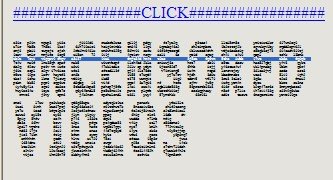
When I previewed the message, I got this picture -


I was curious - not for the uncensored videos - I live in a country that liberated porn in 1969, so nothing is censored here - but for the funny graphics. Using the mouse, I realized that it was actually text, no a picture. The text is used for drawing larger letters, just like the banner pages on a line printer. I remember creating such a program once in Cobol...

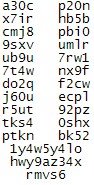
Anyway I selected a line of text before taking the screen shot as you can see from the blue line. To get into more detail, I copied all the 'uncensored' lines, pasted them into notepad and isolated the U - to make this more readable for you -

As you can see, the picture is drawn from different letters. I wonder how a antispam product will be able to detuct this kind of message, containing no 'nasty' word. I fact, the big letters could be made up of non-spamish sentences.
Spammers seem to be very creative.

Sunday, June 11, 2006

Windows Vista beta 2 testing

Just got a brand new Dell Latitude D820 with the necessary power to run Vista including Aero (NVIDIA GeForce Go 7400/Quadro NVS 120M). The aim is to use it for testing Vista and Office 2007 and to automate the installation, so I can rebuilt it with SMS whenever Vista, Office or the drivers get updated.

My first major obstacle was to get a grahics driver - the NVidia Forceware beta 88.61 did not recognize my hardware (even though the claim it is a universal driver).

Well today I browser the Dell forums and found this thread which linked be to the Nicke Anderson blog and finally it ended up at Laptop Video 2 Go, which have a modded nv_disp.inf that did the job. I included all the steps in my search, so you can get all the details yourself.

After installing the driver with the modded .inf, I just had to adjust the display resolution (1920x1200 nice!) and select the Aero color scheme.

So, now I'll continue my tests...

Thursday, May 25, 2006

LCS, Audio/video, file transfers and firewalls

I was responding to a question on the ASP.NET forums and thought it would be a good contribution to msgoodies (Almost unedited so maybe I will update it some day to be more thorough ;-)

The question was

What happens when a LCS solution sits behind a firewall/nat?

The answer is -

It is possible to do file transfers and audio/video in a hosted or enterprise LCS environment, where LCS sits behinds a NAT/firewall but it all depends on your configuration of LCS and/or Office Communicator and/or your firewall.

For a start LCS is basically a SIP Server and SIP is of course Session Initiation Protocol. In SIP you use what we refer to as a triangle. User A will initally communicate with User B through the LCS server and SIP, but when a user decides to start a session with e.g. audio/video or file transfers, the server will help the client negotiate the right protocols etc. and when this is in place the clients will communicate directly with each other (Thereby creating the SIP triangle between both User A, User B talking with each other and both talking with the LCS server). So only SIP is passed through the server and the rest is usually done peer to peer.

So why is it not working for you? A lot of reasons for this might apply, which I try to explain in the following -

Office Communicator
Well for one you need to check or set the relevant Group Policies. You can do this by importing the Communicator.adm file in to the Administrative Templates in the Computer Configuration part of the GPO (Or by setting the relevant registry keys manually). The interesting parts here are SIP Security mode, where High Security mode will require encrypted SIP communication but still allow P2P filetransfers and audio/video, but it disables the use of uPnP, which sometimes is necessary if one of the parties involved in the communication is sitting behind e.g. a Wireless ADSL Router/Packet filtering firewall. The other interesting policy is obviously the policy called "Prevent File Transfer".

Server
On the server side IMFilter.am is enabled by default on the Access Proxy and it disables file transfers and URLs in IM's, so instead I would deploy the LCS Intelligent IM Filter which is more configurable in terms of allowing certain file types.
Furthermore if you implement e.g. Sybari Antivirus on the server all file transfers are forced to go through the server (Thereby needing to open the ports used for TFTP through the Service Providers firewall).

Firewall
In the case of file transfers the protocol used is TFTP over TCP and it runs over port 6891-6900 (Allowing for 10 concurrent file transfers). For application sharing T.120 through Port 1503 is used and for audio/video a combination of RTP / RTCP is used. You can find more info in KB 903056 and in the article Windows Messenger in Windows XP (Note that Office Communicator uses the underlying technologies of Windows Messenger and thereby have the same restrictions).

Conclusion
The sum is that in a hosted or enterprise LCS scenario, all audio/video, file transfers and application sharing can work perfectly internally between desktops and mobile devices (Communicator Mobile) at the customer (Assuming they are not firewalling between internal network segments). But when a client needs to communicate with users outside their firewall, the same restrictions apply that apply for companies deploying their own LCS solution. NetMeeting is an old product and just doesn't handle traversing firewalls and NATs very well (even though some workarounds can be made) and this is probably why it is deprecated in Windows Vista (See RTC Client API's and Vista). The next version of LCS called Live Server and Office Communicator will supposedly handle this "in another way" but we will have to wait a couple of months until Microsoft will go public with more info in this product (Launching just after Office 2007).

Monday, May 22, 2006

How to delete a contact for several users in LCS / Office Communicator

A little follow-up to my earlier post on Populating Users in Office Communicator / LCS. If you want to delete a contact for all users (E.g. for a employee leaving the company) - you can remove the /contactsgroup parameter and instead use the /delete paramater e.g. -

cscript LCSAddContacts.wsf /usersfile:contacts.txt
/contactsfile:delete.txt /delete
(Wrapped for readability)

The syntax of the contacts.txt and delete.txt input file is -

sip:jens@inceptio.dk
sip:peter@inceptio.dk

Check my earlier post for further info.

Tuesday, May 02, 2006

What drink should I serve?

Well, simply look at the drink property in Active Directory. Yes, it really exists!

Came across it from this blog.

BTW: The answer is G&T if you are going to buy me one...

Friday, April 28, 2006

Support issues with Communicator Mobile

Tom has posted a Product Support Guide for Communicator Mobile on his blog, containing issues that isn't part of the release notes or accompanying documentation (As of yet).

One of the things he notes is that installation of Communicator Mobile isn’t supported on Storage Cards (As I enjoy to do with the limited memory on my Qtek 8310), also it explains why CoMO sometimes can be unresponsive.

Find the guide here.

Wednesday, April 26, 2006

Exchange 12 / Monad name changes

Just a quick note - At the MMS in San Diego there were a few announcements on this. Exchange 12 is now named Exchange Server 2007, and Monad is now Windows PowerShell.

Sunday, April 23, 2006

Where Vista Fails

Interesting article with some harsh comments from Paul Thurrot -

The company itself has turned into that thing it most hated (read:
IBM)

The bad news, then, is that UAP is a sad, sad joke. It's the most annoying feature that Microsoft has ever added to any software product, and yes, that
includes that ridiculous Clippy character from older Office versions.

On Media Center: It's a horrid update to a wonderful bit of software, an ugly stepchild of beautiful parents.

Feature complete, my butt

OK, let's not get silly here. I don't hate Windows Vista ... That's not
horrible. It's just not what was promised.


Read it all here (Btw. I'm downloading build 5365 for my x64 notebook now - lets hope it has improved since 5342, which IMHO was way to unstable to do any testing on). Originally seen on bink.nu

Microsoft Office Communicator Mobile released

I've been using Office Communicator Mobile since the first beta released last year and was happy to get an e-mail from the beta team, stating that it finally has been released to the web (And also last week I heard that the RC of Qtek 8310 AKU2 was released - so we will probably soon see the final version).

So what's in the product ?
  • A new Home/Today screen showing you availability
  • Presence on your contacts including federated and PIC users (Including their icons)
  • Contact information like "Idle since .." and Outlook calender information like "Free for next 2 hours"
  • Escalation from IM conversation to phone calls
  • VoIP calls through Wireless LANs (No firewall traversall though - so just internal within the companys network)
  • 3rd Party Call Control like changing your desk/work phone forwarding settings
  • E-mailing the content of an IM conversation
  • And much more ;-)
You can find information here -
And the download here.

Thursday, April 20, 2006

runas without domain trusts

Being a consultant, I often work from my own laptop on my customers computers. This often results in a lot of commands like these -
net use \\server\ipc$ /user:custdomain\account

Recently, I discovered, that I could actually create a new process with runas and use my customer credentials from that process. The trick is the /netonly argument. If I do a -
runas /user:custdomain\account /netonly cmd
I end up with a command prompt running as my normal user. But when I access network resources from that command prompt - or any child processes - I do it with my customer credentials. Needless to say, this saves a lot of tedious work.

Remember that if you do somethings, that invokes Explorer, you are often back to your default credentials - read more here.

When you use /netonly, you can actually specify any domain\user you like. The security check will - as always - be made when you try to access a resource.

Finding and fixing those LUA problems

Back in 1997, I was working at LEGO doing a PC project based on Windows NT workstation. The goal was end-users without local administrative permissions. This made perfectly sense, as we came out of a OpenVMS environment where that was the norm.
Back then, we learned the hard way how difficult it was to do this and without regmon and filemon we never could have do it. Back then the problem was lack of documenation - today the problem is the waste amount of documentation - and when you finally hit the right spot you sometimes find that the detail you were looking for was left out of the documentation - or simply wrong.
Things have improved when it comes to using LUA but there are still a way to go before nirvana is reached.
Aaron Margosis created a series of articles on this - and the best is the prioritized approach he has taken - i.e. should I start tweaking the registry permissions first or should I copy parts of the class registry to HKCU? Read it all here and here.

Also read my LUA article about controlling permissions with Group Policy.

Thursday, April 13, 2006

To be or not to be - really random

Having the flu - this is day #5 - I found energy to browse dibert.com to motion my cheeks. I saw Scott Adams blog and had to read it as I like his twisted mind. From there I came across a reference to real random numbers called HotBits. The most interesting part was the How HotBits Works. This explains parts of quantum physics in a really simple way - e.g. that a beta particle is simply an electron and that gamma ray is simply high energy photons.
So is this really 'in scope' of this blog? Hmmm - well random numbers are - else simply blame it on the flu.

Wednesday, April 12, 2006

Microsoft Exchange's 10 year anniversary

As one of my contacts at Microsoft just pointed out, Microsoft Exchange was released more than 10 years ago in March 1996. It also means that I now have been a MCP for 12 years (Since April 1994); time has certainly gone fast since Microsoft Advanced Server 3.1 was the new kid on the block and it was unique to be a MCSE (I still remember competing with Per to be the first MCSE+I). I personally started working with OS/2 LanServer and Lotus cc:Mail and variations of Microsoft Mail and later evolved to Exchange 4.0 and Exchange 5.0/5.5, where clustering were one of my specialities and also my first piece published to the web was on the subject of Tips for Clustering Exchange Successfully (In the days of NT 4.0 and Exchange 5.5).

Windows IT Pro has released a very good article series by well known Industry Experts like Tony Redmond, Kevin Laahs and Kieran McCorry (All former colleagues at Digital/Compaq), Eric Legault and Pierre Bijaoui. It’s called A Decade of Exchange and it is certainly worth a read.

More interesting, to me anyway, is the future of Exchange in the Unified Communications group. We are probably going to witness a unification of Exchange, Live Communications Server (SIP) and related Voice services (VoIP, PBX, Centrex etc.), the interesting part here will ultimately be which technologies will be delivered by Microsoft and which will be delivered by 3rd party products. Also the evolution of SIP and perhaps disruptive Peer-to-Peer SIP standards/products and its impact on e.g. Microsoft UC and telephony service providers (And vendors) will be interesting to follow on the side-/frontline.

In my world Live Communications Server and the upcoming Live Server and their integration in Exchange and to CSTA, VoIP and MCU’s will certainly continue to be a main focus.

Monday, April 10, 2006

Sending IM messages through scripts

Would you like to send an instant message through script like this -

cscript lcsSendmsg.vbs administrator@managenet.com.au
"Hello world how are you doing”


Then look no further than Glen's Exchange Dev Blog and his post on the subject, where he uses the newly announced AJAX SDK for the purpose (Btw. if your scripting against Exchange his blog is certainly worth a look; in this case I'm only sorry that I didn't get around to write the script ;-)

Tuesday, April 04, 2006

Office Communicator Web Access AJAX Service SDK 1.0

Microsoft has released the Office Communicator AJAX Service SDK 1.0 including the following sample applications:

A simple instant messaging (IM) client written in JavaScript.
A simple instant messaging (IM) client written in C#.
A C# application that receives events from Communicator Web Access and displays them, as well as the methods that are being sent to the server, in JSON format.
You can find it here

Saturday, April 01, 2006

Corrupted logon Web page when you try to log on to Communicator Web Access

If you are running Windows 2000 on your clients, and they are accessing an internal CWA Server, you may have had problems with corrupted web logon pages. Microsoft has now released a public hotfix for this problem.

See the KB describing the problem, download the hotfix and the description here

Friday, March 31, 2006

Vista feature summation

If you want to know what kind of beast Windows Vista is, then there is a nice summary to be found here -

http://en.wikipedia.org/wiki/Windows_Vista

Also if you want to know more about the new features (Including those features from XP not making it to Vista), there's a nice wiki here -

http://en.wikipedia.org/wiki/Features_new_to_Windows_Vista

(Thanks to Steffen Madsen from Inceptio A/S for the hint).