According to a press release from Citrix, they have just released a new MP integrating Presentation Server 4 and MetaFrame (Presentation Server 3) with MOM 2005.
This is great news for customers having both products.
Thursday, November 17, 2005


Exchange 12 will be 64 bit only
Microsoft announced yesterday that it will be 64 bit only as they have seen significant performance gains on this platform -
Read more at Eileen's post and in the official press release.
They tested Exchange on 64 bit and found almost a 75% reduction in IOs per second compared with Exchange 2003. This could result in almost a 4X increase in the number of users on the same disks or require 1/4 the disks to support the same users from a throughput perspective.
Read more at Eileen's post and in the official press release.
Wednesday, November 16, 2005
Enabling Exchange 2003 SP2 IMF v2
So you've uninstalled IMF v1, installed SP2, set the SCL thresholds and actions correctly and everything should be fine but UCE keeps arriving at your inbox?
Well it might be because you forgot the last bit - namely setting the Default SMTP Virtual Server properties for each SMTP server correctly. Under the General tab, IP Address, Advanced, Edit there’s a checkbox called "Apply Intelligent Message Filter".
If you can't find it then visit Vladimir’s blog, which contains detailed instructions (with pictures ;-) for enabling IMF v2.
Well it might be because you forgot the last bit - namely setting the Default SMTP Virtual Server properties for each SMTP server correctly. Under the General tab, IP Address, Advanced, Edit there’s a checkbox called "Apply Intelligent Message Filter".
If you can't find it then visit Vladimir’s blog, which contains detailed instructions (with pictures ;-) for enabling IMF v2.
New whitepaper on HMC use of privileged users, security groups and permission
Conrad Agramont has written an interesting whitepaper that tries to accomplish the following -
The HMC solution includes documentation and deployment tools that will provide instructions for or will automate the creation of user accounts, security groups, and permissions. However, there isn’t a single view for all of the accounts and their "final” implementation. The purpose of this document is to provide such a view.For anyone new to HMC it gives a good overview of the solutions use of accounts and security groups. It is based on HMC 3.0 - but so far that I can se it will also be applicable for the upcoming HMC 3.5 release (I'm in Redmond on HMC 3.5 training but we have been explicitly asked not to blog about the new features in HMC 3.5).
LCS and Network Load Balancing
I've have had a few questions on using hardware load balancers versus using Windows Server 2003 Network Load balancing. The important note is the following quote from the "Live Communications Server 2005 Enterprise Pools and Windows 2003 Network Load Balancing" deployment guide -
Using hardware load balancers is strongly recommended. Microsoft Windows® NLB may be used for evaluation, test, and pilot systems or for small, nonmission critical deployments.Furthermore there are the following limitations with using NLB -
So the short answer is - don't do it !1. Remote administration using the Live Communications Server snap-in is not supported. The front-end Enterprise Servers will have to be managed by running the administrative snap-in locally and not from a remote computer.
2. Multiple pools within an organization are not supported.
Sony XCP uninstaller opens a new security hole!
The first version of the uninstall software that Sony has delivered opens yet another security hole according to a Princeton researcher -
Read more here Update: Sony Uninstaller Hole Stays Open
Due to a serious design flaw, the CodeSupport component allows any web site you visit to download and run software on your computer. A malicious web site author can write an evil program, package up that program appropriately, put the packaged code at some URL, and then write a web page that causes CodeSupport to download and run code from that URL.
Read more here Update: Sony Uninstaller Hole Stays Open
Saturday, November 12, 2005
Mark won the "war" against Sony BMG - update #3
Last update #3 - read Marks post Victory! (No further explanation required ;-)
According to eWeek Mark Russinovich apparently won the "war" against Sony in the combat against the cloaking methods used in their DRM software (Source).
If you haven't followed the story then go to his blog and read the first post Sony, Rootkits and Digital Rights Management Gone Too Far - there are a lot of interesting insights and comments to his his first and the following posts on the subject (1, 2, 3)
UPDATE - Mark has written a follow-up story after Sony's retreat Sony: No More Rootkit - For Now also Microsoft is going to include detection and removal of the rootkit in Windows AntiSpyware and the upcoming Windows Defender (Source). Congratulations to Mark and all who will benefit from his fight !!!
UPDATE #2 - Someone actually sat down, read the EULA and summed up the result of it; check out these examples -
According to eWeek Mark Russinovich apparently won the "war" against Sony in the combat against the cloaking methods used in their DRM software (Source).
If you haven't followed the story then go to his blog and read the first post Sony, Rootkits and Digital Rights Management Gone Too Far - there are a lot of interesting insights and comments to his his first and the following posts on the subject (1, 2, 3)
UPDATE - Mark has written a follow-up story after Sony's retreat Sony: No More Rootkit - For Now also Microsoft is going to include detection and removal of the rootkit in Windows AntiSpyware and the upcoming Windows Defender (Source). Congratulations to Mark and all who will benefit from his fight !!!
UPDATE #2 - Someone actually sat down, read the EULA and summed up the result of it; check out these examples -
If your house gets burgled, you have to delete all your music from your laptop when you get home. That's because the EULA says that your rights to any copies terminate as soon as you no longer possess the original CD.
You must install any and all updates, or else lose the music on your computer. The EULA immediately terminates if you fail to install any update. No more holding out on those hobble-ware downgrades masquerading as updates.
Sony-BMG can install and use backdoors in the copy protection software or media player to "enforce their rights" against you, at any time, without notice. And Sony-BMG disclaims any liability if this "self help" crashes your computer, exposes you to security risks, or any other harm.
If you file for bankruptcy, you have to delete all the music on your computer. Seriously.
Friday, November 11, 2005
Solution for adding own root certificates to Windows Mobile 5 devices - Updated
Per and I just received our new Qtek 8310 mobile devices today and got into trouble when we tried to add our own root certificate.
On Pocket devices and in Windows Mobile 2003 SE you just copy the certificate to the device and doubleclick it from File Explorer. But on the Qtek 8310 we got the error "Security permission was insufficient to update your device". In desperation, we also tried to use the SPAddcert.exe utility for Windows Mobile 2002 and 2003 Smartphone edition and received the message "The phone may be locked".
The problem were due to changes in the security model in Windows Mobile 5. Although it is very interesting/innovative in terms of mobile device security (Protecting from malicious software) it isn’t something we like when we want our new gadgets to work with WPA and Exchange Server ActiveSync.
Using Google intensively, I finally found the direction for solving the problem (the first version of this post) and using MSDN I found a better solution as follows -
First you need to get a copy of regeditSTG.exe (Apparently a HTC signed registry editor with an issuer CN that equals HTCCanary) zip it and move it to your device (You get an error if you copy the .exe directly). Now unzip it by double clicking it from File Explorer (on your device) and run the program. Then change the Grant Manager Policy registry key (Remember to note the old value) -
HKLM\Security\Policies\Policies\00001017 = 144
After setting the registry key above reboot your device, copy your root certificate to the File Explorer and click to install it (There’s no feedback that the operation was successful – check settings, security, certificates, root certificates for the existence of your certificate).
Before proceeding, we choose to set the registry setting back to the original values so the Phone was once again protected and finally Exchange ActiveSync and WPA worked like a charm ;-)
The solution apparently works on several different devices like i-Mate, C550, Qtek 8310 (Thats the only one we tested - don't ask about the others but do feel free to comment on those that works ;-) and probably most Windows Mobile 2005 Smartphone devices.
A utility called SDA_ApplicationUnlock.exe can also be found on the Internet but our testing shows us that it does the same as the Grant Manager Policy registry key. The problem with this application is that it only has a "Remove Lock" feature and no "Enable Lock" feature. Different posts/websites show the solution for other phones that include the use of SDA_ApplicationUnlock.exe utility; so if you run into problems you might want to try it.
Disclaimer - We don't know the copyrights on the mentioned utilities - so this posting is only meant for informational purposes and be sure to get correctly licensed versions of these!
On Pocket devices and in Windows Mobile 2003 SE you just copy the certificate to the device and doubleclick it from File Explorer. But on the Qtek 8310 we got the error "Security permission was insufficient to update your device". In desperation, we also tried to use the SPAddcert.exe utility for Windows Mobile 2002 and 2003 Smartphone edition and received the message "The phone may be locked".
The problem were due to changes in the security model in Windows Mobile 5. Although it is very interesting/innovative in terms of mobile device security (Protecting from malicious software) it isn’t something we like when we want our new gadgets to work with WPA and Exchange Server ActiveSync.
Using Google intensively, I finally found the direction for solving the problem (the first version of this post) and using MSDN I found a better solution as follows -
First you need to get a copy of regeditSTG.exe (Apparently a HTC signed registry editor with an issuer CN that equals HTCCanary) zip it and move it to your device (You get an error if you copy the .exe directly). Now unzip it by double clicking it from File Explorer (on your device) and run the program. Then change the Grant Manager Policy registry key (Remember to note the old value) -
HKLM\Security\Policies\Policies\00001017 = 144
After setting the registry key above reboot your device, copy your root certificate to the File Explorer and click to install it (There’s no feedback that the operation was successful – check settings, security, certificates, root certificates for the existence of your certificate).
Before proceeding, we choose to set the registry setting back to the original values so the Phone was once again protected and finally Exchange ActiveSync and WPA worked like a charm ;-)
The solution apparently works on several different devices like i-Mate, C550, Qtek 8310 (Thats the only one we tested - don't ask about the others but do feel free to comment on those that works ;-) and probably most Windows Mobile 2005 Smartphone devices.
A utility called SDA_ApplicationUnlock.exe can also be found on the Internet but our testing shows us that it does the same as the Grant Manager Policy registry key. The problem with this application is that it only has a "Remove Lock" feature and no "Enable Lock" feature. Different posts/websites show the solution for other phones that include the use of SDA_ApplicationUnlock.exe utility; so if you run into problems you might want to try it.
Disclaimer - We don't know the copyrights on the mentioned utilities - so this posting is only meant for informational purposes and be sure to get correctly licensed versions of these!
Thursday, November 10, 2005
EASI passport domains support in PIC / LCS 2005 SP1
As opposed to the information in KB897567 Rev. 3.0 with the short name "Known issues that occur with public instant messaging after you install Office Live Communications Server Service Pack 1" EASI domains are supported by now (Actually by October 11th). Earlier only domains like hotmail.com, messengeruser.com etc. were supported with MSN Messenger connectivity but now domains/addresses like dlt@inceptio.dk are also fully supported (I've just tested it together with a Microsoft contact of mine).
You will have to add EASI passports using a special syntax of user(easidomain.com)@msn.com e.g. the EASI passport msnuser@inceptio.dk would translate to msnuser(inceptio.dk)@msn.com.
If you are considering using PIC then there are many interesting quirks documented in the KB article. One of them is that the MPOP functionality doesn’t work together with MSN/Yahoo/AOL (MPOP is Multiple Points Of Presence where Office Communicator 2005 supports being logged on to several devices at the same time - including the upcoming Microsoft Office Communicator Mobile).
Furthermore, if you're using multiple domains in LCS then be sure to get a public certificate from a provider that supports Subject Alternative Names (Source).
You will have to add EASI passports using a special syntax of user(easidomain.com)@msn.com e.g. the EASI passport msnuser@inceptio.dk would translate to msnuser(inceptio.dk)@msn.com.
If you are considering using PIC then there are many interesting quirks documented in the KB article. One of them is that the MPOP functionality doesn’t work together with MSN/Yahoo/AOL (MPOP is Multiple Points Of Presence where Office Communicator 2005 supports being logged on to several devices at the same time - including the upcoming Microsoft Office Communicator Mobile).
Furthermore, if you're using multiple domains in LCS then be sure to get a public certificate from a provider that supports Subject Alternative Names (Source).
Wednesday, November 09, 2005
Mobile Communicator Beta 1 released
I just received an e-mail that the Beta 1 for Mobile Communicator has been released. This product is a "mobile" version of Office Communicator 2005 designed for Windows Mobile 2003 SE and Windows Mobile 2005 and it appearently includes VoIP functionality and remote call control. I personally look forward to testing this product and I'm already downloading it - but I will have to wait for my new Qtek 8310 (a.k.a. HTC Tornado) that arrives Thursday this week :-)
This is the first version of Next Gen line of products that also will include new versions of Live Meeting with multipoint audio/video and VoIP as the significant enhancements.
I will get back to you with a small review of the product and also information on Live Communications Server 2005 in the near future.
This is the first version of Next Gen line of products that also will include new versions of Live Meeting with multipoint audio/video and VoIP as the significant enhancements.
I will get back to you with a small review of the product and also information on Live Communications Server 2005 in the near future.
Tuesday, November 01, 2005
Changes to Virtual Server and VMWare support
There’s a couple of new changes on support for virtualization software one of them is the change to support for Exchange Server under Virtual Server that we've earlier reported would happen as part of Exchange 2003 Sp2, this is still true but apparently Virtual Server R2 or later will also be required.
On another story Microsoft also changed the support policy for other non-Microsoft hardware virtualization software (a.k.a. VMWare). Now they will provide “commercially reasonable efforts” to test the software - but only for Premier Support customers and furthermore they may require a reproduction "independently from the non-Microsoft hardware virtualization software" ;-)
On another story Microsoft also changed the support policy for other non-Microsoft hardware virtualization software (a.k.a. VMWare). Now they will provide “commercially reasonable efforts” to test the software - but only for Premier Support customers and furthermore they may require a reproduction "independently from the non-Microsoft hardware virtualization software" ;-)
Tuesday, October 11, 2005
Limits of search categories
Blogger does not have categories as a standard feature but Amy has found an interesting way to use Blogger Search for this, which I have implemented in the sidebar.
Note that the search has Limited capabilities and won't find all posts in a given category. Especially older posts before mid 2005 won't be a part of the searches. Check out Blogger Help on Blog Search for further info.
Note that the search has Limited capabilities and won't find all posts in a given category. Especially older posts before mid 2005 won't be a part of the searches. Check out Blogger Help on Blog Search for further info.
Monday, October 03, 2005
Setting SMS 2003 Cache Tombstone Duration
If you are downloading before running a lot in SMS - i.e. making SMS copy the package down to its cache before running the program - you may have come across the problem that the cache is full, even though all your programs have finished and you'd expected that it had freed the cache entries.
Well, SMS keeps the cache entries around for at least a day - just in case you need it again, I guess. In normal circumstances, that could be ok, but if you are installing a fresh PC with a lot of packages, this cache strategy can get you in space problems.
Microsoft writes about it in KB 839513 - How the Systems Management Server 2003 Advanced Client manages its cache. Microsoft states that the cache tombstone duration is 24 hours.
Microsoft draws you attention to the SDK, especially the CacheInfo object. But this object only allows you to read the tombstone duration.
What they do not mention, is that you can simply tweak the cache tombstone duration, so the problem is gone or at least highly reduced. You do that by creating a MOF file - say SetCacheTombstoneDuration.mof - with these lines (sorry about the tiny font - I try to prevent the lines from wrapping)
#pragma namespace("\\\\.\\root\\ccm\\policy\\machine\\requestedconfig") [CCM_Policy_PartialPolicy(true)]
instance of CCM_SoftwareDistributionClientConfig
{
SiteSettingsKey = 1;
// Override only this property,
// all others come from the Site/Management Point
PolicySource = "Local";
// 5 min, default 86400 - one day
[CCM_Policy_Override(true)] CacheTombstoneContentMinDuration = 300;
};
Send the program to the relevant clients and execute it with -
mofcomp SetCacheTombstoneDuration.mof
That is all these is to it.
I cannot see that this method give any side-effects - but I also cannot guarantee it. If you experience any problems, please feel free to share your experience as comments to this entry.
Well, SMS keeps the cache entries around for at least a day - just in case you need it again, I guess. In normal circumstances, that could be ok, but if you are installing a fresh PC with a lot of packages, this cache strategy can get you in space problems.
Microsoft writes about it in KB 839513 - How the Systems Management Server 2003 Advanced Client manages its cache. Microsoft states that the cache tombstone duration is 24 hours.
Microsoft draws you attention to the SDK, especially the CacheInfo object. But this object only allows you to read the tombstone duration.
What they do not mention, is that you can simply tweak the cache tombstone duration, so the problem is gone or at least highly reduced. You do that by creating a MOF file - say SetCacheTombstoneDuration.mof - with these lines (sorry about the tiny font - I try to prevent the lines from wrapping)
#pragma namespace("\\\\.\\root\\ccm\\policy\\machine\\requestedconfig") [CCM_Policy_PartialPolicy(true)]
instance of CCM_SoftwareDistributionClientConfig
{
SiteSettingsKey = 1;
// Override only this property,
// all others come from the Site/Management Point
PolicySource = "Local";
// 5 min, default 86400 - one day
[CCM_Policy_Override(true)] CacheTombstoneContentMinDuration = 300;
};
Send the program to the relevant clients and execute it with -
mofcomp SetCacheTombstoneDuration.mof
That is all these is to it.
I cannot see that this method give any side-effects - but I also cannot guarantee it. If you experience any problems, please feel free to share your experience as comments to this entry.
Wednesday, September 28, 2005
netstat -b (and -v)
I just learned something useful - so this day is not completely wasted ;)
On Windows XP SP2 and Windows Server 2003 SP1 netstat got a new -b argument.
So what does it do? It lists the executable using the connection. No more need to consolidate information between netstat -o and task manager or such :D
Example output:
TCP MyPC:4137 baym-cs344.msgr.hotmail.com:1863 ESTABLISHED 1532
[msnmsgr.exe]
-v gives even more information (and is quite slow):
TCP MyPC:4137 baym-cs344.msgr.hotmail.com:1863 ESTABLISHED 1532
C:\WINDOWS\System32\mswsock.dll
C:\WINDOWS\system32\WS2_32.dll
C:\Program Files\MSN Messenger\msnmsgr.exe
C:\WINDOWS\system32\USER32.dll
[msnmsgr.exe]
Try it for yourself...
On Windows XP SP2 and Windows Server 2003 SP1 netstat got a new -b argument.
So what does it do? It lists the executable using the connection. No more need to consolidate information between netstat -o and task manager or such :D
Example output:
TCP MyPC:4137 baym-cs344.msgr.hotmail.com:1863 ESTABLISHED 1532
[msnmsgr.exe]
-v gives even more information (and is quite slow):
TCP MyPC:4137 baym-cs344.msgr.hotmail.com:1863 ESTABLISHED 1532
C:\WINDOWS\System32\mswsock.dll
C:\WINDOWS\system32\WS2_32.dll
C:\Program Files\MSN Messenger\msnmsgr.exe
C:\WINDOWS\system32\USER32.dll
[msnmsgr.exe]
Try it for yourself...
Sunday, September 25, 2005
Granting access to eventlogs on Windows Server 2003
When Windows Server 2003 came out, a more flexible method for granting access to eventlogs was made available. A REG_SZ called CustomSD below HKLM\System\CCS\Services\Eventlog\NameOfLog contains an SDDL string with the specified access. This can be automated using the suggested Group Policy changes or you can use a script like the one below. This script attempts to find a local admin for a given AD site and grant this person and a global Security Reviewer role read access to the server at hand. This script could be used as a startup script on the servers, you want to delegate access to.
The WSF script -
<job>
<script language="vbscript">
Option explicit
main
sub main
dim strLocalAdminSid
dim strSecurityReviewerSid
strLocalAdminSid = GetSidForGroup("Local Admin for " & GetSite)
strSecurityReviewerSid = GetSidForGroup("Security Reviewer Role")
UpdateEventlogAccess strLocalAdminSid
UpdateEventlogAccess strSecurityReviewerSid
end sub
sub UpdateEventlogAccess(strSID)
' Give user read access to eventlog
const ROOTKEY="HKLM\SYSTEM\CurrentControlSet\Services\Eventlog"
dim objShell
dim strSDDLKey
dim strSDDL
dim strReadAccessSDDL
const NOSUCHKEY=&h80070002
dim objEventLog
dim lngError
set objShell = CreateObject("wscript.shell")
for each objEventlog in GetObject("winmgmts:")._
InstancesOf("win32_NTeventlogFile")
wscript.echo objEventlog.Logfilename
strSDDLKey=ROOTKEY & "\" & _
objEventlog.Logfilename & "\CustomSD"
on error resume next
strSDDL=objShell.RegRead(strSDDLKey)
lngError=err
on error goto 0
if lngError<>0 then
' Key not found - so we can’t do anything
else
wscript.echo "Existing SDDL - " & strSDDL
' check if key needs to be updated
strReadAccessSDDL = "(A;;0x01;;;" & strSID & ")"
if instr(strSDDL,strReadAccessSDDL)=0 then
strSDDL=strSDDL & strReadAccessSDDL
objShell.RegWrite strSDDLKey, strSDDL, "REG_SZ"
wscript.echo "New SDDL - " & strSDDL
end if
end if
next
end sub
function GetSite
dim objInfo
set objInfo = CreateObject("ADSystemInfo")
GetSite = objInfo.SiteName
end function
function GetSidForGroup(strName)
dim objWMIService
dim objItems
dim objItem
dim strSID
Set objWMIService = GetObject("winmgmts:\\.\root\cimv2")
Set objItems = objWMIService.ExecQuery _
("Select * from Win32_Group Where name='" & strName & "'")
For Each objItem in objItems
strSID = objItem.SID
Next
GetSidForGroup=strSID
end function
</script>
</job>
Use it at your own risk - but have fun!
The WSF script -
<job>
<script language="vbscript">
Option explicit
main
sub main
dim strLocalAdminSid
dim strSecurityReviewerSid
strLocalAdminSid = GetSidForGroup("Local Admin for " & GetSite)
strSecurityReviewerSid = GetSidForGroup("Security Reviewer Role")
UpdateEventlogAccess strLocalAdminSid
UpdateEventlogAccess strSecurityReviewerSid
end sub
sub UpdateEventlogAccess(strSID)
' Give user read access to eventlog
const ROOTKEY="HKLM\SYSTEM\CurrentControlSet\Services\Eventlog"
dim objShell
dim strSDDLKey
dim strSDDL
dim strReadAccessSDDL
const NOSUCHKEY=&h80070002
dim objEventLog
dim lngError
set objShell = CreateObject("wscript.shell")
for each objEventlog in GetObject("winmgmts:")._
InstancesOf("win32_NTeventlogFile")
wscript.echo objEventlog.Logfilename
strSDDLKey=ROOTKEY & "\" & _
objEventlog.Logfilename & "\CustomSD"
on error resume next
strSDDL=objShell.RegRead(strSDDLKey)
lngError=err
on error goto 0
if lngError<>0 then
' Key not found - so we can’t do anything
else
wscript.echo "Existing SDDL - " & strSDDL
' check if key needs to be updated
strReadAccessSDDL = "(A;;0x01;;;" & strSID & ")"
if instr(strSDDL,strReadAccessSDDL)=0 then
strSDDL=strSDDL & strReadAccessSDDL
objShell.RegWrite strSDDLKey, strSDDL, "REG_SZ"
wscript.echo "New SDDL - " & strSDDL
end if
end if
next
end sub
function GetSite
dim objInfo
set objInfo = CreateObject("ADSystemInfo")
GetSite = objInfo.SiteName
end function
function GetSidForGroup(strName)
dim objWMIService
dim objItems
dim objItem
dim strSID
Set objWMIService = GetObject("winmgmts:\\.\root\cimv2")
Set objItems = objWMIService.ExecQuery _
("Select * from Win32_Group Where name='" & strName & "'")
For Each objItem in objItems
strSID = objItem.SID
Next
GetSidForGroup=strSID
end function
</script>
</job>
Use it at your own risk - but have fun!
Wednesday, September 14, 2005
Microsoft re-issues SP4 Rollup 1
As reported earlier Microsoft has now re-released Windows 2000 SP4 Rollup 1 due to customers problems with the Rollup. Some of these can be found in the comments part of my first posting - but according to the KB it doesn't seem to address the problems regarding SNMP reporter by our readers (Source can be found here)
Thursday, August 18, 2005
One Management Pack to Monitor them all...
The management pack called Microsoft Management Pack Notifier is very useful as you do not have to monitor the Microsoft sites to get the latest MPs. This MP will do the job for you. Unfortunately, it does not monitor report versions.
To benefit from it, first download and install the MSI package. It creates Microsoft Management Pack Notifier.akm (and an EULA and a readme) below %programfiles%\MOM 2005 Management Packs\Microsoft Management Pack Notifier.
It seems to be old stuff, now being released for the public. The file is dated November 11th 2004.
Next import this MP from the administrator console using the Management Pack Import/Export Wizard. Remember to select 'Import Management Packs only' or you may be stuck in the Wizard when you must specify report to import (you can though step back).
The MP creates a new rule group called Microsoft Operations Manager MPNotifier, creates a new computer group called Microsoft Operation Manager MPNotifier MOM Server. The rule group contains a rule that check the versions against microsoft.com. This rule has a provider called MPNotifier-Schedule daily which runs the Microsoft MPNotifier Version Check script daily. Another rule fires off an alert when the versions mismatch. Finally an alert rule forwards the alerts to the Operation Manager Administrators notification group. I do not know why, but on my RTM test system, it does not fire off any alerts - I only get events.
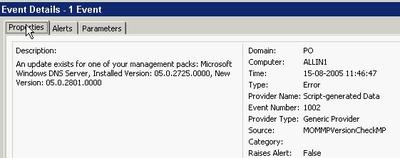
An event looks like this -
You must manually add the server you want to check microsoft.com for updates to the new computer group. Keep in mind that the agent account on the server in question must have http access to microsoft.com across any firewall in the path. The actual URL it uses can be found in the script and is http://www.microsoft.com/management/mma/momnotifier.xml.
Unfortunately, the XML does not provide a direct download link. Let us hope, that will be added in the next release. Ideally, it should provide the option of downloading the files and even upgrade the MPs. The latter for test environments only naturally ;).
To benefit from it, first download and install the MSI package. It creates Microsoft Management Pack Notifier.akm (and an EULA and a readme) below %programfiles%\MOM 2005 Management Packs\Microsoft Management Pack Notifier.
It seems to be old stuff, now being released for the public. The file is dated November 11th 2004.
Next import this MP from the administrator console using the Management Pack Import/Export Wizard. Remember to select 'Import Management Packs only' or you may be stuck in the Wizard when you must specify report to import (you can though step back).
The MP creates a new rule group called Microsoft Operations Manager MPNotifier, creates a new computer group called Microsoft Operation Manager MPNotifier MOM Server. The rule group contains a rule that check the versions against microsoft.com. This rule has a provider called MPNotifier-Schedule daily which runs the Microsoft MPNotifier Version Check script daily. Another rule fires off an alert when the versions mismatch. Finally an alert rule forwards the alerts to the Operation Manager Administrators notification group. I do not know why, but on my RTM test system, it does not fire off any alerts - I only get events.
An event looks like this -

You must manually add the server you want to check microsoft.com for updates to the new computer group. Keep in mind that the agent account on the server in question must have http access to microsoft.com across any firewall in the path. The actual URL it uses can be found in the script and is http://www.microsoft.com/management/mma/momnotifier.xml.
Unfortunately, the XML does not provide a direct download link. Let us hope, that will be added in the next release. Ideally, it should provide the option of downloading the files and even upgrade the MPs. The latter for test environments only naturally ;).
Wednesday, August 03, 2005
And I thought Power Users were a wise choice...
A lot of discussion is going on about the level of permissions one has when runing day-to-day tasks. This is not one day too early. The discussion has at least two branches: A) Administrators running without permissions and only having them when necessary and B) Standard users running as users, power users or local administrators.
Continuing on the B branch, I always thought that Power User were a pretty safe choice - at least it prevented the user from tampering with Group Policies.
This turns out to be a false feeling - even Microsoft warns us in this KB that Power Users are not safe: A member of the Power Users group may be able to gain administrator rights and permissions in Windows Server 2003, Windows 2000, or Windows XP.
Unfortunately, there are no - useful - resolution to avoid this. I would have wanted a way to tweak Power Users, so it is safe. Microsoft claims that Power Users are intended for legacy stuff and wants you to only run software certified for Windows. Get real - LOL!
Well, anyway, I think Power User is still better than local administrators - i. e. until some easy-to-use tool makes elevating to administrator easy. You could also read this post and its comments to get a feeling of how easy it is for an installation program to jeopardize the security of the system.
I came across the KB from the Hall of Shame site.
BTW: Discussion A is covered here.
Let us hope they get it right in Vista a. k. a. Longhorn as they intent.
Continuing on the B branch, I always thought that Power User were a pretty safe choice - at least it prevented the user from tampering with Group Policies.
This turns out to be a false feeling - even Microsoft warns us in this KB that Power Users are not safe: A member of the Power Users group may be able to gain administrator rights and permissions in Windows Server 2003, Windows 2000, or Windows XP.
Unfortunately, there are no - useful - resolution to avoid this. I would have wanted a way to tweak Power Users, so it is safe. Microsoft claims that Power Users are intended for legacy stuff and wants you to only run software certified for Windows. Get real - LOL!
Well, anyway, I think Power User is still better than local administrators - i. e. until some easy-to-use tool makes elevating to administrator easy. You could also read this post and its comments to get a feeling of how easy it is for an installation program to jeopardize the security of the system.
I came across the KB from the Hall of Shame site.
BTW: Discussion A is covered here.
Let us hope they get it right in Vista a. k. a. Longhorn as they intent.
Vista and Virtual PC / Server
Now that Windows Vista is the hottest news, I just want to direct you attention to the excellent Virtual PC Guy blog. Especially these two entries contains valuable information: Running Virtual Server / Virtual PC on Windows Vista Beta 1 and the opposite Running Windows Vista Beta 1 under Virtual PC / Virtual Server.
SMS 2003 SP2 Beta starts
Vacation done...
Just got the invitation to join i.e. nominate myself. It is going to be interesting to see if they drop in new features just like they did for SP1 and in that case what they will improve.
Just got the invitation to join i.e. nominate myself. It is going to be interesting to see if they drop in new features just like they did for SP1 and in that case what they will improve.
Subscribe to:
Posts (Atom)