When Windows Server 2003 came out, a more flexible method for granting access to eventlogs was made available. A REG_SZ called CustomSD below HKLM\System\CCS\Services\Eventlog\NameOfLog contains an SDDL string with the specified access. This can be automated using the suggested Group Policy changes or you can use a script like the one below. This script attempts to find a local admin for a given AD site and grant this person and a global Security Reviewer role read access to the server at hand. This script could be used as a startup script on the servers, you want to delegate access to.
The WSF script -
<job>
<script language="vbscript">
Option explicit
main
sub main
dim strLocalAdminSid
dim strSecurityReviewerSid
strLocalAdminSid = GetSidForGroup("Local Admin for " & GetSite)
strSecurityReviewerSid = GetSidForGroup("Security Reviewer Role")
UpdateEventlogAccess strLocalAdminSid
UpdateEventlogAccess strSecurityReviewerSid
end sub
sub UpdateEventlogAccess(strSID)
' Give user read access to eventlog
const ROOTKEY="HKLM\SYSTEM\CurrentControlSet\Services\Eventlog"
dim objShell
dim strSDDLKey
dim strSDDL
dim strReadAccessSDDL
const NOSUCHKEY=&h80070002
dim objEventLog
dim lngError
set objShell = CreateObject("wscript.shell")
for each objEventlog in GetObject("winmgmts:")._
InstancesOf("win32_NTeventlogFile")
wscript.echo objEventlog.Logfilename
strSDDLKey=ROOTKEY & "\" & _
objEventlog.Logfilename & "\CustomSD"
on error resume next
strSDDL=objShell.RegRead(strSDDLKey)
lngError=err
on error goto 0
if lngError<>0 then
' Key not found - so we can’t do anything
else
wscript.echo "Existing SDDL - " & strSDDL
' check if key needs to be updated
strReadAccessSDDL = "(A;;0x01;;;" & strSID & ")"
if instr(strSDDL,strReadAccessSDDL)=0 then
strSDDL=strSDDL & strReadAccessSDDL
objShell.RegWrite strSDDLKey, strSDDL, "REG_SZ"
wscript.echo "New SDDL - " & strSDDL
end if
end if
next
end sub
function GetSite
dim objInfo
set objInfo = CreateObject("ADSystemInfo")
GetSite = objInfo.SiteName
end function
function GetSidForGroup(strName)
dim objWMIService
dim objItems
dim objItem
dim strSID
Set objWMIService = GetObject("winmgmts:\\.\root\cimv2")
Set objItems = objWMIService.ExecQuery _
("Select * from Win32_Group Where name='" & strName & "'")
For Each objItem in objItems
strSID = objItem.SID
Next
GetSidForGroup=strSID
end function
</script>
</job>
Use it at your own risk - but have fun!
Sunday, September 25, 2005


Wednesday, September 14, 2005
Microsoft re-issues SP4 Rollup 1
As reported earlier Microsoft has now re-released Windows 2000 SP4 Rollup 1 due to customers problems with the Rollup. Some of these can be found in the comments part of my first posting - but according to the KB it doesn't seem to address the problems regarding SNMP reporter by our readers (Source can be found here)
Thursday, August 18, 2005
One Management Pack to Monitor them all...
The management pack called Microsoft Management Pack Notifier is very useful as you do not have to monitor the Microsoft sites to get the latest MPs. This MP will do the job for you. Unfortunately, it does not monitor report versions.
To benefit from it, first download and install the MSI package. It creates Microsoft Management Pack Notifier.akm (and an EULA and a readme) below %programfiles%\MOM 2005 Management Packs\Microsoft Management Pack Notifier.
It seems to be old stuff, now being released for the public. The file is dated November 11th 2004.
Next import this MP from the administrator console using the Management Pack Import/Export Wizard. Remember to select 'Import Management Packs only' or you may be stuck in the Wizard when you must specify report to import (you can though step back).
The MP creates a new rule group called Microsoft Operations Manager MPNotifier, creates a new computer group called Microsoft Operation Manager MPNotifier MOM Server. The rule group contains a rule that check the versions against microsoft.com. This rule has a provider called MPNotifier-Schedule daily which runs the Microsoft MPNotifier Version Check script daily. Another rule fires off an alert when the versions mismatch. Finally an alert rule forwards the alerts to the Operation Manager Administrators notification group. I do not know why, but on my RTM test system, it does not fire off any alerts - I only get events.
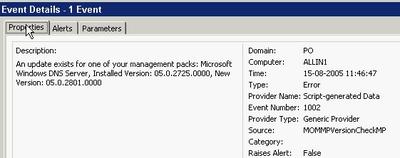
An event looks like this -
You must manually add the server you want to check microsoft.com for updates to the new computer group. Keep in mind that the agent account on the server in question must have http access to microsoft.com across any firewall in the path. The actual URL it uses can be found in the script and is http://www.microsoft.com/management/mma/momnotifier.xml.
Unfortunately, the XML does not provide a direct download link. Let us hope, that will be added in the next release. Ideally, it should provide the option of downloading the files and even upgrade the MPs. The latter for test environments only naturally ;).
To benefit from it, first download and install the MSI package. It creates Microsoft Management Pack Notifier.akm (and an EULA and a readme) below %programfiles%\MOM 2005 Management Packs\Microsoft Management Pack Notifier.
It seems to be old stuff, now being released for the public. The file is dated November 11th 2004.
Next import this MP from the administrator console using the Management Pack Import/Export Wizard. Remember to select 'Import Management Packs only' or you may be stuck in the Wizard when you must specify report to import (you can though step back).
The MP creates a new rule group called Microsoft Operations Manager MPNotifier, creates a new computer group called Microsoft Operation Manager MPNotifier MOM Server. The rule group contains a rule that check the versions against microsoft.com. This rule has a provider called MPNotifier-Schedule daily which runs the Microsoft MPNotifier Version Check script daily. Another rule fires off an alert when the versions mismatch. Finally an alert rule forwards the alerts to the Operation Manager Administrators notification group. I do not know why, but on my RTM test system, it does not fire off any alerts - I only get events.
An event looks like this -

You must manually add the server you want to check microsoft.com for updates to the new computer group. Keep in mind that the agent account on the server in question must have http access to microsoft.com across any firewall in the path. The actual URL it uses can be found in the script and is http://www.microsoft.com/management/mma/momnotifier.xml.
Unfortunately, the XML does not provide a direct download link. Let us hope, that will be added in the next release. Ideally, it should provide the option of downloading the files and even upgrade the MPs. The latter for test environments only naturally ;).
Wednesday, August 03, 2005
And I thought Power Users were a wise choice...
A lot of discussion is going on about the level of permissions one has when runing day-to-day tasks. This is not one day too early. The discussion has at least two branches: A) Administrators running without permissions and only having them when necessary and B) Standard users running as users, power users or local administrators.
Continuing on the B branch, I always thought that Power User were a pretty safe choice - at least it prevented the user from tampering with Group Policies.
This turns out to be a false feeling - even Microsoft warns us in this KB that Power Users are not safe: A member of the Power Users group may be able to gain administrator rights and permissions in Windows Server 2003, Windows 2000, or Windows XP.
Unfortunately, there are no - useful - resolution to avoid this. I would have wanted a way to tweak Power Users, so it is safe. Microsoft claims that Power Users are intended for legacy stuff and wants you to only run software certified for Windows. Get real - LOL!
Well, anyway, I think Power User is still better than local administrators - i. e. until some easy-to-use tool makes elevating to administrator easy. You could also read this post and its comments to get a feeling of how easy it is for an installation program to jeopardize the security of the system.
I came across the KB from the Hall of Shame site.
BTW: Discussion A is covered here.
Let us hope they get it right in Vista a. k. a. Longhorn as they intent.
Continuing on the B branch, I always thought that Power User were a pretty safe choice - at least it prevented the user from tampering with Group Policies.
This turns out to be a false feeling - even Microsoft warns us in this KB that Power Users are not safe: A member of the Power Users group may be able to gain administrator rights and permissions in Windows Server 2003, Windows 2000, or Windows XP.
Unfortunately, there are no - useful - resolution to avoid this. I would have wanted a way to tweak Power Users, so it is safe. Microsoft claims that Power Users are intended for legacy stuff and wants you to only run software certified for Windows. Get real - LOL!
Well, anyway, I think Power User is still better than local administrators - i. e. until some easy-to-use tool makes elevating to administrator easy. You could also read this post and its comments to get a feeling of how easy it is for an installation program to jeopardize the security of the system.
I came across the KB from the Hall of Shame site.
BTW: Discussion A is covered here.
Let us hope they get it right in Vista a. k. a. Longhorn as they intent.
Vista and Virtual PC / Server
Now that Windows Vista is the hottest news, I just want to direct you attention to the excellent Virtual PC Guy blog. Especially these two entries contains valuable information: Running Virtual Server / Virtual PC on Windows Vista Beta 1 and the opposite Running Windows Vista Beta 1 under Virtual PC / Virtual Server.
SMS 2003 SP2 Beta starts
Vacation done...
Just got the invitation to join i.e. nominate myself. It is going to be interesting to see if they drop in new features just like they did for SP1 and in that case what they will improve.
Just got the invitation to join i.e. nominate myself. It is going to be interesting to see if they drop in new features just like they did for SP1 and in that case what they will improve.
Saturday, July 09, 2005
There's no place like 127.0.0.1
Home at last from an exciting week at TechEd Europe. My feet are aching and I’m tired – but luckily the weather in Denmark is sunny and warm (30.5 degrees Celsius) as opposed to the rainy weather in Amsterdam. I guess my lawnmower needs some exercise (At the very least I won’t sit down all weekend after all the “sitting” I’ve done this week). I have a lot of blogging to catch up on so expect to see more tidbits from TechEd - but for now I will shutdown my notebook and enjoy the weekend.
Thanks to you all for a great week!
Thanks to you all for a great week!
Thursday, July 07, 2005
Hardware management in Windows Server 2003 R2 - tidbits from TechEd Europe
A new feature of R2 is the ability to manage hardware through something called WS-Management. WS-Management uses the WS-* Web Service architecture to support a consistent method for remote management of devices (e.g. servers). It does this by exposing a set of functionalities to consume hardware management information on top of the Intelligent Platform Management Interface (IPMI). In addition to hardware it also interfaces with WMI so you can accomplish management tasks both through IPMI-enabled devices and WMI.Functions exposed are Read and Set information. Execute methods, create and delete objects and retrieve collections of objects. By default it uses certificate-based authentication but R2 also provides basic authentication (over SSL of course).
An example would be enabling Remote Desktops through wsman as I've demonstrated earlier through WMI and through the registry -
wsman invoke http://schemas.microsoft.com/wsman/2005/
02/wmi/cimv2/Win32_TerminalServiceSetting?
ServerName=HOSTNAME -machine:FQDN @{AllowTSConnections="1"}
(Wrapped for readability)
The wsman command line tool itself is actually a script, so you can use this as a basis for your own scripts, furthermore it "only" needs port 443 open on the target system.
For more information check out the TechNet scriptcenter article or this whitepaper.
An example would be enabling Remote Desktops through wsman as I've demonstrated earlier through WMI and through the registry -
wsman invoke http://schemas.microsoft.com/wsman/2005/
02/wmi/cimv2/Win32_TerminalServiceSetting?
ServerName=HOSTNAME -machine:FQDN @{AllowTSConnections="1"}
(Wrapped for readability)
The wsman command line tool itself is actually a script, so you can use this as a basis for your own scripts, furthermore it "only" needs port 443 open on the target system.
For more information check out the TechNet scriptcenter article or this whitepaper.
Wednesday, July 06, 2005
Microsoft's stance on third-party replication technologies in connection with Exchange
Third day at Tech-Ed. Need sleep / time off.
Attended a Chalk&Talk instead on Windows Server x64... Exchange was discussed - maybe a little off subject - but someone mentioned a KB on how Microsoft support third-party replication/clustering technologies. As that sounded interesting, I set off to find the KB. You can read it here. Required reading, if you have one of those systems, I think.
Attended a Chalk&Talk instead on Windows Server x64... Exchange was discussed - maybe a little off subject - but someone mentioned a KB on how Microsoft support third-party replication/clustering technologies. As that sounded interesting, I set off to find the KB. You can read it here. Required reading, if you have one of those systems, I think.
Tuesday, July 05, 2005
Tidbits on security and Windows 2003 SP1 - TechEd Europe day #1
As I wrote earlier I attended the "Active Directory Internals: the Sequel" a couple of hours in the late morning and there were a couple of interesting topics.
As you may know Windows Server 2003 contains a reanimation (undelete) API which recovers objects without buying third-party tools. SP1 now also recovers the sIDHistory of an object. Restore is quite easy if you know the ldp tool - just set LDAP control flags in LDP to show deleted objects, find the object and in one operation set the isDeleted attribute to NULL and set the DN appropriately (To where you want to locate your object). Find more on the subject of reanimation in KB 840001 under the topic "How to manually undelete objects".
Also SP1 introduces the notion of confidential attributes that can't be seen by default by Authenticated Users (As most attributes can). Just set the searchFlags bit 7 to 1 (Confidential / True) or 0 (False).
Steve Riley and Jesper Johansson on security
The presentation wasn't by anyway boring - I kept my eyes open all day (a first ;-) - but I'm sad to say that the overall technical content wasn't satisfactory. Most of the day wen't with plain vanilla stuff on security based on the Implementing Client/Server Security presentations used earlier, administrative templates and other plain/old information. Luckily it was nicely beefed up with good stories, discussions and provocating thoughts by Steve and Jesper.
So what was interesting? -Well "Passwords has passed the end of their useful lifetime." I do agree with that and it has also been discussed by other security experts than Jesper and the solution isn't always just to buy a two factor authentication device as Schneier discusses in his essay - To Little, To Late. But personally I do prefer to use Password Safe instead of jotting down my password ;-)
There was an interesting discussion on security and outsourcing and they stated that China doesn't even have the concept of Intellectual Property and that outsourcing companies that may have loads of internal information on their customers probably will be the next point of attack.
ISA 2004 was as usual well appraised especially the fact that Application Proxy’s are much more usable than standard Packet filtering firewalls. I do agree that ISA 2004 is a great firewall with one exemption - the application filters aren't updated on a frequent basis and there are no new ones coming unless there is a product upgrade. Like MOM Management Packs it should be a requirement that each product group, if applicable, should release a new/updated application filter at the same time or just after releasing their product (E.g. for Live Communications Server). I discussed this with Steve and he told me that there are no plans for this (And he already had a discussion with the product group around this without luck).
On the point of SP1 it was emphasized that in an Exchange scenario SCW is used to secure the OS itself - NOT exchange so we should still use the Exchange 2003 Security Hardening Guide to secure Exchange.
Also I discussed with Steve on when the Firewall actually is disabled; a discussion I’ve had earlier with Susan Bradley on my article Microsoft Security Initiatives in SP1 and SP2 - nothing but a complex toy? (Check the comments). There’s apparently some confusion on this topic – in my experience with the RTM release the Firewall is always disabled after an upgrade or on in case of a new slipstreamed SP1 installation after you press Finish in the Post Setup Security Updates (PSSU) wizard.
As I mentioned in the start I wasn't bored at anytime but each time a topic looked a bit interesting (Like on Network Isolation or Wireless Security) the comment was We have a session during the week on X and X go listen to that instead and we want to make sure that we have enough attendees to our other sessions - Well why do you think we paid for a pre-conference day ? To listen to security for one day so that we could follow other tracks or the hands on labs the rest of the week! (To Steve and Jespers defence they were provided with a set of standard slideware that they were required to follow).
As you may know Windows Server 2003 contains a reanimation (undelete) API which recovers objects without buying third-party tools. SP1 now also recovers the sIDHistory of an object. Restore is quite easy if you know the ldp tool - just set LDAP control flags in LDP to show deleted objects, find the object and in one operation set the isDeleted attribute to NULL and set the DN appropriately (To where you want to locate your object). Find more on the subject of reanimation in KB 840001 under the topic "How to manually undelete objects".
Also SP1 introduces the notion of confidential attributes that can't be seen by default by Authenticated Users (As most attributes can). Just set the searchFlags bit 7 to 1 (Confidential / True) or 0 (False).
Steve Riley and Jesper Johansson on security
The presentation wasn't by anyway boring - I kept my eyes open all day (a first ;-) - but I'm sad to say that the overall technical content wasn't satisfactory. Most of the day wen't with plain vanilla stuff on security based on the Implementing Client/Server Security presentations used earlier, administrative templates and other plain/old information. Luckily it was nicely beefed up with good stories, discussions and provocating thoughts by Steve and Jesper.
So what was interesting? -Well "Passwords has passed the end of their useful lifetime." I do agree with that and it has also been discussed by other security experts than Jesper and the solution isn't always just to buy a two factor authentication device as Schneier discusses in his essay - To Little, To Late. But personally I do prefer to use Password Safe instead of jotting down my password ;-)
There was an interesting discussion on security and outsourcing and they stated that China doesn't even have the concept of Intellectual Property and that outsourcing companies that may have loads of internal information on their customers probably will be the next point of attack.
ISA 2004 was as usual well appraised especially the fact that Application Proxy’s are much more usable than standard Packet filtering firewalls. I do agree that ISA 2004 is a great firewall with one exemption - the application filters aren't updated on a frequent basis and there are no new ones coming unless there is a product upgrade. Like MOM Management Packs it should be a requirement that each product group, if applicable, should release a new/updated application filter at the same time or just after releasing their product (E.g. for Live Communications Server). I discussed this with Steve and he told me that there are no plans for this (And he already had a discussion with the product group around this without luck).
On the point of SP1 it was emphasized that in an Exchange scenario SCW is used to secure the OS itself - NOT exchange so we should still use the Exchange 2003 Security Hardening Guide to secure Exchange.
Also I discussed with Steve on when the Firewall actually is disabled; a discussion I’ve had earlier with Susan Bradley on my article Microsoft Security Initiatives in SP1 and SP2 - nothing but a complex toy? (Check the comments). There’s apparently some confusion on this topic – in my experience with the RTM release the Firewall is always disabled after an upgrade or on in case of a new slipstreamed SP1 installation after you press Finish in the Post Setup Security Updates (PSSU) wizard.
As I mentioned in the start I wasn't bored at anytime but each time a topic looked a bit interesting (Like on Network Isolation or Wireless Security) the comment was We have a session during the week on X and X go listen to that instead and we want to make sure that we have enough attendees to our other sessions - Well why do you think we paid for a pre-conference day ? To listen to security for one day so that we could follow other tracks or the hands on labs the rest of the week! (To Steve and Jespers defence they were provided with a set of standard slideware that they were required to follow).
Monday, July 04, 2005
The hunt for non-PC SMS programs (SMS 2003 SDK v3)
Having created an SMS script late yesterday, setting the MOM flag on the programs for one of my customers, he came back and told me, he had to do an SMS restore as it trashed the image packages.
Bad, bad.
Ok, I said to myself. I'll just modify the program to skip those image package programs - and exclude any device management programs as well.
But this was easier than done. First of all, I'm at Tech-Ed in Amsterdam with my fellow blogger Dennis. Secondly, the battery of my Dell is bad and finding power for charging is difficult here at the RAI.
Having come across all those obstacles, I went on...
First I stumbled across v3 of the SMS SDK. It was released June 21st. Get it from MS downloads. This is a must-have for all doing SMS automation. The official voice says: New for the SMS V3 SDK is a .NET server side library which simplifies access to the SMS WMI site provider, and Device Management inventory extensibility information.
So I looked to the program flags and found that bit 9 indicates a device program. But how do I see, that the program is an OS installation?
That it NOT documented.
Found it myself though. The SMS_Package class has an ImageFlags property. It seems to be zero - remember this is undocumented and at your own risk - for normal packages.
So I redid my script and can now first filter away the image packages and then the device programs.
I hope my customer does not have to do a new restore tomorrow...
Bad, bad.
Ok, I said to myself. I'll just modify the program to skip those image package programs - and exclude any device management programs as well.
But this was easier than done. First of all, I'm at Tech-Ed in Amsterdam with my fellow blogger Dennis. Secondly, the battery of my Dell is bad and finding power for charging is difficult here at the RAI.
Having come across all those obstacles, I went on...
First I stumbled across v3 of the SMS SDK. It was released June 21st. Get it from MS downloads. This is a must-have for all doing SMS automation. The official voice says: New for the SMS V3 SDK is a .NET server side library which simplifies access to the SMS WMI site provider, and Device Management inventory extensibility information.
So I looked to the program flags and found that bit 9 indicates a device program. But how do I see, that the program is an OS installation?
That it NOT documented.
Found it myself though. The SMS_Package class has an ImageFlags property. It seems to be zero - remember this is undocumented and at your own risk - for normal packages.
So I redid my script and can now first filter away the image packages and then the device programs.
I hope my customer does not have to do a new restore tomorrow...
Arrived at Teched Europe and looking forward to a interesting week
I arrived Sunday at the Golden Tulip Inntel which is nicely situated between the Dam place and the Central Station. Beside being a nice hotel it has free wireless and lots of shopping/restaurants and the Tram nearby as some of the best features.
I originally meant to follow the pre-conference day on security with Steve Riley and Jesper Johansson. Primarily because they both are hilarious speakers and their views on security are interesting - but the first two items on their agenda were Implementing server/client security on Windows. Those specific sessions I delivered as a speaker a year ago on one of the TechNet days in Denmark - so probably nothing new there :- Instead I joined John Craddock and Sally Storey on "Active Directory Internals the Sequel" for the morning (ldp tool advanced topics usually ;-) and then I'll probably switch back to Steve and Jesper for the afternoon sessions.
When I'm at TechEd I usually find some of the subjects that's in the future or that I don't normally specialize in myself and also I like to use quite a lot of time in the Hands On Labs. I personally use TechEd as a possibility of delving into Technology a whole week without thinking on colleagues, customers and family and this year is business as usual.
My agenda for this week contains playing in the Hands On Labs with Windows Server 2003 R2, Enterprise Project Management Solutions (EPM), Microsoft Identity and Integration Server (MIIS), NLB/CARP Load Balancing with ISA Server 2004, Indigo and the new Data Protection Manager - sometimes I follow the lab guidelines (E.g. for Indigo) but most times I don't.
For the Sessions I look forward to hearing about the Network Isolation that Microsoft uses (As a Microsoft vendor I've had all the hassles during their initial roll-out when connecting a non-Microsoft domain joined computer to their network through RAS). Also I'm attending sessions on Scripting with R2, Longhorn Client Security, Microsoft ITs administration of Windows Mobiles, MIIS, Active Directory Federation Services (Including Web SSO), System Center Reporting and not least Running Windows with least privileges by Aaron Margosis (I really enjoy reading his blog - its a 'recommended').
Btw. my postings on TechEd Europe are cross-blogged on the MS Exchange Blog.
I originally meant to follow the pre-conference day on security with Steve Riley and Jesper Johansson. Primarily because they both are hilarious speakers and their views on security are interesting - but the first two items on their agenda were Implementing server/client security on Windows. Those specific sessions I delivered as a speaker a year ago on one of the TechNet days in Denmark - so probably nothing new there :- Instead I joined John Craddock and Sally Storey on "Active Directory Internals the Sequel" for the morning (ldp tool advanced topics usually ;-) and then I'll probably switch back to Steve and Jesper for the afternoon sessions.
When I'm at TechEd I usually find some of the subjects that's in the future or that I don't normally specialize in myself and also I like to use quite a lot of time in the Hands On Labs. I personally use TechEd as a possibility of delving into Technology a whole week without thinking on colleagues, customers and family and this year is business as usual.
My agenda for this week contains playing in the Hands On Labs with Windows Server 2003 R2, Enterprise Project Management Solutions (EPM), Microsoft Identity and Integration Server (MIIS), NLB/CARP Load Balancing with ISA Server 2004, Indigo and the new Data Protection Manager - sometimes I follow the lab guidelines (E.g. for Indigo) but most times I don't.
For the Sessions I look forward to hearing about the Network Isolation that Microsoft uses (As a Microsoft vendor I've had all the hassles during their initial roll-out when connecting a non-Microsoft domain joined computer to their network through RAS). Also I'm attending sessions on Scripting with R2, Longhorn Client Security, Microsoft ITs administration of Windows Mobiles, MIIS, Active Directory Federation Services (Including Web SSO), System Center Reporting and not least Running Windows with least privileges by Aaron Margosis (I really enjoy reading his blog - its a 'recommended').
Btw. my postings on TechEd Europe are cross-blogged on the MS Exchange Blog.
Wednesday, June 29, 2005
ExBPA v2.1 Released
According to You Had Me At EHLO... a new version of Exchange Server Best Practices Analyzer has been released. If you don't know ExBPA by now then it's time to get acquainted with it. IMHO it should be part of every Exchange Admins toolbox!
Check the overview or the Microsoft Exchange teams blogs about it here and here and also you can find the history behind the tool here.
Check the overview or the Microsoft Exchange teams blogs about it here and here and also you can find the history behind the tool here.
Update Rollup 1 for Windows 2000 SP4
has finally been released -
Interestingly it won't be delivered to Windows 2000 through automatic updates until each server has been moved to Windows Update v6. See more info here and in the KB.
The Update Rollup contains all security updates produced for Windows 2000 between the time SP4 was released and April 30, 2005... The Update Rollup also contains a number of updates that increase system security, reliability, reduce support costs, and support the current generation of PC hardware.
Interestingly it won't be delivered to Windows 2000 through automatic updates until each server has been moved to Windows Update v6. See more info here and in the KB.
Sunday, June 26, 2005
Windows AntiSpyware beta update
The beta 1 just got updated. The second beta refresh (!) build is 1.0.614. The Microsoft AntiSpyware Update start menu shortcut does not seem to update it despite what the download page claims. Maybe I'm just too fast...
The update is a genuine Microsoft Windows update - which reminds me of an article on slashdot.org claiming that the check was cracked by the Indian researcher Debasis Mohanty.
The update is a genuine Microsoft Windows update - which reminds me of an article on slashdot.org claiming that the check was cracked by the Indian researcher Debasis Mohanty.
Friday, June 24, 2005
TechEd Europe T minus 9 days
Per and I will both be at TechEd Europe in Amsterdam. I'm personally looking forward to the Pre-Conference day with Jesper Johansson and Steve Riley on the topic "Be Secure: How to Build a Defense-in-Depth Strategy for your Environment - Today!" they are both great speakers and always fun to listen to (Even though they also can be busted as you can hear approx 17 minutes into this webcast where Steve just has been 'taught' by an MVP why 802.1x on Wired Lans isn't perfect and why a personal firewall in this case will lower your security ;-)
Anyway we look forward to seeing both former and current customers/colleagues and maybe even a reader or two (If its two its probably all of our readers ;-) My e-mail at TechEd will be My.Initials@mseventseurope.com or as usual My.Initials@inceptio.dk.
Anyway we look forward to seeing both former and current customers/colleagues and maybe even a reader or two (If its two its probably all of our readers ;-) My e-mail at TechEd will be My.Initials@mseventseurope.com or as usual My.Initials@inceptio.dk.
Top client/server support issues in Microsoft Exchange
PSS has gathered a good list of KB's / their top issues in the following areas -
You can find the KB article here
• Microsoft Outlook. This includes topics that are related to Microsoft
Exchange connectivity.
• Microsoft Outlook Web Access.
• Exchange Mobility. This includes topics that are related to remote
procedure call (RPC) over HTTP.
You can find the KB article here
Wednesday, June 15, 2005
Nasty stuff - Vulnerability in SMB Could Allow Remote Code
This is bad news. Even though most systems will be protected from internet attacks, this opens up for a new worm flooding your internal network.
Get the update distributed right away!
For those of you with NT4 systems - hmmm - bad luck??
Get the update distributed right away!
For those of you with NT4 systems - hmmm - bad luck??
Customers who require additional support for Windows NT 4.0 SP6a must contact their Microsoft account team representative, their Technical Account Manager, or the appropriate Microsoft partner representative for custom support options.
Customers without an Alliance, Premier, or Authorized Contract can contact their local Microsoft sales office.
Tuesday, June 14, 2005
Microsoft Security Initiatives in SP1 and SP2 - nothing but a complex toy?
I've written an essay on the security initiatives in SP1 and SP2 for the Industry insiders forum and it can be found here or in this post -
I recently read Kevin Day's book "Inside a Security Mind" - not because I pretend or intend to be a security guru but because I'm aware of the fact that we as a industry need to change focus in terms of security.
Working as a Solution Architect and Managing Consultant I've been pushing security focus to my customers for a long time - both in term of technology itself and more importantly around the processes involved in implementing and supporting technology - and it's quite frankly at times an uphill process. The comment from Kevin Day's book that triggered me to write this article was –
The same applies to the security initiatives in Windows Server 2003 SP1. These includes the Windows Server Post-Setup Security Updates (PSSU) that works as a firewall blocking all incoming traffic during OS installation until all required security updates has been installed and the person installing the server presses "Finish" in the wizard that pops up after logon. PSSU is luckily on by default in slipstreamed Windows 2003 SP1 installations.
Furthermore the Security Configuration Wizard and its 50+ role-based configurations allows us to create templates/roles for all servers in a organization – allowing us to take a role-based approach towards the security configuration on servers. Using the “scwcmd transform” command takes SCW to the next step by converting our templates to group policies that now can be linked to our OU structure and further enhancing the roll-out of our security policies to servers that are domain members (Be aware though that IIS settings aren’t deployable through group polices and therefore NOT part of the transformation).
One of the main advantages of the enhancements in both service packs is that when properly implemented they are a good start towards the “principle of least privilege”; in terms of OS hardening almost everything incoming is blocked by default – except the settings/roles you have defined as allowed.
This essay is not meant to be a review of all the security enhancements in SP1/SP2 but I feel the need to comment that I’m not saying SCW or the firewall in SP2 are perfect. An important feature missing in the firewall is outgoing connections – including which applications are allowed to initiate these (Although I recognize the fact that it would be hard to implement and manage in a corporate environment) another is the many different tools used for security configuration. Furthermore, I think it’s disappointing that Microsoft didn’t have the nerve to enable the firewall by default in a slipstreamed Windows Server 2003 SP1 installation (Although I’m sure they had good reasons for this) – so that “everything” was blocked by default and you had to use SCW to open the server for the necessary applications/usages. Last but not least I’m painfully aware of the work required to actually making these technologies work in an existing production environment (But I personally think it’s worth the effort).
Back to the point that relates to one of the Ten Immutable Laws of Security "Technology is not a panacea" and Kevin’s point about expensive/complex toys. If the full functionality of the Service packs isn’t implemented in your organization or if they are implemented in a environment where the proper processes around security isn’t in place or where simple things as password protected screensavers are disabled (as I’ve seen in our of my enterprise clients, due to a Managing Director that was annoyed with having to unlock Windows when returning to his desk) and/or the rest of the organization isn’t security aware – then whatever security initiatives Microsoft makes it’s almost a dead end game.
I do believe however that the enhancements in SP1/SP2 are much more than toys and that you and I can use it to make a difference - they are way better than the current situation where machines are often attacked during installation or before they are fully patched – and I do believe that if we all try to influence the people around, below and/or above us that we can help to raise the security bar and awareness in our respective companies and in the industry (Just to be clear - I don't think its Kevin’s point either that we should give up on security if all processes/systems aren’t in place ;-)
So come on – let’s join forces and go and test and design the firewall for our XP clients and role-based security based on GPO and SCW for all our servers (Btw. don’t use it with SBS 2003 and do try this Google search for other known issues).
I recently read Kevin Day's book "Inside a Security Mind" - not because I pretend or intend to be a security guru but because I'm aware of the fact that we as a industry need to change focus in terms of security.
Working as a Solution Architect and Managing Consultant I've been pushing security focus to my customers for a long time - both in term of technology itself and more importantly around the processes involved in implementing and supporting technology - and it's quite frankly at times an uphill process. The comment from Kevin Day's book that triggered me to write this article was –
“.. a security device, no matter how expensive or complex, is nothing more than a toy if it does not function within a greater security framework.”I principally agree with this statement as it relates directly to some of the solutions I have seen at customers and in terms of XP SP2 it reminds me of one of the first customer comments I heard about the Windows XP SP2 firewall - "Very fine – but how do we disable it?". From a short-sighted manageability point of view, I understand the comment, but from a security Point of View the possibility of implementing a managed firewall is an opportunity that I personally would not let go.
The same applies to the security initiatives in Windows Server 2003 SP1. These includes the Windows Server Post-Setup Security Updates (PSSU) that works as a firewall blocking all incoming traffic during OS installation until all required security updates has been installed and the person installing the server presses "Finish" in the wizard that pops up after logon. PSSU is luckily on by default in slipstreamed Windows 2003 SP1 installations.
Furthermore the Security Configuration Wizard and its 50+ role-based configurations allows us to create templates/roles for all servers in a organization – allowing us to take a role-based approach towards the security configuration on servers. Using the “scwcmd transform” command takes SCW to the next step by converting our templates to group policies that now can be linked to our OU structure and further enhancing the roll-out of our security policies to servers that are domain members (Be aware though that IIS settings aren’t deployable through group polices and therefore NOT part of the transformation).
One of the main advantages of the enhancements in both service packs is that when properly implemented they are a good start towards the “principle of least privilege”; in terms of OS hardening almost everything incoming is blocked by default – except the settings/roles you have defined as allowed.
This essay is not meant to be a review of all the security enhancements in SP1/SP2 but I feel the need to comment that I’m not saying SCW or the firewall in SP2 are perfect. An important feature missing in the firewall is outgoing connections – including which applications are allowed to initiate these (Although I recognize the fact that it would be hard to implement and manage in a corporate environment) another is the many different tools used for security configuration. Furthermore, I think it’s disappointing that Microsoft didn’t have the nerve to enable the firewall by default in a slipstreamed Windows Server 2003 SP1 installation (Although I’m sure they had good reasons for this) – so that “everything” was blocked by default and you had to use SCW to open the server for the necessary applications/usages. Last but not least I’m painfully aware of the work required to actually making these technologies work in an existing production environment (But I personally think it’s worth the effort).
Back to the point that relates to one of the Ten Immutable Laws of Security "Technology is not a panacea" and Kevin’s point about expensive/complex toys. If the full functionality of the Service packs isn’t implemented in your organization or if they are implemented in a environment where the proper processes around security isn’t in place or where simple things as password protected screensavers are disabled (as I’ve seen in our of my enterprise clients, due to a Managing Director that was annoyed with having to unlock Windows when returning to his desk) and/or the rest of the organization isn’t security aware – then whatever security initiatives Microsoft makes it’s almost a dead end game.
I do believe however that the enhancements in SP1/SP2 are much more than toys and that you and I can use it to make a difference - they are way better than the current situation where machines are often attacked during installation or before they are fully patched – and I do believe that if we all try to influence the people around, below and/or above us that we can help to raise the security bar and awareness in our respective companies and in the industry (Just to be clear - I don't think its Kevin’s point either that we should give up on security if all processes/systems aren’t in place ;-)
So come on – let’s join forces and go and test and design the firewall for our XP clients and role-based security based on GPO and SCW for all our servers (Btw. don’t use it with SBS 2003 and do try this Google search for other known issues).
Friday, June 10, 2005
Good overview of AD enhancements in SP1
Just a quick note - I found a nice overview of the New Active Directory features in Windows Server 2003 with Service Pack 1 (SP1).
Subscribe to:
Posts (Atom)