Being a consultant, I often work from my own laptop on my customers computers. This often results in a lot of commands like these -
net use \\server\ipc$ /user:custdomain\account
Recently, I discovered, that I could actually create a new process with runas and use my customer credentials from that process. The trick is the /netonly argument. If I do a -
runas /user:custdomain\account /netonly cmd
I end up with a command prompt running as my normal user. But when I access network resources from that command prompt - or any child processes - I do it with my customer credentials. Needless to say, this saves a lot of tedious work.
Remember that if you do somethings, that invokes Explorer, you are often back to your default credentials - read more here.
When you use /netonly, you can actually specify any domain\user you like. The security check will - as always - be made when you try to access a resource.
Thursday, April 20, 2006


Finding and fixing those LUA problems
Back in 1997, I was working at LEGO doing a PC project based on Windows NT workstation. The goal was end-users without local administrative permissions. This made perfectly sense, as we came out of a OpenVMS environment where that was the norm.
Back then, we learned the hard way how difficult it was to do this and without regmon and filemon we never could have do it. Back then the problem was lack of documenation - today the problem is the waste amount of documentation - and when you finally hit the right spot you sometimes find that the detail you were looking for was left out of the documentation - or simply wrong.
Things have improved when it comes to using LUA but there are still a way to go before nirvana is reached.
Aaron Margosis created a series of articles on this - and the best is the prioritized approach he has taken - i.e. should I start tweaking the registry permissions first or should I copy parts of the class registry to HKCU? Read it all here and here.
Also read my LUA article about controlling permissions with Group Policy.
Back then, we learned the hard way how difficult it was to do this and without regmon and filemon we never could have do it. Back then the problem was lack of documenation - today the problem is the waste amount of documentation - and when you finally hit the right spot you sometimes find that the detail you were looking for was left out of the documentation - or simply wrong.
Things have improved when it comes to using LUA but there are still a way to go before nirvana is reached.
Aaron Margosis created a series of articles on this - and the best is the prioritized approach he has taken - i.e. should I start tweaking the registry permissions first or should I copy parts of the class registry to HKCU? Read it all here and here.
Also read my LUA article about controlling permissions with Group Policy.
Thursday, April 13, 2006
To be or not to be - really random
Having the flu - this is day #5 - I found energy to browse dibert.com to motion my cheeks. I saw Scott Adams blog and had to read it as I like his twisted mind. From there I came across a reference to real random numbers called HotBits. The most interesting part was the How HotBits Works. This explains parts of quantum physics in a really simple way - e.g. that a beta particle is simply an electron and that gamma ray is simply high energy photons.
So is this really 'in scope' of this blog? Hmmm - well random numbers are - else simply blame it on the flu.
So is this really 'in scope' of this blog? Hmmm - well random numbers are - else simply blame it on the flu.
Wednesday, April 12, 2006
Microsoft Exchange's 10 year anniversary
As one of my contacts at Microsoft just pointed out, Microsoft Exchange was released more than 10 years ago in March 1996. It also means that I now have been a MCP for 12 years (Since April 1994); time has certainly gone fast since Microsoft Advanced Server 3.1 was the new kid on the block and it was unique to be a MCSE (I still remember competing with Per to be the first MCSE+I). I personally started working with OS/2 LanServer and Lotus cc:Mail and variations of Microsoft Mail and later evolved to Exchange 4.0 and Exchange 5.0/5.5, where clustering were one of my specialities and also my first piece published to the web was on the subject of Tips for Clustering Exchange Successfully (In the days of NT 4.0 and Exchange 5.5).
Windows IT Pro has released a very good article series by well known Industry Experts like Tony Redmond, Kevin Laahs and Kieran McCorry (All former colleagues at Digital/Compaq), Eric Legault and Pierre Bijaoui. It’s called A Decade of Exchange and it is certainly worth a read.
More interesting, to me anyway, is the future of Exchange in the Unified Communications group. We are probably going to witness a unification of Exchange, Live Communications Server (SIP) and related Voice services (VoIP, PBX, Centrex etc.), the interesting part here will ultimately be which technologies will be delivered by Microsoft and which will be delivered by 3rd party products. Also the evolution of SIP and perhaps disruptive Peer-to-Peer SIP standards/products and its impact on e.g. Microsoft UC and telephony service providers (And vendors) will be interesting to follow on the side-/frontline.
In my world Live Communications Server and the upcoming Live Server and their integration in Exchange and to CSTA, VoIP and MCU’s will certainly continue to be a main focus.
Windows IT Pro has released a very good article series by well known Industry Experts like Tony Redmond, Kevin Laahs and Kieran McCorry (All former colleagues at Digital/Compaq), Eric Legault and Pierre Bijaoui. It’s called A Decade of Exchange and it is certainly worth a read.
More interesting, to me anyway, is the future of Exchange in the Unified Communications group. We are probably going to witness a unification of Exchange, Live Communications Server (SIP) and related Voice services (VoIP, PBX, Centrex etc.), the interesting part here will ultimately be which technologies will be delivered by Microsoft and which will be delivered by 3rd party products. Also the evolution of SIP and perhaps disruptive Peer-to-Peer SIP standards/products and its impact on e.g. Microsoft UC and telephony service providers (And vendors) will be interesting to follow on the side-/frontline.
In my world Live Communications Server and the upcoming Live Server and their integration in Exchange and to CSTA, VoIP and MCU’s will certainly continue to be a main focus.
Monday, April 10, 2006
Sending IM messages through scripts
Would you like to send an instant message through script like this -
Then look no further than Glen's Exchange Dev Blog and his post on the subject, where he uses the newly announced AJAX SDK for the purpose (Btw. if your scripting against Exchange his blog is certainly worth a look; in this case I'm only sorry that I didn't get around to write the script ;-)
cscript lcsSendmsg.vbs administrator@managenet.com.au
"Hello world how are you doing”
Then look no further than Glen's Exchange Dev Blog and his post on the subject, where he uses the newly announced AJAX SDK for the purpose (Btw. if your scripting against Exchange his blog is certainly worth a look; in this case I'm only sorry that I didn't get around to write the script ;-)
Tuesday, April 04, 2006
Office Communicator Web Access AJAX Service SDK 1.0
Microsoft has released the Office Communicator AJAX Service SDK 1.0 including the following sample applications:
You can find it hereA simple instant messaging (IM) client written in JavaScript.
A simple instant messaging (IM) client written in C#.
A C# application that receives events from Communicator Web Access and displays them, as well as the methods that are being sent to the server, in JSON format.
Saturday, April 01, 2006
Corrupted logon Web page when you try to log on to Communicator Web Access
Friday, March 31, 2006
Vista feature summation
If you want to know what kind of beast Windows Vista is, then there is a nice summary to be found here -
http://en.wikipedia.org/wiki/Windows_Vista
Also if you want to know more about the new features (Including those features from XP not making it to Vista), there's a nice wiki here -
http://en.wikipedia.org/wiki/Features_new_to_Windows_Vista
(Thanks to Steffen Madsen from Inceptio A/S for the hint).
http://en.wikipedia.org/wiki/Windows_Vista
Also if you want to know more about the new features (Including those features from XP not making it to Vista), there's a nice wiki here -
http://en.wikipedia.org/wiki/Features_new_to_Windows_Vista
(Thanks to Steffen Madsen from Inceptio A/S for the hint).
Wednesday, March 29, 2006
Windows deployment resource
Here’s some shameless advertising for a friend of mine ;-) Rico Raja, and some of his friends, has started a blog/forum/website, that centers mainly around Windows Deployment, Preinstallation and unattended installation. His expertise is, amongst others, Vista Deployment and he (and his friends) has produced some very exciting records in installation time for Windows Vista Deployments.
Check out www.windows-admin.com and since they haven't implemented a RSS or Atom feed (Hint, hint!) you need to bookmark it for future updates (I have seen some of the upcoming content and it looks promising).
Check out www.windows-admin.com and since they haven't implemented a RSS or Atom feed (Hint, hint!) you need to bookmark it for future updates (I have seen some of the upcoming content and it looks promising).
Sunday, March 26, 2006
Unified Communications presentations
As promised, here are the presentations from the Unified Communications event -
Friday, March 24, 2006
IM Culture
Along with new ways of communicating, there will be new do's and don’ts. I personally have more than 100 persons on my IM lists, but I prefer to have most of my private contacts on a separate IM client, namely Live Messenger, and first when Office Communicator implements Spheres as per the RFC's (a.k.a. selective per group availability) will I move them to OC. And why is that you may ask? Well mainly because my family (Including my 79 years old grandmother) has a habit of "disturbing" me during my work time, and my business contacts tends to be more into the IM way of doing things, with only occasional, important and short IM conversations.
Heather Leigh wrote an interesting blog about her opinion on this subject called IM Angst, quote
Suffice to say new habits and cultures will arise. Quickly, if appropriate, moving from e-mail to IM with Office Communicator has certainly lessened the amount of e-mails in my inbox and also moving from IM to phone or video/VoIP conferencing has shortened the amount of time in the IM space for my sake.
Heather Leigh wrote an interesting blog about her opinion on this subject called IM Angst, quote
"What’s the deal with people you have never met before IMing you? This is analogous to interrupting a potentially important conversation (let’s not pretend all of my conversations are important but some of them are...some are even important AND interesting). In my opinion, IMing basically says, “I know you well enough to do this” (among friends) or “this is urgent” (among business associates). I cannot tell you how many times I receive IMs that fall into neither category. When a simple e-mail would suffice, IM is chosen for the immediacy (of the sender) without regard to the time of the receiver."
Suffice to say new habits and cultures will arise. Quickly, if appropriate, moving from e-mail to IM with Office Communicator has certainly lessened the amount of e-mails in my inbox and also moving from IM to phone or video/VoIP conferencing has shortened the amount of time in the IM space for my sake.
Thursday, March 23, 2006
Migrating RSS feeds from RssReader to Outlook 2007
Adding more than 100 feeds manually into Outlook 2007 wasn't an option and RssReader does import OPML, but doesn't export to it. So I did a little Googling and found a nice script, with an accompanying XSLT transform file. It will take RssReaders XML based export file as an input and create an OPML compliant XML file. The only thing missing here is Groups, so I had to manually regroup all my feeds :-
You can find the script here
Btw. Outlook 2007 RSS implementation in Beta1 TR is way better that the last version I've tested - but there is still room for enhancement (Remember its still beta, so it will probably change). The concept of groups is badly implemented (Especially when adding new feeds), the formatting of the posts is nothing compared to RssReaders and there's missing a "View all Unread Posts" and a "Mark all Unread Posts as Read" (It can be accomplished under Unread Mail - but I personally don't like to mix these in the same folder).
You can find the script here
Btw. Outlook 2007 RSS implementation in Beta1 TR is way better that the last version I've tested - but there is still room for enhancement (Remember its still beta, so it will probably change). The concept of groups is badly implemented (Especially when adding new feeds), the formatting of the posts is nothing compared to RssReaders and there's missing a "View all Unread Posts" and a "Mark all Unread Posts as Read" (It can be accomplished under Unread Mail - but I personally don't like to mix these in the same folder).
Tuesday, March 21, 2006
Whitepaper/resources on Exchange 2003 Mobility and MSFP / AKU2
As several different Telcos are releasing WM5 AKU2 / MSFP updates to their devices, there's also a need to setup the environment to support these new devices. I have earlier described a "Quick Guide" to upgrading the device, and configuring the website and ISA for DirectPush. But, as reported by several sources, Mr. Mobile a.k.a. Jason Langridge has released a large whitepaper on configuring all the aspects of mobility including web sites, certificates, ISA, certificate login and configuring the device. His excellent whitepaper can be found here.
Furthermore Vlad has posted a very good set of resources in a post called Advanced Mobility and Stalking with WM5.
Furthermore Vlad has posted a very good set of resources in a post called Advanced Mobility and Stalking with WM5.
Office Communicator now available in new languages
Friday, March 17, 2006
Microsoft Connect and SMS 4 Beta
Wanted to join the SMS 4 Beta program - and consequently got into a new (for me at least) site called Microsoft Connect. Connect is a kind of new betaplace. Browsing the available programs page, I found another interesting product called Certificate Lifecycle Manager Beta 1. You can check it out yourself - I will when I have a little time to spare.
Communicator Web Access guides released
Three new Communicator Web Access guides has been released -
Microsoft Office Communicator Web Access Getting Started Guide
This guide describes how to use the instant messaging (IM) and presence features of Microsoft® Office Communicator Web Access.
Microsoft Office Communicator Web Access Technical Reference Guide
This guide provides reference and troubleshooting information for administrators who are deploying or have deployed Microsoft® Office Communicator Web Access.
Factors Affecting User Capacity of Microsoft Office Communicator Web Access
This white paper discusses the factors that affect the number of users that can be supported on a Microsoft® Office Communicator Web Access server.
Also Don't forget the "old" guide on (With the pace Microsoft is announcing VoIP, SIP and UC news 3 months must be considered old ;-)
Microsoft Office Communicator Web Access Planning and Deployment Guide
This guide helps you plan and deploy Communicator Web Access for your organization.
Microsoft Office Communicator Web Access Getting Started Guide
This guide describes how to use the instant messaging (IM) and presence features of Microsoft® Office Communicator Web Access.
Microsoft Office Communicator Web Access Technical Reference Guide
This guide provides reference and troubleshooting information for administrators who are deploying or have deployed Microsoft® Office Communicator Web Access.
Factors Affecting User Capacity of Microsoft Office Communicator Web Access
This white paper discusses the factors that affect the number of users that can be supported on a Microsoft® Office Communicator Web Access server.
Also Don't forget the "old" guide on (With the pace Microsoft is announcing VoIP, SIP and UC news 3 months must be considered old ;-)
Microsoft Office Communicator Web Access Planning and Deployment Guide
This guide helps you plan and deploy Communicator Web Access for your organization.
Thursday, March 16, 2006
Thursday, March 09, 2006
Live Communications Server Snap-in cannot open the certificate store
OK – now Per is at it, I also want to confess about one of my “mistakes”. I want to tell a story about LCS and the certificates snap-in that eventually made me rip my hair off (figuratively speaking that is – I need a magnifier and a pair of tweezers to find some) and calling PSS (It’s not a shame to do so btw … I keep telling myself).
As usual in LCS deployments I started by installing a LCS Home Server, implemented the necessary internal DNS records and then tested the functionality with TCP (Everything worked like a breeze). I then installed my LCS Access Proxy, used LCSCertUtil from the resource kit to request a public certificate and installed this on the Public Interface and our own certificate on the Internal Interface.
Then on my LCS Home Server I requested the necessary certificate and started the Live Communications Server 2005 MMC. I dribbled down through Forest, LCS Servers and pools, Server and right-clicked Properties on my server. I then clicked add and received the error message Live Communications Server Snap-in cannot open the certificate store followed by a Live Communications Server Snap-in cannot read the certificate information associated with this entry and a greyed out Add Connection Window. The same happened when I clicked the Security tab.
Googling the error message showed me that there was a known issue, whereby Sysadmins had installed the certificate in the user store (Checking, double and triple checking this made me certain that this wasn’t the problem) also the certificates checked out fine. Eventually (A day later) I ended up reinstalling the server, and it had no effect what so ever (Thinking that missing security rights or something the like was an issue).
To cut the story short(er) then I’m a geek so when I install new servers, I disable everything I can. One of the things I like to disable is File and Printer Sharing for Microsoft Networks on servers/network cards that doesn’t need it.
With the assistance of a skilled PSS guy from Turkey, named Fadi, it turned out, that when a LCS Home Server needs to find certificates in the GUI of the LCS MMC; it needs File and Printer sharing enabled on the server! But this isn’t the case on Access Proxies – so in the beginning I had no clue what to look for. Disabling File and Printer Sharing again, after installing and verifying the certificates, works fine so it must be a “feature” in the LCS 2005 MMC.
As usual in LCS deployments I started by installing a LCS Home Server, implemented the necessary internal DNS records and then tested the functionality with TCP (Everything worked like a breeze). I then installed my LCS Access Proxy, used LCSCertUtil from the resource kit to request a public certificate and installed this on the Public Interface and our own certificate on the Internal Interface.
Then on my LCS Home Server I requested the necessary certificate and started the Live Communications Server 2005 MMC. I dribbled down through Forest, LCS Servers and pools, Server and right-clicked Properties on my server. I then clicked add and received the error message Live Communications Server Snap-in cannot open the certificate store followed by a Live Communications Server Snap-in cannot read the certificate information associated with this entry and a greyed out Add Connection Window. The same happened when I clicked the Security tab.
Googling the error message showed me that there was a known issue, whereby Sysadmins had installed the certificate in the user store (Checking, double and triple checking this made me certain that this wasn’t the problem) also the certificates checked out fine. Eventually (A day later) I ended up reinstalling the server, and it had no effect what so ever (Thinking that missing security rights or something the like was an issue).
To cut the story short(er) then I’m a geek so when I install new servers, I disable everything I can. One of the things I like to disable is File and Printer Sharing for Microsoft Networks on servers/network cards that doesn’t need it.
With the assistance of a skilled PSS guy from Turkey, named Fadi, it turned out, that when a LCS Home Server needs to find certificates in the GUI of the LCS MMC; it needs File and Printer sharing enabled on the server! But this isn’t the case on Access Proxies – so in the beginning I had no clue what to look for. Disabling File and Printer Sharing again, after installing and verifying the certificates, works fine so it must be a “feature” in the LCS 2005 MMC.
Wednesday, March 08, 2006
DoS'ing ISA by modifying a user object in AD
The other day, one of the contributers to this blog unwillingly made a Denial-of-Service on our ISA server. It went on like this –
“I wonder if it is possible to hand out a static route to a user, when a VPN is established?”
So this admin found his user object, tabbed to Dial-in, enabled Apply Static Routes and clicked Static Routes. Added the wanted route and saved it all. Next, the user reconnected the VPN – and things started to go wrong…
After messing things back to normal, I – sorry, the admin - began reading the help text –
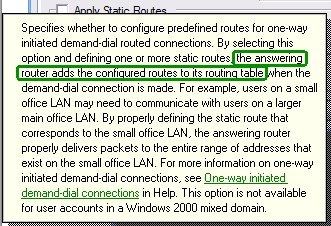
Hmmm, the answering server – the ISA server in this case – does this. It is not handed to the client. Bad luck!
The worse part of this – and the reason I’m writing this – is to warn you. If you grant you helpdesk, decentral admins etc. the permissions to change these settings on your user objects having VPN access, you risk they make your ISA server unavailable!
The GUI settings corresponds to these LDAP properties –
1> msRADIUSFramedRoute: 8.8.8.0/24 0.0.0.0 1;
1> msRASSavedFramedRoute: 8.8.8.0/24 0.0.0.0 1;
So if someone has change access to these properties – i.e. they have full permissions on the user, explicit permissions for the properties or implicit permissions you are at risk. Beware that the RAS-Information a.k.a “Remote Access Information” property set includes these properties. Note that the default for Active Directory is to give the built-in Account Operators group permissions to update these.
“I wonder if it is possible to hand out a static route to a user, when a VPN is established?”
So this admin found his user object, tabbed to Dial-in, enabled Apply Static Routes and clicked Static Routes. Added the wanted route and saved it all. Next, the user reconnected the VPN – and things started to go wrong…
After messing things back to normal, I – sorry, the admin - began reading the help text –
Hmmm, the answering server – the ISA server in this case – does this. It is not handed to the client. Bad luck!
The worse part of this – and the reason I’m writing this – is to warn you. If you grant you helpdesk, decentral admins etc. the permissions to change these settings on your user objects having VPN access, you risk they make your ISA server unavailable!
The GUI settings corresponds to these LDAP properties –
1> msRADIUSFramedRoute: 8.8.8.0/24 0.0.0.0 1;
1> msRASSavedFramedRoute: 8.8.8.0/24 0.0.0.0 1;
So if someone has change access to these properties – i.e. they have full permissions on the user, explicit permissions for the properties or implicit permissions you are at risk. Beware that the RAS-Information a.k.a “Remote Access Information” property set includes these properties. Note that the default for Active Directory is to give the built-in Account Operators group permissions to update these.
Tuesday, March 07, 2006
Blocking MSN Messenger traffic by using HTTP filtering in ISA
FYI: Tom Shinder at www.isaserver.org has published a nice little step-by-step guide to blocking MSN Messenger traffic in ISA with the short name - ISA Firewall Quick Tip: Blocking MSN Messenger Access through the ISA Firewall while Enabling Access to Some Users.
In this article we'll go over the following procedures: Create the HTTP/HTTPS Access Rule to Deny Access to MSN Messenger; Configure the User Group Exception and the HTTP Security Filter on the Deny Rule; Create the Allow Rule for the Excepted Users.
Subscribe to:
Posts (Atom)